Best Apps For Blind Students in 2026
Discover the 10 best apps for blind and visually impaired students in 2026. Free tools, AI-powered, works in Pakistan. Sighted students benefit too.
EDUCATION
Inclusive Info Hub
Imagine sitting in a university lecture hall, your professor holds up a diagram, and every student around you leans forward to study it — except you cannot see it. Or picture exam season: stacks of printed past papers that your classmates can scan in seconds while you wait for someone to read them aloud.
For millions of blind and visually impaired students around the world, this is not an occasional inconvenience — it is a daily reality. But in 2026, the gap between what blind students can access and what sighted students take for granted has never been smaller, thanks to a generation of apps designed specifically for independence in education.
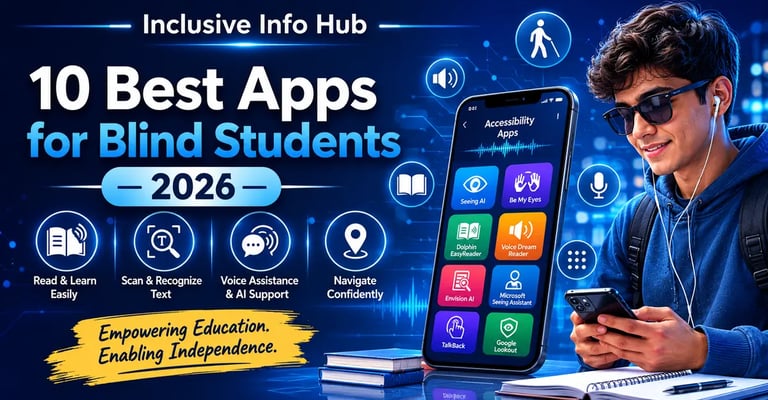
This guide covers the 10 best apps for blind students in 2026 — what each one does, who it is best for, how much it costs, and why many of these tools are just as useful for sighted students as they are for those with visual impairments.
1. Seeing AI — Microsoft's Free AI Reading Companion
Price: Free | Platform: iOS and Android | Best for: Reading everything around you
If a blind student could only install one app, Seeing AI would be the strongest single choice. Built by Microsoft and now available on both iOS and Android, it turns a smartphone camera into a narrator for the physical world.
Point your phone at printed text and it reads it aloud instantly — textbooks, handouts, signs, whiteboards, food labels. Point it at a person and it describes who is in front of you, estimating age and recognising emotions. Point it at a document and it reads the full page. Point it at a scene and it describes what is happening around you.
For students, the most practical feature is the document channel, which automatically detects when a full page of text is in frame and reads it from top to bottom with no manual selection needed. This works on printed lecture notes, photocopied readings, and exam papers — materials that cannot always be digitised in advance.
What makes it unique in 2026: Seeing AI now operates in 18 languages with plans for broader expansion, making it accessible to students in non-English speaking countries including Pakistan, where English-medium study materials may be mixed with Urdu context.
Benefits for sighted students too:
Instantly read handwritten notes without typing them up
Translate text in foreign language signs during study abroad
Describe images in documents for accessibility checks
Read text from screenshots without copy-paste
2. Be My Eyes — Real Humans, Real Help, Right Now
Price: Free | Platform: iOS and Android | Best for: Immediate practical help with any visual task
Some tasks require a human's judgment, not an algorithm. Be My Eyes connects blind and low-vision users with sighted volunteers through a live video call — within seconds. The volunteer sees what the student's camera sees and guides them through whatever they need.
For students this could mean: reading the course code on a printed timetable, identifying which textbook edition is on a shelf, checking whether a form has been filled in correctly, or navigating an unfamiliar campus building.
The app has grown significantly. It now includes a Specialised Help directory where users can connect directly with support staff from major companies and institutions — not just volunteers, but trained agents. This means that a student struggling with a university portal or a software accessibility problem can reach actual support, not just goodwill.
For Pakistani students: Be My Eyes is fully available in Pakistan, works over standard mobile data, and has no subscription cost. The volunteer network operates 24 hours a day, which means help is available even during late-night study sessions.
Benefits for sighted students too:
Volunteer as a helper — universities value disability support experience
Learn what real accessibility needs look like, which is valuable for any education or healthcare career
Use the specialised help feature for technical support queries
3. Dolphin EasyReader — The Accessible Library Gateway
Price: Free | Platform: iOS and Android | Best for: Reading textbooks, academic materials, and ebooks
EasyReader's greatest strength is not just that it reads to you — it is that it connects you directly to one of the largest libraries of accessible books in the world: Bookshare, which offers free membership to students with a documented print disability.
For a student who relies on audio reading, having access to hundreds of thousands of textbooks, academic journals, and reading materials is transformative. EasyReader supports DAISY, EPUB, MP3 audio books, and PDF formats, with word-by-word text highlighting as the app reads aloud.
The ability to adjust reading speed, font size, background colour, and voice makes it adaptable to every type of visual impairment — from complete blindness to low vision to dyslexia, which makes it useful far beyond the visually impaired community.
For Pakistani students: Bookshare membership is free for students with a documented print disability. The verification process can be supported through a school or institution. The app performs reliably on mobile data without requiring a constant Wi-Fi connection.
Benefits for sighted students too:
Listen to textbooks while commuting or exercising
Increase playback speed for fast revision before exams
Reduce eye strain during heavy reading periods
Improve comprehension by combining listening and reading simultaneously
4. Voice Dream Reader — The Premium Reading Powerhouse
Price: ~$20 one-time | Platform: iOS and Android | Best for: Students who need maximum customisation
Voice Dream Reader is the premium alternative to EasyReader, and for many students with significant reading needs, it is worth every rupee. The app supports over 200 text-to-speech voices in dozens of languages, gives complete control over speed, pitch, and pacing, and integrates with Bookshare, Dropbox, Google Drive, and cloud storage.
What distinguishes it from free alternatives is the quality of the reading experience. The voices are noticeably more natural, the navigation between chapters and sections is faster, and the visual display options are more detailed — all of which matters enormously when a student is spending three to four hours a day listening to course material.
It also supports PDF annotation, which means students can listen and make notes at the same time — a capability that free apps rarely offer at this level.
Who should pay for it: Students in higher education or professional training who depend on audio reading daily. The one-time cost is low compared to the cumulative time saved.
Benefits for sighted students too:
Superior to any free text-to-speech tool for heavy academic reading
Annotation while listening is genuinely useful for essay preparation
Supports more file formats than almost any other reading app
5. One Step Reader — The Document Scanner Built for Blind Users
Price: ~$100 one-time | Platform: iOS and Android | Best for: Scanning and reading printed documents quickly and accurately
One Step Reader was built from the ground up for blind users — unlike general OCR apps that treat accessibility as an afterthought. It scans printed text with exceptional accuracy, reads it aloud immediately, and is optimised to work with screen readers like VoiceOver and TalkBack.
For students, this is the app for exam papers, printed forms, handouts, and any physical document that is not available digitally. The accuracy on complex layouts — tables, columns, multi-font pages — is significantly higher than generic scanning apps.
The cost is high for a mobile app, but for students who regularly deal with printed materials that are not accessible in other formats, One Step Reader is a professional-grade tool. Many disability services and institutions subsidise the cost.
Benefits for sighted students too:
Fastest accurate text extraction from printed materials
Useful for converting old printed notes to searchable digital text
Archive physical study materials by scanning them directly
6. Bookshare — The Largest Accessible Library in the World
Price: Free for qualifying students | Platform: Web and mobile (via EasyReader or Voice Dream) | Best for: Accessing textbooks and academic reading
Bookshare is not just an app — it is the library that makes most accessible reading apps genuinely useful. With over a million titles in accessible formats (DAISY, EPUB, audio), it is the primary source of academic reading material for blind and visually impaired students globally.
Membership is free for students in many countries — including Pakistan — who have a documented print disability. Eligible conditions include visual impairment, dyslexia, cerebral palsy, and other physical disabilities that make reading standard print difficult.
Books are accessed through compatible apps, most commonly Dolphin EasyReader or Voice Dream Reader, rather than directly through the Bookshare website on mobile.
For Pakistani students: Apply at bookshare.org. You will need documentation from a school, doctor, or disability organisation to verify eligibility. Once approved, the full catalogue is free with no monthly charges.
7. Otter.ai — Your Lectures, Transcribed Automatically
Price: Free (600 minutes/month) | Paid plans available | Platform: iOS and Android | Best for: Capturing spoken lectures in real time
Otter.ai transcribes spoken audio to text in real time with strong accuracy for clear speech. For a blind student, the ability to focus entirely on listening during a lecture — knowing that every word is being captured and searchable — removes the anxiety of missing something important while trying to navigate note-taking at the same time.
The free tier gives 600 minutes of transcription per month, which covers roughly 10 one-hour lectures — practical for most students. The transcript is fully searchable, can be shared, exported, and reviewed later with any screen reader.
It also works during one-on-one meetings with tutors, group study sessions, and recorded video lectures.
Benefits for sighted students too:
Never miss a detail during fast-paced lectures
Create searchable notes from any recorded meeting
Save significant time that would otherwise go into manual note-taking
8. Microsoft Soundscape — Audio Navigation Built for Blind Students
Price: Free | Platform: iOS | Best for: Navigating campus and unfamiliar environments independently
Microsoft Soundscape uses 3D audio to give blind users a rich, spatial awareness of their surroundings. Rather than giving turn-by-turn directions like a standard GPS app, it creates an ongoing audio landscape — naming streets, buildings, and points of interest as they come into range, in 3D sound that reflects which direction they are in.
For students, this is transformative when navigating a new campus, finding lecture halls, or moving through a city to reach a library or placement. The audio is delivered through standard earphones and works alongside other apps and phone calls without interruption.
Why this matters specifically in 2026: As AI integration in navigation tools deepens, Soundscape's approach — environment awareness rather than instruction-following — trains users to build mental maps rather than depending on a device for every step, which builds genuine independence.
9. Learning Ally — Audio Textbooks for School Students
Price: Subscription (free access available in many US schools) | Platform: iOS and Android | Best for: Blind students in K-12 education
Learning Ally provides over 80,000 human-narrated audio textbooks, specifically targeted at school-age students. The human narration — rather than computer-generated text-to-speech — makes dense academic content significantly easier to follow, especially in complex subjects like science, history, and literature.
The app is widely used in American schools and is increasingly accessible internationally. For parents and teachers of blind children in Pakistan, it is worth investigating whether the institution can access a subsidised account.
Benefits for sighted students too:
Human-narrated books are easier to follow during long commutes than robotic TTS
Excellent for students with dyslexia or reading difficulties at any ability level
10. Google Lookout — Android's Built-In Accessibility Powerhouse
Price: Free | Platform: Android | Best for: Quick, hands-free environmental awareness
Google Lookout uses AI to describe the physical environment around the user — identifying objects, reading text, and scanning documents — entirely hands-free through an earpiece. Available natively on most Android phones, it requires no additional download on newer devices.
For students, the food label mode, document mode, and explore mode cover the most common daily needs: reading printed materials, identifying items in a room, and understanding what is in front of them during navigation.
Its integration with Android means it works seamlessly with TalkBack, Android's built-in screen reader, making it part of a complete accessibility ecosystem rather than a standalone tool.
The Sighted Student Angle — Why These Apps Matter to Everyone
This is the perspective that most accessibility lists miss entirely. Every single app on this list has direct practical value for sighted students:
Otter.ai removes the need for manual note-taking for anyone in a lecture hall. Seeing AI can read any physical document instantly without a scanner. Voice Dream Reader turns any commute into study time. Be My Eyes volunteers gain disability awareness experience that is valued in healthcare, education, and social work careers. Dolphin EasyReader helps anyone who processes information better through listening than reading.
Accessibility tools are not niche products for a small community — they are productivity tools that the wider student population has not yet discovered. Your awareness of them puts you ahead.
For Students in Pakistan and South Asia
Several of these tools have specific relevance for Pakistani students:
Bookshare offers free membership for students with print disabilities, including those studying in Pakistan. The process requires institutional or medical verification, which disability organisations in Pakistan can support.
Seeing AI and Be My Eyes both work without restriction in Pakistan and perform reliably over standard mobile data connections.
Most apps on this list are free or have free tiers, which removes the financial barrier that prevents many Pakistani students from accessing assistive technology.
The most significant gap for Pakistani students is the limited availability of Urdu-language content in accessible formats. English-medium academic materials are well covered. Urdu accessible content remains a major unmet need — and an opportunity for Pakistani organisations to lead on.
Final Verdict — Where to Start
If you are a blind student setting up your phone for the first time, start here:
Immediately (free, high impact): Seeing AI, Be My Eyes, Google Lookout (Android) or VoiceOver (iPhone built-in)
For reading and studying: Register on Bookshare, then install Dolphin EasyReader to access the library
For lectures: Set up Otter.ai before your first class
For navigation: Install Microsoft Soundscape before visiting any new campus location
When budget allows: Voice Dream Reader for serious long-form academic reading
These tools do not replace the support that universities and educational institutions should provide — but they give blind and visually impaired students the independence to not have to wait for that support before getting things done.
Frequently Asked Questions
1. Are these apps free for blind students?
Most are free or have a free tier. Seeing AI, Be My Eyes, Google Lookout, and Otter.ai (basic) are completely free. Dolphin EasyReader is free, and Bookshare is free for qualifying students. Voice Dream Reader costs around $20 and KNFB Reader around $100 — both are one-time purchases, not subscriptions.
2. Which app is best for reading textbooks?
Dolphin EasyReader paired with a Bookshare account is the strongest free combination. Voice Dream Reader is the best paid option if you read heavily and want higher voice quality and more customisation.
3. Do these apps work in Pakistan?
Yes. All apps listed are available on the App Store and Google Play without regional restriction and work on standard Pakistani mobile data. Bookshare is accessible to Pakistani students who meet the eligibility criteria for free membership.
4. Can sighted students use accessibility apps?
Absolutely. Apps like Otter.ai, Seeing AI, and Voice Dream Reader are used by millions of sighted students worldwide as productivity tools. They are especially popular among students with dyslexia, ADHD, or anyone who prefers learning through audio.
5. What is the best screen reader for students?
VoiceOver (built into every iPhone) and TalkBack (built into Android) are the most important screen readers for mobile use. For computers, NVDA is the best free option for Windows and is widely used by students globally.
6. How do blind students take notes in class?
The most common modern approach combines Otter.ai for automatic transcription with a braille note-taker or an accessible notes app like AccessNote. Some students use voice memos and transcribe later. The combination depends on the student's preferred method and the nature of the subject.
7. Are there any accessibility apps specifically for Pakistani students?
Not yet in a dedicated sense — this is a significant gap in the market. Most global apps work in Pakistan, but Urdu accessible content remains very limited. For Urdu support, Google's TalkBack and iOS VoiceOver provide some functionality, but dedicated Urdu accessible reading libraries do not yet exist at the scale of English resources like Bookshare.