ChatGPT Without Eyes: The Complete 2026 Guide for Blind and Visually Impaired Students
Blind and visually impaired students can use ChatGPT fully with VoiceOver, TalkBack, and screen readers. This complete 2026 guide covers every method — voice, keyboard, Braille — for students in Pakistan, Asia, the US, and UK.
EDUCATIONLATEST TECHNOLOGY
Inclusive Info Hub
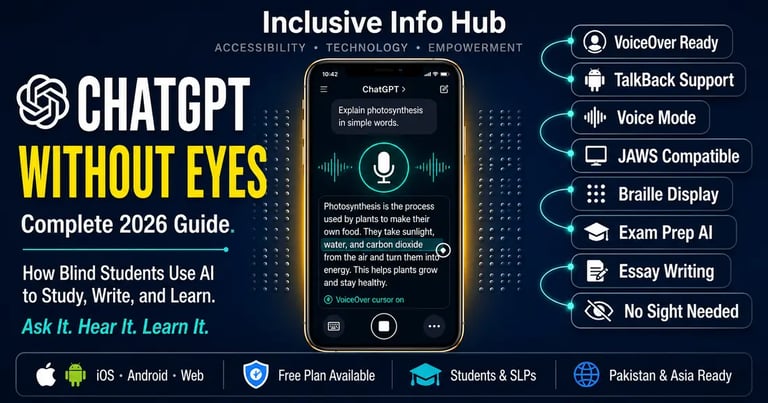
According to the Perkins School for the Blind — one of the most respected institutions in blind education globally — ChatGPT is transforming accessibility in education for blind students by breaking down visual and complex content, providing real-time assistance, and offering customizable educational support that bridges gaps in the learning experience. At Inclusive Info Hub, every guide reviewed here is tested against one honest question: does this tool actually work for a blind student sitting in a classroom in Lahore or London, right now, on the device they already own.
Picture a blind university student in Islamabad at eleven o'clock on a Sunday night, three days before his final exam. His course material is dense. His textbook is not available in audio format. His professor's notes are a forty-page PDF. In previous years, this situation would have meant asking a sighted friend to read aloud, hoping a family member was available, or simply falling behind. Tonight, he opens ChatGPT on his Android phone using TalkBack, activates voice mode, and says — "Explain the concept of monetary policy in plain language, then give me five practice questions."
Within seconds, ChatGPT responds in clear, conversational audio. He listens. He asks a follow-up. He asks for simpler language. He asks for another practice question. He is not dependent on anyone. He is not waiting for anything. He is studying — independently, efficiently, and on his own terms.
This guide covers exactly how that interaction works, step by step, across every device a blind student is likely to own.
Does ChatGPT Actually Work With Screen Readers?
This is the first question every blind user asks, and it deserves a direct, honest answer before anything else.
Yes. ChatGPT works well with NVDA and VoiceOver on desktop and with TalkBack on Android. The web interface at chat.openai.com is navigable by keyboard and screen reader. The mobile apps on both iOS and Android are compatible with VoiceOver and TalkBack respectively. The voice mode — where a user speaks rather than types and ChatGPT responds in spoken audio — functions entirely without requiring the user to look at a screen at all.
The one caveat worth naming honestly: like most web applications, ChatGPT's interface occasionally changes as OpenAI updates its design, and some updates have temporarily disrupted screen reader navigation before being corrected. Blind users are generally best served by checking current community feedback on platforms like AppleVis or the ACB mailing lists for any known screen reader issues with the most recent interface version before relying heavily on it for a time-sensitive academic task.
With that honest note made, the overall accessibility picture is genuinely positive — and improving with each update.
Method 1: Using ChatGPT With VoiceOver on iPhone or iPad
Setting Up
VoiceOver is Apple's built-in screen reader. If you are on iPhone or iPad and VoiceOver is already active, no additional setup is needed — ChatGPT's iOS app is VoiceOver compatible from the moment of download.
Download: Search "ChatGPT" on the Apple App Store — published by OpenAI. Free to download with a free usage tier available.
Navigating the Interface
When VoiceOver is active, swipe right to move through interface elements and double-tap to activate any button. The text input field, the send button, and the voice mode button are all accessible through standard VoiceOver navigation. ChatGPT's responses appear as text in the conversation thread, which VoiceOver reads aloud automatically as new content loads.
Using Voice Mode — The Most Powerful Option for Blind Users
Voice mode is where ChatGPT becomes genuinely hands-free and vision-free for blind users. In the iOS app, navigate to the voice mode button — VoiceOver announces it as the waveform or headphone icon — and double-tap to activate. Once in voice mode, speak naturally. ChatGPT listens, processes, and responds in spoken audio without the user needing to read anything on screen at all.
A blind student using voice mode does not need to type. Does not need to read a response. Does not need to navigate the interface between turns. The conversation flows entirely through audio — in through the microphone, out through the speaker or earphones.
For a student reviewing lecture content, asking for explanations of complex topics, or generating practice exam questions, this voice-first workflow is as close to having a personal tutor available on demand as any tool currently offers.
Method 2: Using ChatGPT With TalkBack on Android
Setting Up
TalkBack is Android's built-in screen reader, available on virtually every Android device. On most devices it can be activated by holding both volume buttons simultaneously for three seconds, or through Settings → Accessibility → TalkBack.
Download: Search "ChatGPT" on Google Play — published by OpenAI. Free download.
Navigating With TalkBack
TalkBack navigation uses a single-finger swipe right to move through elements and double-tap to activate. The ChatGPT Android app is navigable using these standard TalkBack gestures. Responses are announced by TalkBack as text appears in the conversation thread.
For blind users who prefer a simpler path than navigating the full app interface, the browser-based version at chat.openai.com accessed through Chrome also works with TalkBack, and some users find the clean text layout of the web version slightly easier to navigate than the app in complex conversation sessions.
Voice Input on Android
Android's built-in voice typing — activated by pressing the microphone icon on the Google keyboard while in the ChatGPT text field — allows a blind user to speak their prompt, which is then transcribed and sent as text. This is slightly different from voice mode (which responds in spoken audio) but is a reliable workaround for Android users who find the full voice mode less consistent on certain devices.
Method 3: Using ChatGPT With NVDA or JAWS on Windows
For blind students using a desktop or laptop computer with Windows, ChatGPT at chat.openai.com is accessible through both NVDA (free) and JAWS (paid) screen readers in any major browser.
Best Browser for Screen Reader Access
Chrome and Firefox both work well with NVDA and ChatGPT. Some blind users report that Firefox with NVDA provides slightly more consistent reading of dynamically loaded chat responses, but Chrome is also fully functional. Microsoft Edge with NVDA is another reliable combination.
Keyboard Navigation Shortcuts
For blind users who prefer keyboard navigation over screen reader virtual cursor browsing, ChatGPT supports standard keyboard interaction:
Tab key — moves between interface elements
Enter key — activates focused buttons
Shift + Enter — adds a new line within a message without sending
Enter — sends a typed message
The conversation thread is announced by screen readers as each new response loads. For JAWS users, turning on Forms Mode when the text input field is focused allows direct typing without virtual cursor interference.
Screen Reader Mode in ChatGPT
OpenAI has introduced a screen reader mode specifically for users with visual impairments that simplifies the interface and improves the consistency of response announcement by screen readers. This is accessible through the ChatGPT settings menu — look for Accessibility settings and enable the screen reader optimization option. This is worth enabling before using ChatGPT seriously with NVDA or JAWS as it reduces the number of interface elements the screen reader needs to navigate around.
Method 4: Using ChatGPT With a Braille Display
For blind users who prefer reading Braille output rather than audio, ChatGPT's text responses are fully compatible with refreshable Braille displays when used alongside a screen reader that supports Braille output.
On iPhone with VoiceOver and a connected Braille display — such as the Focus Blue series or Humanware Brailliant — ChatGPT's responses appear on the Braille display in real time as VoiceOver receives the text. Panning through a long response works normally using the display's pan buttons.
On Windows with JAWS or NVDA and a connected Braille display, the same principle applies — the screen reader routes ChatGPT's text output to the Braille display as it reads the conversation thread.
For deaf-blind users who rely entirely on Braille rather than audio, this combination of ChatGPT plus screen reader plus Braille display represents a genuinely powerful academic research and study workflow — provided the Braille display is of sufficient length to comfortably read multi-sentence AI responses without excessive panning.
What Can Blind Students Actually Use ChatGPT For?
This section matters as much as the how-to instructions. A tool is only as useful as the tasks it handles well — and ChatGPT handles a remarkable range of academic tasks that have historically been difficult or inaccessible for blind students.
Understanding Complex Lecture Content
A blind student who receives lecture notes as a text file can paste the content into ChatGPT and ask for a plain-language summary, a list of key concepts, or a step-by-step explanation of any difficult passage. The response arrives as text that a screen reader announces immediately. No visual parsing of the original document is required.
Exam Preparation on Demand
<cite index="21-1">ChatGPT can act as an on-demand study partner, helping blind students by answering questions, explaining difficult topics, and even generating practice questions to test their understanding. This is particularly helpful in subjects that require memorization, reasoning, or the understanding of complex concepts.</cite> A student can ask ChatGPT to generate ten practice questions from a specific topic, answer them verbally, and then ask for feedback on each answer — a complete practice session conducted entirely through audio on a locked screen.
Essay Drafting and Structure
<cite index="21-1">In academic writing, ChatGPT assists by helping students draft essays, organize their thoughts, and refine their writing.</cite> A blind student who finds the visual organization of a word processor disorienting when navigating by screen reader can dictate their ideas to ChatGPT through voice mode, ask it to organize those ideas into a structured outline, then develop each section through conversation — producing a complete draft without ever needing to visually manage a document layout.
Mathematical Problem Explanation
<cite index="21-1">A student working on a mathematics problem can ask ChatGPT to explain each step, breaking down complex processes into digestible steps.</cite> For blind students in mathematics-heavy courses — engineering, economics, statistics — the ability to ask for verbal step-by-step explanations of problem-solving processes fills a gap that standard textbooks and visual blackboard explanations leave entirely open.
Simplifying Research Papers
Academic papers are written in dense, specialized language that creates a comprehension barrier even for sighted readers. For a blind student who is processing a research paper through a TTS app at 1.5x speed, asking ChatGPT to summarize the main argument, methodology, and conclusions in plain English before listening to the full paper significantly improves the return on study time.
Proofreading and Grammar Checking by Voice
Rather than visually scanning a completed essay for errors — which is impossible without sight — a blind student can paste their written work into ChatGPT and ask it to identify grammatical errors, unclear sentences, and structural issues, then explain each correction. The entire proofreading process happens through audio.
Describing Visual Content in Documents
GPT-4o — the vision-capable version of ChatGPT available in the paid tier — can receive image uploads and describe their content in text, which is then announced by a screen reader. A blind student who receives a document containing charts, graphs, or diagrams can upload the image to ChatGPT and ask for a detailed verbal description of what it shows. This partially closes the gap between visual and non-visual access to data-heavy academic materials.
Language Translation and Multilingual Support
For students in Pakistan and across South Asia studying in English-medium institutions whose first language is Urdu, Hindi, or Bengali, ChatGPT's ability to explain academic concepts in multiple languages — or to translate a passage and then explain it — provides a bridge that no other single tool covers as comprehensively.
Advanced Workflow: Combining ChatGPT With Other Accessibility Apps
The most powerful accessibility setups for blind students in 2026 do not rely on a single tool but combine specialized apps into a seamless workflow. Here is how ChatGPT fits into a broader toolkit.
ChatGPT + Otter.ai: Use Otter.ai to transcribe a lecture in real time. After class, paste the transcript into ChatGPT and ask for a summary, key concepts, and practice questions. Two tools, covering the full lecture-to-study workflow with no sighted assistance required at any point.
ChatGPT + Seeing AI or Google Lookout: Use Seeing AI or Lookout to read printed handouts and textbook pages aloud using OCR. Copy the recognized text and paste it into ChatGPT for deeper explanation, summarization, or question generation.
ChatGPT + Voice Dream Reader: Use Voice Dream Reader to read through a long PDF document. When a difficult passage is encountered, pause the reading, switch to ChatGPT, ask for a plain-language explanation of the specific concept, then return to the document.
ChatGPT Pricing — What Is Free and What Is Paid
Free tier (GPT-4o mini): Available at chat.openai.com and through the iOS and Android apps with no payment required. The free tier includes text conversation, basic voice mode, and limited GPT-4o access. For most exam preparation, essay drafting, and concept explanation tasks, the free tier is sufficient.
ChatGPT Plus ($20/month): Unlocks priority access to GPT-4o — the most capable model including vision features for image description — faster response times, and higher usage limits. For blind students who regularly need image description of charts, graphs, and diagrams from academic documents, the vision capability in the paid tier is the most relevant upgrade.
Student discount: OpenAI does not currently offer a standardized student discount program, but educational institution deals and regional pricing adjustments exist in some markets. It is worth checking the current pricing at openai.com for your specific country, as pricing in Pakistan, India, and other markets may differ from US dollar pricing.
Honest Limitations
Interface changes can temporarily disrupt screen reader navigation. OpenAI updates ChatGPT's web and app interface regularly, and some updates briefly introduce screen reader navigation issues before being corrected. Blind users who depend on a specific navigation workflow should check community resources like AppleVis after major updates.
GPT-4o vision features require the paid tier. The ability to upload images of charts, graphs, and diagrams for verbal description — one of the most educationally significant features for blind students — is behind the $20 monthly paywall. The free tier cannot process image uploads in the same way.
Voice mode requires a reliable internet connection. Unlike some screen readers that function offline, ChatGPT's voice mode and all AI processing require a stable internet connection. For students in areas of Pakistan and South Asia with unreliable connectivity, this is a real and practical constraint.
ChatGPT can be wrong. This limitation applies to every user, sighted or not — but it is worth stating directly for blind students who may be relying on ChatGPT's responses without being able to visually cross-reference other sources simultaneously. ChatGPT occasionally produces inaccurate information delivered with complete confidence. The discipline of asking follow-up questions, asking for sources, and cross-referencing important claims through other accessible tools is important regardless of how the response sounds.
Not a replacement for structured education or human teachers. <cite index="21-1">ChatGPT should not be used to complete homework directly but can serve as a tool to support the student's understanding and learning.</cite> This is not a moral judgment — it is a practical one. A student who uses ChatGPT to generate complete assignment answers rather than to understand the material is undermining their own exam performance, where ChatGPT will not be available.
Frequently Asked Questions
Does ChatGPT work with VoiceOver on iPhone? Yes. ChatGPT's iOS app is VoiceOver compatible. All interface elements including the text input field, send button, and voice mode button are accessible through standard VoiceOver swipe-and-double-tap navigation. Voice mode works entirely through audio with no visual interaction required.
Does ChatGPT work with TalkBack on Android? Yes. The ChatGPT Android app is TalkBack compatible. The web version at chat.openai.com in Chrome also works with TalkBack for users who prefer browser-based access.
Can a completely blind student use ChatGPT without any sighted help? Yes, completely independently. Using voice mode on either iPhone or Android, a blind student can open ChatGPT, activate voice mode, speak a question, and receive an audio response — the entire interaction requires no visual engagement at any point.
Is ChatGPT free for blind students? The free tier is fully functional for text conversations and basic voice mode on both iOS and Android. The $20/month Plus tier unlocks GPT-4o with vision features including image description, which is the most significant paid upgrade for blind users specifically.
Is ChatGPT available in Pakistan and South Asia? Yes. ChatGPT is accessible globally at chat.openai.com and through iOS and Android apps with no regional restrictions on the core service. Some payment methods for the paid tier may vary by region — check openai.com for current payment options available in Pakistan.
What This Means for Blind Students in Pakistan and Across Asia
Whether you are a blind student at NUST in Islamabad navigating an English-medium curriculum, a visually impaired student at the University of the Punjab in Lahore trying to keep up with dense academic reading, or a low-vision student in Dhaka studying for a professional certification exam — ChatGPT is available right now, on your Android phone, through TalkBack, for free, and it will answer any academic question you ask it in plain, clear language within seconds.
The infrastructure gap that has historically left blind students in Pakistan and across South Asia underserved — limited accessible textbooks, no audio lecture recordings, minimal screen-reader-friendly digital content — does not disappear because of ChatGPT. But it shrinks, meaningfully, every time a blind student asks ChatGPT to explain something their professor presented visually on a slide they could not see, or asks it to summarize a research paper that exists only as an inaccessible PDF scan.
That shrinkage — imperfect, internet-dependent, sometimes inaccurate — is still real. And for a blind student at 11pm the night before an exam, real is exactly what is needed.
A Closing Thought
There is a particular kind of frustration that blind students have described for decades — the experience of sitting in a room full of people learning things, and knowing that some portion of what is being taught is arriving through a visual channel that simply does not reach you. The board. The slide. The diagram. The gesture toward the projected graph.
ChatGPT does not fix the board. It does not make the slide accessible. It does not solve the structural problem of educational institutions that have not yet built inclusive curricula. What it does is put a tool in a blind student's pocket that can answer any question about any subject in any format they request — aloud, simplified, broken into steps, turned into practice questions, translated into their first language.
That tool is free. It works on the phone they already own. It works with the screen reader they already use. And it is available at 11pm in Islamabad, 2am in Dhaka, and 6am in Karachi — whenever the student needs it, without waiting for anyone.
That is not everything. But it is genuinely something.
Read More on Inclusive Info Hub
👉 Otter.ai — AI transcription turning spoken lectures into searchable text for blind and deaf students: Read our full review here → [OTTER.AI ARTICLE LINK]
👉 Seeing AI vs Be My Eyes — AI visual assistance for reading the world around you: Read our full comparison here → [SEEING AI VS BE MY EYES ARTICLE LINK]
👉 Voice Dream Reader — the best TTS app for reading PDFs and documents aloud: Read our full review here → [VOICE DREAM READER ARTICLE LINK]
👉 Best AI Accessibility Tools in 2026 — complete guide to every AI tool blind students should know: Read our full guide here → [BEST AI ACCESSIBILITY TOOLS ARTICLE LINK]
👉 Google Lookout — free Android AI visual assistance for blind students: Read our full review here → [GOOGLE LOOKOUT ARTICLE LINK]