Microsoft Translator Review 2026: Real-Time Captions and Live Translation for Deaf Students and Multilingual Communicators
Microsoft Translator is a free app that captions live conversations and translates speech across 100 plus languages for deaf, hard of hearing, and multilingual users. Available on iOS and Android. Full 2026 review for students in Pakistan, Asia, the US, and UK.
APPS FOR HI SUPPORTLATEST TECHNOLOGYEDUCATION
Inclusive Info Hub
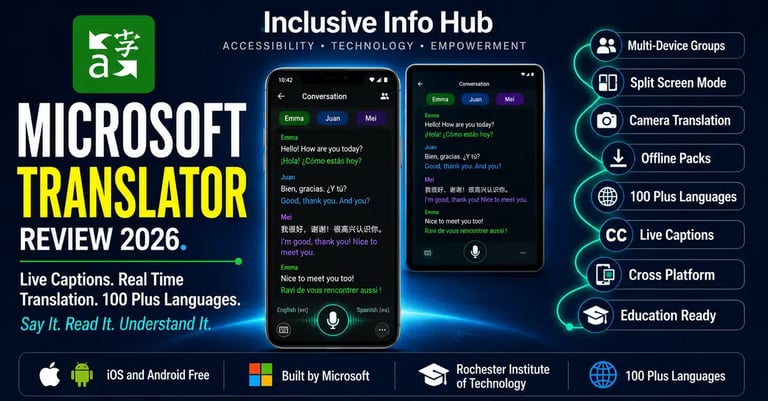
According to the World Health Organization, over 1.5 billion people worldwide live with some degree of hearing loss, and a significant proportion of them navigate educational and professional environments where the language of instruction or work is not their first language. At Inclusive Info Hub, every hearing accessibility app reviewed here is measured by one honest question: does it solve a real daily problem for the user who needs it most. Microsoft Translator solves two problems simultaneously that most captioning apps address only one of — it converts spoken language to readable text for deaf and hard of hearing users, and it translates that text across more than 100 languages in real time for users whose hearing barrier and language barrier arrive together.
Picture a hard of hearing student from Pakistan studying at a university in the United Kingdom. She has moderate hearing loss and uses captions to follow lectures. Her study group includes students from China, Germany, and Brazil. The informal discussion after the seminar shifts between English, Mandarin fragments, and the occasional German phrase. A basic captioning app gives her English captions of the English parts. Microsoft Translator gives her live captions of the entire conversation — and translates everything into the language she reads most comfortably, in real time, on her phone screen, while everyone else continues talking naturally.
That simultaneous resolution of two access barriers in one free app is what makes Microsoft Translator the tool that deserves its own dedicated review in this series.
What Is Microsoft Translator?
Microsoft Translator is a free speech and text translation application developed by Microsoft, available on iOS, Android, and as a web experience. The app provides real-time speech-to-text transcription, live translation across more than 100 languages, camera-based text translation for printed materials, and a multi-device group conversation feature that allows multiple participants on different devices to follow a single conversation in their preferred language simultaneously.
The app serves multiple audiences simultaneously. For deaf and hard of hearing users it functions as a real-time captioning tool that transcribes speech to readable text. For international users whose first language differs from the language of the conversation it functions as a live translation tool. For users who are both hard of hearing and multilingual it functions as both at once. Microsoft's recognition that these two communication barriers frequently occur together is reflected throughout the app's design in a way that most competitor captioning apps have not replicated.
The app is confirmed available on both the Apple App Store and Google Play Store as "Microsoft Translator" published by Microsoft Corporation. It is free to download with no subscription required for the core functionality that covers the entire accessibility use case described in this article.
One important platform note: the Microsoft Translator app for Windows desktop was retired and is no longer available for download from the Microsoft Store. For Windows desktop translation, Microsoft recommends using the browser-based experience or other Microsoft translation tools. This review focuses on the iOS and Android mobile apps which remain fully active.
The Feature That Makes Microsoft Translator Unique — Multi-Device Group Conversations
Every other captioning app in this series — Google Live Transcribe, Ava, Nagish and Rylo — is designed primarily around the deaf or hard of hearing user's device capturing audio from speakers around them. Microsoft Translator's multi-device conversation feature works differently and more powerfully for group situations.
In a Microsoft Translator conversation, one participant creates a conversation session and shares a code or QR code with every other participant. Each participant joins the conversation from their own device using the Microsoft Translator app. From that point, every participant speaks into their own device's microphone, the app transcribes and translates their speech, and the complete conversation appears on every participant's screen simultaneously in their chosen language.
This architecture means a deaf Pakistani student does not need to hold their phone toward a speaker and hope the audio is clear enough for accurate transcription. Each speaker speaks directly into their own device. The transcription quality is governed by the proximity of each speaker to their own microphone rather than the ambient distance from one central device. In a group of six students working on a project together, all six speaking into their own phones and all six reading captions in their preferred language, communication barriers in both directions are removed simultaneously.
Rochester Institute of Technology has used Microsoft Translator to demonstrate exactly this capability in real university scenarios including group study sessions, campus navigation by hard of hearing visitors, and parent-teacher conferences requiring real-time translation, with documented case studies showing practical impact across all three contexts.
Who Microsoft Translator Is Built For
Deaf and Hard of Hearing Students in Group Academic Settings
For a deaf or hard of hearing student attending seminars, tutorials, group projects, and study sessions where multiple participants are speaking, the multi-device conversation feature solves a group captioning challenge that single-device tools handle less reliably. When each participant speaks into their own device, the deaf student reads captions from every speaker with equal accuracy regardless of their position in the room or the volume at which they speak.
International Students With Combined Hearing and Language Barriers
This is the audience that most captioning apps do not address and that Microsoft Translator was specifically designed to serve. A hard of hearing student studying in a second or third language faces two overlapping barriers — they cannot hear clearly and they are processing a language that does not come automatically. Microsoft Translator's combination of captioning and real-time translation addresses both simultaneously in a way that requires no additional tools or accounts beyond the free app.
Deaf Users Traveling in Foreign Countries
The offline language pack feature combined with camera translation means a deaf traveler in Pakistan, Japan, Turkey, or any country where signage and menus appear in an unfamiliar script can point their phone camera at printed text and receive an instant translated reading without internet connectivity. For deaf users who already navigate environmental text visually, this camera translation capability extends accessibility across language barriers as well as hearing barriers.
Teachers and Educators in Diverse Classrooms
Microsoft positions Translator specifically for educational contexts, including one-on-one meetings between teachers and hard of hearing students, group projects with multilingual participants, and parent-teacher conferences where parents speak a different language from the school's instructional medium. The conversation code system makes it straightforward to set up a real-time captioned session without requiring every participant to create an account in advance.
Hard of Hearing Professionals in Multilingual Workplaces
For professionals in international organizations where meetings shift between languages, or where colleagues speak with accents that reduce captioning accuracy on standard tools, Microsoft Translator's multi-language simultaneous transcription capability provides a more robust solution than single-language captioning alone.
Key Features in Full Detail
Multi-Device Live Conversation With Real-Time Captions and Translation
The defining feature of the app. A conversation host creates a session, shares the conversation code with participants, and everyone joins from their own device. Each participant's speech is transcribed and translated in real time with their name attached to their caption lines, creating a color-coded, speaker-identified conversation transcript visible to all participants simultaneously. Up to 100 devices can join a single conversation session. Participants who cannot download the app can join the same conversation through a web browser at translator.microsoft.com without installing anything.
Split Screen Mode for One-on-One Conversations on a Single Device
When both parties are present but only one has the app installed, the split screen mode allows two people to speak into the same device in two different languages — one speaks into the top half of the screen, the other speaks into the bottom half. Each person's speech is transcribed and translated and displayed in the other person's language on their half of the screen. For a hard of hearing Pakistani student having a one-on-one conversation with a hearing professor who speaks primarily in English, this split screen approach creates a bilingual real-time conversation without requiring the professor to install anything.
Camera Translation for Printed Text
Point the phone camera at any printed text — a menu, a street sign, a printed handout, a notice board — and the app translates the text into the user's chosen language in real time through an augmented reality overlay on the camera view. Offline language packs can be downloaded in advance, allowing camera translation without an internet connection. For deaf users who navigate the world primarily through visual text, the combination of OCR reading and translation in a single camera view addresses both accessibility and language barriers simultaneously.
Text Translation With Offline Support
Type or paste any text into the app and receive an instant translation across more than 100 languages. Offline language packs downloaded in advance make text translation available without internet connectivity — directly relevant for users in areas of Pakistan and South Asia where connectivity is inconsistent.
Speech Translation for Real-Time Spoken Interpretation
Speak a phrase in one language and hear the translation spoken back in another language through the device speaker. For a deaf user accompanying a hearing family member who is communicating with a speaker of an unfamiliar language, this spoken translation capability allows the deaf user to facilitate the conversation even when they themselves cannot hear the spoken content.
100 Plus Language Support
Microsoft Translator supports more than 100 languages for text translation and a significant subset of those languages for live speech captioning and translation. The language range covers Arabic, Bengali, Chinese Simplified and Traditional, French, German, Hindi, Indonesian, Italian, Japanese, Korean, Malay, Persian, Polish, Portuguese, Punjabi, Russian, Spanish, Turkish, Urdu, Vietnamese, and dozens of additional languages. The Urdu and Bengali support is directly relevant for users in Pakistan and Bangladesh.
Web Browser Participation Without App Download
Participants can join a Microsoft Translator conversation through any web browser on any device — including a desktop computer, a Chromebook, or a phone with no app store access — simply by entering the conversation code at translator.microsoft.com. This zero-install participation model is particularly useful in educational settings where participants may not be able to install apps on institutional devices.
Microsoft Translator in Education — Verified Real-World Use
Rochester Institute of Technology has documented multiple real-world use cases for Microsoft Translator on campus, providing verified evidence of the app's accessibility effectiveness beyond product demonstrations:
In a one-on-one scenario, a professor and a hard of hearing student were meeting to discuss coursework. The student was having difficulty reading the professor's lips and took out pen and paper to write — an approach that was time-consuming and inefficient for a full academic discussion. Microsoft Translator replaced the pen and paper with real-time captions, allowing the conversation to proceed at a natural pace.
In a group scenario, students from different language backgrounds were working on a group project together. Language and hearing barriers made the collaborative work difficult. The multi-device conversation feature allowed all participants to speak in their preferred language and read captions in their own language simultaneously.
In a navigation scenario, a visitor arrived on campus late for a job interview and stopped a student to ask for directions. The student was hard of hearing. Rather than struggling through a verbal exchange, the Microsoft Translator conversation feature was used to caption and facilitate the brief interaction.
These documented use cases at a major US university demonstrate the app functioning effectively in exactly the environments — classrooms, campuses, professional settings — where deaf and hard of hearing students in Pakistan and globally spend their academic lives.
Pricing — Completely Free
Microsoft Translator is completely free to download and use on both the Apple App Store and Google Play Store. There is no subscription, no premium tier, and no usage limit on the core captioning, translation, and conversation features.
Offline language packs are free to download within the app. The multi-device conversation feature is free. Camera translation is free. The web browser participation option at translator.microsoft.com is free. The full accessibility use case described throughout this article requires no payment at any point.
For users in Pakistan and South Asia, the free model combined with offline language pack support makes Microsoft Translator one of the most financially accessible multilingual captioning tools available on any platform.
Honest Limitations
Single-device audio capture is less accurate than multi-device in group settings. When only the deaf user has the app installed and other participants do not join from their own devices, the app reverts to capturing ambient audio through the phone's microphone — the same limitation shared by Google Live Transcribe and other single-device captioning tools. The multi-device feature's accuracy advantage only applies when all participants have joined the session from their own phones or devices.
Speech captioning language range is smaller than text translation range. More than 100 languages are supported for text translation. The number of languages supported for live speech captioning is smaller, though Microsoft does not publish the exact figure. Users whose primary language is not among the major world languages should verify their specific language's availability for live speech captioning before relying on the app in a time-sensitive situation.
Windows desktop app has been retired. The Microsoft Translator app for Windows desktop is no longer available from the Microsoft Store. Desktop users should access Microsoft Translator through the web browser at translator.microsoft.com or through other Microsoft translation tools built into Windows and Office applications.
Background noise reduces captioning accuracy. As with all AI-based captioning tools, noisy environments including busy cafeterias, outdoor spaces, and large lecture halls with poor acoustics reduce transcription accuracy. The multi-device feature partially addresses this by having each participant speak directly into their own microphone, but ambient noise from the participant's own environment still affects their microphone's capture quality.
Translation accuracy varies by language pair. Microsoft Translator's translation quality is excellent for major world languages and language pairs with large training datasets. For less common languages or unusual language pair combinations, accuracy may be lower. Users relying on Urdu translation should test the specific accuracy for their typical conversation context before depending on it in high-stakes situations.
App Store Details — Verified and Confirmed
Apple App Store: "Microsoft Translator" published by Microsoft Corporation. Free to download. Available globally including Pakistan, India, and South Asia.
Google Play Store: "Microsoft Translator" published by Microsoft Corporation. Free to download. Available globally with no regional restrictions.
Web browser: Access at Microsoft Translator for joining conversations without the app installed, on any device with a modern browser.
Frequently Asked Questions
Is Microsoft Translator free for deaf students? Yes, completely free. The full accessibility feature set including multi-device group conversations, live captions, camera translation, and offline language packs requires no subscription or payment on either iOS or Android.
Is Microsoft Translator available in Pakistan? Yes. The app is available globally on both the Apple App Store and Google Play Store with no regional restrictions and no cost.
Does Microsoft Translator work without internet? Offline language packs can be downloaded in advance for text translation and camera translation without internet connectivity. Live speech captioning and the multi-device conversation feature require an internet connection to function.
How many people can join a Microsoft Translator conversation? Up to 100 devices can join a single Microsoft Translator conversation session simultaneously, covering even large classroom and conference scenarios. Participants can join from the mobile app or from a web browser at translator.microsoft.com without needing to install the app.
Does Microsoft Translator support Urdu? Yes. Urdu is included in Microsoft Translator's supported language list for text translation. Live speech captioning accuracy in Urdu should be tested against specific conversation contexts before relying on it in high-stakes situations.
Is Microsoft Translator better than Google Live Transcribe for deaf users? The two tools serve different primary use cases. Google Live Transcribe is the stronger tool for everyday one-on-one face-to-face captioning in a single language, with superior performance in simple ambient captioning scenarios. Microsoft Translator is the stronger tool for multi-participant group conversations, multilingual settings, and situations where both captioning and translation are needed simultaneously.
What This Means for Students and Professionals in Pakistan and Across Asia
Whether you are a hard of hearing student at LUMS in Lahore working on a group project with classmates from different linguistic backgrounds, a deaf professional in Karachi attending meetings with international colleagues, or a hearing-impaired student in Dhaka studying at an English-medium institution whose first language is Bengali — Microsoft Translator addresses the intersection of hearing loss and language difference that most accessibility tools treat as two separate problems requiring two separate solutions.
The Urdu language support, offline language pack availability, and completely free model make the app genuinely accessible for users in Pakistan and across South Asia without requiring any financial commitment or reliable internet connectivity for core text translation features. For live speech captioning in multilingual group settings, the multi-device conversation architecture delivers a quality advantage over ambient-microphone captioning tools that only improves as more participants join from their own devices.
For a Pakistani student studying abroad who needs both hearing access and language support simultaneously, Microsoft Translator may be the single most comprehensive free tool available on either platform.
A Closing Thought
The student from Pakistan sitting in a study group with classmates from China, Germany, and Brazil did not arrive at university expecting her hearing loss to be the only barrier to full participation. She arrived knowing the language of instruction was not her first language, knowing the conversations would move fast, and knowing she would have to work harder than most of her classmates just to follow what was being said.
Microsoft Translator does not make that easy. Nothing makes it entirely easy. But it removes two of the specific barriers — the hearing barrier and the language barrier — that compounded on each other and made a difficult situation significantly harder.
A free app. Two barriers removed. One conversation, followed completely, for the first time in a group setting.
That is what accessibility technology is supposed to do.
Read More on Inclusive Info Hub
👉 10 Best Apps for Deaf and Hard of Hearing Users — where Live Transcribe sits in the full picture: Read our complete guide here → [10 BEST APPS DEAF HH ARTICLE LINK]
👉 Ava — live group conversation captions with 99% accuracy and human scribes: Read our full review here → [AVA Article link]
👉 Best AI Accessibility Tools in 2026 — complete guide including OCR and document tools: Read our full guide here → [BEST AI ACCESSIBILITY TOOLS ARTICLE LINK]
👉Nagish now Rylo — the free global captioned calling alternative: Read our full review here — [RYLO NAGISH ARTICLE LINK]
👉Google Live Transcribe — free Android real-time captions for face-to-face conversations: Read our full review here — [GOOGLE LIVE TRANSCRIBE ARTICLE LINK]