Otter.ai Review: The AI Note-Taking App That Never Lets a Word Slip By
Otter.ai converts spoken lectures, meetings, and conversations into real-time searchable transcripts. Discover how it empowers blind, deaf, and disabled students — and why sighted students in Pakistan, Asia, the US, and UK are using it to study smarter in 2025.
Inclusive Info Hub
The Problem Nobody Talks About in Inclusive Education
Here is a scenario that plays out every single day in classrooms across the world.
A blind student sits in a university lecture. The professor speaks for ninety minutes, moving fast, referencing the board, pointing at slides, saying things like "as you can see here" and "this diagram shows." The student's screen reader cannot read what is being projected. A note-taker who was supposed to attend called in sick. And the lecture recording, if one exists at all, will be uploaded sometime next week — maybe.
Now imagine the same scenario for a student with severe dyslexia who processes written text slowly and falls behind trying to write notes while simultaneously processing what is being said. Or a deaf student without a sign language interpreter present. Or an international student at a university in Lahore or Karachi, attending an English-medium lecture with an accent they are still adjusting to, trying to write notes in a language that is not their first.
All of these students share one problem: the spoken word is disappearing the moment it is said, and no tool is catching it.
Otter.ai was built to solve exactly that.
What Is Otter.ai?
Otter.ai is an AI-powered transcription and note-taking application developed by AISense Inc., founded in 2016 by computer science engineers Sam Liang and Yun Fu. It uses artificial intelligence and speech recognition to convert spoken audio into real-time text transcripts that are searchable, shareable, and annotatable.
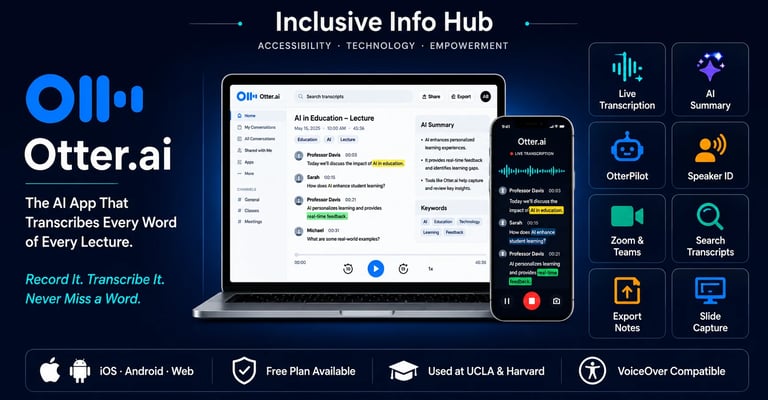
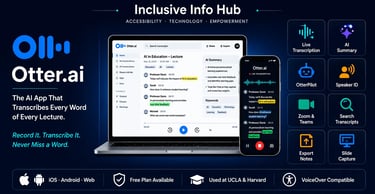
In plain terms: you open Otter.ai, press record, and everything that is said in the room — or in your online meeting — is instantly converted into written text on your screen as it happens. When the lecture or meeting ends, you have a full, searchable transcript, an AI-generated summary, highlighted key phrases, and the ability to replay any part of the audio by clicking on its corresponding text.
The app works on iOS, Android, and web browsers, and integrates directly with Zoom, Google Meet, and Microsoft Teams. It has been adopted by universities including UCLA, Harvard, Berkeley, and UMBC as an official accessibility tool for students with disabilities — and its use has quietly spread far beyond that original audience.
How Otter.ai Works: The Core Experience
The first time someone uses Otter.ai in a real lecture or meeting, the reaction is almost always the same: disbelief at how fast and how accurately it works.
You open the app, hit the record button, and the transcription begins immediately. Words appear on screen within a second or two of being spoken. Speaker identification labels different voices automatically, so in a group discussion you can see who said what. As the session continues, key phrases are automatically extracted and displayed separately. If you are in an online meeting using OtterPilot, the app joins the call on your behalf, records, transcribes, and even captures screenshots of any slides shared on screen.
When the session ends, the AI generates a summary — a condensed version of the key points discussed — without any manual input from you. The full transcript is saved, indexed, and searchable from the moment recording stops.
Every word that was spoken is now text. Text that a screen reader can read. Text that can be exported, shared, highlighted, annotated, and reviewed at any pace.
Who Otter.ai Is Built For — and Who It Actually Serves
Blind and Visually Impaired Students
For a blind student, the challenge in a classroom is not just reading — it is the real-time disappearance of spoken information that nobody captures. A lecture happens once. If a blind student cannot take written notes as quickly as sighted peers, or if the professor relies on visual references, critical information is lost.
Otter.ai changes this dynamic fundamentally. The web app works smoothly with NVDA and VoiceOver screen readers, meaning blind users can navigate the interface, start recordings, and read transcripts back through their preferred screen reader without needing sighted assistance. The full transcript of every lecture becomes a screen-reader-accessible text document within moments of the session ending.
Illinois State University, which provides official accessibility guidance for Otter.ai, notes that for the smoothest screen reader experience, accessing transcripts and the AI chatbot through the desktop web version is recommended over the mobile app, where some VoiceOver navigation quirks occasionally appear. Exporting a transcript as a plain text file and opening it in a screen reader is another reliable workflow for blind students who want clean, distraction-free reading.
For students at Berkeley, the Disabled Students' Program formally lists Otter.ai as an approved accommodation tool. Berkeley's DSP office notes that students with Otter.ai in their approved accommodations can capture meeting notes and slides automatically using OtterPilot, get an AI meeting summary with action items after every session, and generate content and get answers using Otter AI Chat.
Deaf and Hard-of-Hearing Students
Otter.ai's real-time captioning capability is perhaps its most immediate and life-changing feature for deaf and hard-of-hearing users. When a deaf student cannot access a CART (Communication Access Real-time Translation) system — which is expensive and requires advance scheduling — Otter.ai provides an instant, affordable alternative.
This was demonstrated in a widely cited real-world case: when Michelle Obama visited UCLA's Pauley Pavilion for College Signing Day, there was not enough notice to arrange a CART system. The head of UCLA's disability services turned to Otter.ai for automated captioning, and deaf students were able to follow the event in real time. The fact that a major university turned to a smartphone app as a live captioning solution — and it worked — says a great deal about where this technology now stands.
Students With Dyslexia and Processing Differences
For students with dyslexia, the act of simultaneously listening to a lecture and writing notes creates a cognitive split that often means neither task is done well. Otter.ai removes note-taking from the equation entirely. The student can focus fully on listening and understanding while the app handles the documentation. The searchable transcript and AI summary become the study resource, available in formats that the student can then load into other accessibility tools for review.
Students With ADHD and Attention-Related Challenges
Students with ADHD frequently struggle with sustained attention during long lectures. Missing sections, losing the thread of an argument, and being unable to reconstruct what was said from incomplete notes are common experiences. Otter.ai's audio-linked transcripts mean that a student who lost focus at any point can return to the exact moment in the transcript and click to hear that section again. The AI summary also provides a structured overview of the full session that reduces the cognitive load of reviewing an hour of material.
Students With Physical or Motor Disabilities
Writing notes by hand or typing quickly during a lecture is impossible for students with certain motor disabilities. Otter.ai makes the entire note-taking process hands-free. The app records automatically, transcribes automatically, and summarizes automatically. The student's physical interaction with the process is minimal.
How Otter.ai Helps Sighted Students — and This Matters More Than People Realize
The accessibility origin story of Otter.ai is real and important. But the honest story of the app in 2025 is that sighted students without any disability have adopted it in enormous numbers — and for completely legitimate reasons.
Staying Present in Lectures
The act of taking notes is cognitively demanding. When a student is focused on writing, they are less focused on listening, thinking, and engaging with ideas. Otter.ai frees sighted students from that trade-off. Knowing that every word is being captured, a student can put the pen down and actually think about what is being said. The notes will be there afterward. The understanding built during the lecture is harder to recover.
Reviewing Lectures Before Exams
A full searchable transcript of every lecture is one of the most valuable study resources a student can have. Instead of re-reading handwritten notes that may be incomplete or confusing, a student can search the transcript for specific terms, read the AI summary to reorient themselves, and replay the audio for any section that needs clarification. This transforms exam preparation from guesswork into a structured review process.
Group Projects and Study Groups
Otter.ai's speaker identification and collaborative features make it genuinely useful for study group sessions. When a group works through a problem together, the conversation itself generates ideas, solutions, and insights. Most of those disappear the moment the meeting ends. Recording the session with Otter.ai means the group has a complete transcript of what was discussed, who suggested what, and what decisions were made — without anyone having to be designated note-taker.
Interviews and Research
Students conducting research interviews — for dissertations, journalism assignments, or academic projects — traditionally face the time-consuming process of manually transcribing recorded audio. Otter.ai handles this automatically. A student who conducts a forty-minute research interview can have a full, searchable transcript within minutes of the session ending, which they can then import into their research workflow.
Commuting and Audio Review
Exported Otter.ai transcripts can be loaded into text-to-speech apps for audio review during commutes. A sighted student who takes the bus to university in Lahore or the tube in London can effectively "re-attend" yesterday's lecture during their morning commute, listening to a TTS playback of the transcript while the city moves past the window.
Language Support for International Students
Otter.ai's transcription is particularly valuable for international students studying in their second language. Following a fast-paced English lecture delivered with an unfamiliar accent is genuinely difficult. Having a real-time transcript on screen means students can read along as they listen, catching words and phrases that the ear missed. Over time, this also accelerates language acquisition in academic contexts.
Key Features That Define the Otter.ai Experience
OtterPilot — AI That Attends Meetings for You
OtterPilot is one of Otter.ai's most powerful features and one that gets underappreciated in accessibility discussions. It is an AI meeting assistant that connects to your Google or Microsoft calendar, identifies upcoming meetings, and automatically joins Zoom, Microsoft Teams, or Google Meet calls to record, transcribe, and summarize — even if you cannot attend. For a student who is unwell, dealing with a disability-related absence, or simply double-booked, this means no class or meeting ever has to result in lost information.
Real-Time Live Transcription
The app generates text on screen within seconds of speech being produced. There is no processing lag that would render it useless for live captioning. For deaf students and students with processing differences who rely on reading along as someone speaks, this responsiveness is what makes the tool genuinely functional rather than merely theoretically useful.
Automatic AI Summary
After every recording, Otter.ai generates a condensed summary of the session's key points without any user input. For students who have just sat through a ninety-minute lecture and need to quickly identify the most important content, the AI summary is a significant time-saver. The quality of these summaries has improved substantially with each update to the underlying model.
Speaker Identification
The app automatically labels different speakers in a transcript, distinguishing between the professor and students during Q&A, or between different participants in a group discussion. This makes multi-person transcripts readable in a way that generic transcription tools — which produce an undifferentiated wall of text — do not.
Automatic Slide Capture
During online meetings and lectures, OtterPilot automatically adds screenshots of slides or screen shares to the conversation notes at the relevant point in the transcript. For a blind student whose screen reader cannot interpret a projected slide in real time, this creates a retrievable record of the visual content that was presented — a partial but meaningful bridge to information that would otherwise be entirely lost.
Otter AI Chat
Otter.ai includes an integrated AI chatbot that can answer questions about the content of a specific recording. A student can ask "what were the three main arguments in today's lecture?" or "what assignment was mentioned at the end of this meeting?" and receive a direct answer drawn from the transcript. This is a materially different experience from scrolling through a long transcript manually.
Searchable Transcript Library
Every recording is indexed and fully searchable across the entire library. A student who wants to find every time a specific term was mentioned across all lectures from a semester can do so with a single search. For exam revision, this is an extraordinarily powerful capability.
Export and Integration
Transcripts can be exported as text files, Word documents, or PDFs, and shared via link. The app integrates with Dropbox for automatic audio sync. Transcripts exported as plain text are particularly useful for blind students who want to work with the content in a screen reader environment outside the Otter.ai interface.
Otter.ai in Pakistan and Across Asia
The context of education in Pakistan, India, Bangladesh, and across South and Southeast Asia gives Otter.ai a specific and compelling relevance that deserves direct attention.
Online and Hybrid Learning Is Now Permanent
The shift toward Zoom-based and hybrid learning that accelerated during the pandemic has not fully reversed in many Pakistani and South Asian universities. Lectures delivered over Zoom, Microsoft Teams, or Google Meet are now a routine part of academic life at institutions like LUMS, NUST, University of the Punjab, and countless others. Otter.ai integrates natively with all three of these platforms. A student who attends any of these institutions can have automatic transcription running for every online class with minimal setup.
Disability Support Infrastructure Gaps
Institutional support for students with disabilities remains uneven across much of South Asia. A student with a visual impairment, hearing loss, or dyslexia at a university in a smaller Pakistani city may have no access to a formal note-taking accommodation, no CART service, and no dedicated disability office. Otter.ai does not require institutional buy-in. It is a personal tool that a student installs and runs independently. It does not need the university's permission to work.
Language and Accent Diversity
Pakistan's educational environment involves lectures delivered in English, Urdu, and regional languages, often mixed within a single session. Otter.ai's transcription is primarily optimized for English, which is the medium of instruction at most private universities and many public ones. For students dealing with lecturers whose English is accented differently from standard American or British English, having a visual transcript to read alongside the audio helps fill comprehension gaps in real time.
The Free Plan Is Genuinely Accessible
Otter.ai's free Basic plan provides 300 transcription minutes per month at no cost. For a student in Pakistan or India where paid subscriptions in US dollars carry a real economic weight, 300 minutes per month — roughly five hours of lectures — covers a meaningful portion of weekly academic content without spending a rupee. The free plan is available globally and requires only a Google or email account to start.
Android Availability
Like KNFB Reader, Otter.ai is available on Android as well as iOS. In markets where Android dominates — which includes most of South and Southeast Asia — this availability matters enormously. A student in Lahore with a mid-range Android phone has the same access to Otter.ai as a student in London with the latest iPhone.
Otter.ai in Tier 1 Markets: US, UK, Canada, and Australia
In the US, Otter.ai has achieved something remarkable in the institutional accessibility space: it has been formally adopted by some of the most well-resourced universities in the world specifically as a disability accommodation tool. UCLA, Berkeley, Harvard, and UMBC have all integrated it into their disability services programs. UMBC formally transitioned from Glean software to Otter.ai as its primary note-taking accommodation tool starting in Spring 2025.
UCLA's Center for Accessibility Director described the shift in direct terms, noting that Otter.ai empowers students with automated live transcription, removes their dependency on others, and enables them to access the learning environment in a way that is most efficient for them.
For students in the US with documented disabilities, Otter.ai can often be funded through university disability services, vocational rehabilitation programs, or ADA accommodation budgets. It is worth contacting your institution's disability office before paying out of pocket.
In the UK, Access to Work funding covers assistive technology costs for employed individuals with disabilities. For students, the Disabled Students' Allowance (DSA) may cover subscription costs. In Canada and Australia, similar support pathways exist through provincial and national disability funding programs.
For professionals in these markets — lawyers, journalists, consultants, executives — Otter.ai's OtterPilot and AI summary features have made it a standard productivity tool entirely separate from any accessibility angle. The ability to never have to manually take notes in a meeting, and to search and reference any conversation from months ago, has real commercial value in professional settings.
Pricing: What You Actually Pay
Otter.ai runs on a tiered model with a genuinely usable free tier.
The Basic plan is free and provides 300 transcription minutes per month with a 30-minute cap per individual conversation. This is enough for students who want to try the tool seriously before committing.
The Pro plan costs $8.33 per month billed annually, or $16.99 month-to-month, and lifts the allowance to 1,200 minutes per month with a 90-minute cap per session. One important note: the Pro plan was quietly reduced from 6,000 to 1,200 minutes without a price reduction, which has frustrated heavy users. For most students attending standard lectures, 1,200 minutes per month is adequate, but power users should be aware.
The Business plan costs $19.99 per user per month billed annually and removes the minute cap entirely, with a four-hour ceiling per individual meeting.
Student and educator discounts are available — it is worth checking the Otter.ai website directly for current discount availability, as these programs change periodically.
For students in Pakistan and South Asia, the free plan covers a meaningful amount of use. Upgrading to Pro at $8.33 per month annually is a real cost in local terms, but for a student with a disability who relies on the tool as a primary academic accommodation, it likely represents the single most impactful per-dollar spend in their study toolkit.
Limitations to Be Honest About
Otter.ai's transcription is optimized for English. Accuracy drops for non-English languages and for strong regional accents. Users in South Asia, East Asia, and other non-native English speaking environments may find accuracy is lower than the marketing suggests for their specific linguistic context. Testing the free plan in your actual lecture environment before subscribing is strongly recommended.
The mobile app's VoiceOver compatibility has known quirks — specifically around the AI chatbot, where screen reader focus sometimes needs to be reset to read responses correctly. The recommendation from Illinois State University is to use the desktop web version for the most reliable screen reader experience.
The Pro plan's quiet reduction from 6,000 to 1,200 minutes without a price cut is a legitimate grievance that has been widely noted. Heavy users — students with full course loads who want to transcribe every lecture — may exhaust the Pro allowance before the month ends during busy exam periods.
Otter.ai does not support Braille display output natively. For deaf-blind users or blind users who prefer Braille over audio, the workflow requires exporting transcripts to a separate interface.
Where to Download Otter.ai
Web: Visit otter.ai and sign up free with a Google account or email address. No payment required to start.
iOS: Search "Otter: Transcribe Voice Notes" on the Apple App Store.
Android: Search "Otter: Transcribe Voice Notes" on Google Play. Available across all Android markets including Pakistan, India, and Southeast Asia.
Zoom / Google Meet / Microsoft Teams: Connect OtterPilot through the Otter.ai web dashboard under settings. Takes under two minutes.
For students in Pakistan: the free plan activates immediately with any Google account. No local payment method needed for the free tier.
The Bigger Picture
There is a quiet revolution happening in how spoken information is captured and made accessible. For decades, the only solution for a student who could not write fast enough — or could not see the board, or could not hear the professor — was to ask a sighted, hearing, fast-writing peer to help them. That dependency, however well-intentioned, has a cost. It is unpredictable. It is incomplete. And it creates a relationship of reliance that chips away at the independence that students with disabilities deserve to have.
Otter.ai shifts that equation. A blind student in Karachi should not have to depend on a classmate's goodwill to access lecture content. A deaf student in London should not have to hope an interpreter shows up. A student with dyslexia at a university in Delhi should not have to choose between writing notes and understanding what is being taught.
The tool is not perfect. No tool is. But the gap it closes — between the spoken word and the student who needs to access it — is one of the most important gaps in accessible education. And it closes it for free.