Seeing AI vs Be My Eyes: Which Visual Assistance App Does Blind Students Actually Need?
Seeing AI and Be My Eyes both help blind and low-vision users understand the world around them — but they work in completely different ways. This in-depth 2025 comparison tells you exactly which app fits which situation, who benefits in Pakistan and Asia, and why sighted users are quietly discovering both.
Inclusive Info Hub
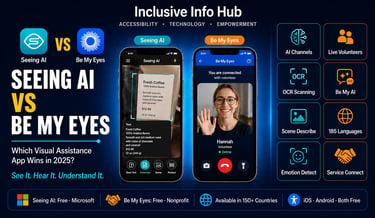
Two Apps. One Mission. Completely Different Approaches.
There is a moment that almost every blind or visually impaired student knows well. You are sitting somewhere — a classroom, a cafeteria, a waiting room — and something printed or visual is right in front of you, completely silent. A handout on the desk. An expression on someone's face. A sign on the wall. A product you have just picked up. Something that everyone around you can read or see in a glance, and that you cannot access at all.
Two apps have been built specifically for this moment. Both are free. Both run on iOS and Android. Both use your phone's camera. But what they do with that camera — and how they help you — could not be more different.
Seeing AI, developed by Microsoft, uses artificial intelligence to instantly analyze what your camera sees and describe it in audio. There is no human on the other end. The AI works alone, processing in real time, reporting back through your earphones.
Be My Eyes, founded in Denmark in 2015, connects you through a live video call to a real sighted volunteer anywhere in the world who can see your camera feed and tell you what they see. A human. Present. Speaking to you in real time.
One is a machine that never sleeps. The other is a community of over nine million people who chose to give their eyes to someone who needs them. Both have a place in a blind student's life. This article helps you understand which one belongs in which situation — and why you almost certainly need both.
Understanding Seeing AI: Microsoft's AI That Narrates the World
What It Is and Where It Comes From
Microsoft Seeing AI is a free visual assistance app powered by artificial intelligence and machine learning that provides information about objects and text for people with vision loss, including blind and low vision users. With Seeing AI, users can use their device camera to take a photo or point it at something in their environment to get a description, or upload something from their camera roll to get a visual description within seconds.
The app was built by a team led by Saqib Shaikh, a Microsoft engineer who is himself blind. It was born from an internal Microsoft hackathon and launched in 2017 for iOS. In December 2023, Seeing AI launched on Android, bringing the app to the more than three billion active Android users worldwide and providing many more people in the blind and low vision community the ability to utilize this technology in their everyday lives.
That Android launch was a turning point. Until then, Seeing AI was an iPhone-only tool — which meant it was inaccessible to the majority of blind users in the developing world, where Android dominates overwhelmingly. Now the playing field has leveled.
The Channel System: One App, Many Tools
What makes Seeing AI genuinely brilliant is its channel architecture. Instead of being a single-function app, it is a collection of specialized tools organized as switchable channels. Each channel does one thing extremely well.
With Seeing AI, you can just point the camera, or take a photo, and hear a description. Switch between channels to hear focused information: Short Text speaks text as soon as it appears in front of the camera. Documents provides audio guidance to capture a printed page and reads the content aloud, along with its original formatting.
The full channel lineup covers more than most people realize:
Short Text is the everyday workhorse. Point the camera at anything with text — a sign, a label, a price tag, a message on a screen — and the words are read aloud within a second. No tap required. The moment text enters the camera frame, Seeing AI reads it. For a student walking through a university corridor, this means every notice board, every door sign, and every printed announcement becomes audible without breaking stride.
Document handles longer printed content with more precision. It guides the user to position the page correctly, then captures and reads the full text including formatting structure. For printed handouts, textbook pages, or letters, this is the right channel.
Scene takes a broader view. Point the camera at an environment and Seeing AI generates a natural language description of what is visible — people, objects, spatial relationships, what is happening. By default, Seeing AI will provide a brief summary of what a photo depicts. When a user taps the "more info" icon, the app will generate a far more in-depth description of the image.
Product identifies items by barcode. Seeing AI can scan barcodes and provide product information such as the name and details from packaging when available, which could be particularly useful when it comes to dealing with medication. For a student shopping independently, navigating a cafeteria, or checking which textbook edition they have picked up, this channel is quietly essential.
Person identifies faces and describes emotional expressions. A student who cannot see whether a professor looks approachable, whether a classmate is paying attention, or whether someone across the room is smiling can use this channel to read the room in a way that is otherwise invisible.
Currency identifies banknotes by denomination — a feature that matters enormously for daily independence in cash-based economies. For students in Pakistan, India, and across South Asia where cash transactions remain common, this is a practical accessibility feature that other apps simply do not offer.
Explore Photo by Touch allows users to run their finger across a photo on screen and hear descriptions of whatever object their finger lands on. This feature enables users to tap their finger to an image on a touch screen to hear a description of objects within an image and the spatial relationship between them. The app can even describe the physical appearance of people and predict their mood.
After scanning a document, you can ask Seeing AI questions about things such as menu items or the price of an item on a bill. You can also ask it to summarize an article you have scanned. This conversational layer, added in recent updates, transforms a simple scanning tool into something closer to an AI reading companion.
Self-Voicing Interface
The Seeing AI interface is self-voicing and uses large, bold text by default, so users do not need to enable VoiceOver or other accessibility features to get access to the different settings. This design decision reflects genuine understanding of the user base. A tool for blind people should not require a secondary accessibility tool to operate. Seeing AI works out of the box.
Understanding Be My Eyes: The Human Network Behind the Camera
What It Is and the Story Behind It
Be My Eyes was founded in 2015 in Denmark by Hans Jørgen Wiberg, a craftsman who himself has low vision. The premise was radical in its simplicity: what if sighted people could volunteer a few minutes of their time to help blind people with visual tasks through a live video call?
Over 9.3 million volunteers and 900,000 blind or visually impaired people use the app. Those numbers tell a story about what happens when you build something that genuinely serves both sides of the exchange. Volunteers do not feel burdened — they feel useful. The calls are typically short, specific, and satisfying. Someone needed help reading an expiry date. You read it. Done. That is micro-volunteering at its most effective.
The Three Pillars of Be My Eyes
Be My Eyes in 2025 is no longer just a volunteer call app. It has evolved into a platform with three distinct tools that work together.
Call-a-Volunteer remains the heart of the platform. Blind and low vision users can connect with more than 7 million volunteers speaking 185 languages, available for free 24 hours a day, 7 days a week. When you press the call button, the app connects you to an available volunteer who speaks your language. A visually impaired person starts a live stream showing their view from their phone camera. They are assigned, through a phone call or chat, a random volunteer who speaks the same language and who is in the same time zone. This allows the volunteer to describe an object and assist the visually impaired person, such as guiding the person to move their camera, read instructions, or clean up a spill.
The human element of this interaction cannot be overstated. A volunteer can say "wait, move your camera a little to the left — there, the expiry date says March 2026." They can engage with the specific task at hand, respond to follow-up questions, and provide reassurance. An AI channel can describe what it sees. A human can problem-solve in real time.
In the Winter 2025 update, Call-a-Volunteer video calls are now made in full 1080p HD resolution as a default. This higher resolution provides volunteers with clearer images and finer details when zooming in. For tasks where clarity matters — reading fine print on medication, identifying a specific item in a crowded shelf — this resolution upgrade is a meaningful improvement.
Be My AI is the platform's AI tool, powered by OpenAI's GPT-4 vision capabilities. When logged in as a blind or low vision user, you can send images via the app to Be My AI, which will answer questions about that image and provide conversational AI generated visual descriptions for a wide variety of tasks in 36 languages.
Be My AI allows blind and low vision users to take a photo and receive a detailed description generated by an AI assistant. They can then ask follow-up questions in natural language — for example, to understand the layout of a room, read a long document, or get guidance while setting up a new device.
If and when the tool is unable to answer a question, it will automatically offer users the option to be connected via the app to a sighted volunteer for assistance — the volunteer experience is not going anywhere. This fallback design is smart. AI handles what it handles well. When it reaches its limits, a human picks up. The user never hits a dead end.
Service Connect is the most underappreciated feature of Be My Eyes. The Service Directory section allows users to connect directly with a wide range of companies for support with their products and services as well as organizations within the blindness community, free of charge. This means a blind student who needs help setting up a device, troubleshooting software, or navigating a company's accessible product can connect directly to a trained customer service representative from that company through Be My Eyes — bypassing the frustrating experience of inaccessible phone trees and web interfaces.
Head-to-Head: Where Each App Wins
Understanding which app to reach for in any given situation is the most practical thing this article can give you. Here is the honest breakdown.
Speed and Immediacy: Seeing AI Wins
When you need information right now — the text on a sign you just passed, the label on what you just picked up, the face of the person who just walked in — Seeing AI is faster. There is no connection wait, no call setup, no volunteer availability to depend on. The AI processes what the camera sees and reports back within one to two seconds. For continuous, ambient information gathering, Seeing AI has no equal.
Complex and Unpredictable Situations: Be My Eyes Wins
When the situation is complicated, ambiguous, or requires judgment — "is this outfit appropriate for a formal presentation?", "which of these two similar products is the one I want?", "can you help me navigate this unfamiliar space?" — a human volunteer can engage with the specific context in a way no AI currently matches. Volunteers can ask clarifying questions, adapt their guidance, and apply common sense to situations that confuse automated systems.
Language Support: Be My Eyes Wins Significantly
Be My Eyes volunteers speak 185 languages and are available 24 hours a day, 7 days a week. For a student in Pakistan who is more comfortable communicating in Urdu than English, or a student in Japan, Korea, or any country with a strong regional language, the ability to speak to a volunteer in their own language without switching to English is a significant practical advantage. Seeing AI supports multiple languages for text recognition, but the conversational interaction is still primarily English-oriented.
Privacy and Sensitive Situations: Seeing AI Wins
Not everything is something you want to share with another person. Reading a private letter. Checking a bank statement. Navigating personal medical information. In these situations, sending a live video feed to another human — however well-intentioned — may not be comfortable. Seeing AI processes everything locally and privately, with no human on the other end.
Internet Dependency: Seeing AI Has Edge
While both apps require internet for full functionality, Seeing AI's Short Text channel can perform basic text recognition with minimal connectivity, and the app is generally more responsive on slower connections. For students in areas with unreliable internet — which includes many parts of Pakistan, rural India, and parts of Southeast Asia — this resilience matters.
Availability in Crisis: Be My Eyes Wins by Design
Be My Eyes is available in over 150 countries, free of charge, 24/7. The volunteer network is geographically distributed globally, which means someone is always awake, available, and willing to help regardless of the time zone or the hour. For a student in Lahore at 2am dealing with an urgent situation, the probability of reaching a helpful volunteer within seconds is high.
Emotional Connection and Human Dignity: Be My Eyes, Clearly
This is not a feature that shows up in a spec sheet, but it is real. There is something qualitatively different about a human voice saying "I can see you, I'm here, let me help you." For students who use assistive technology all day, every day, the warmth of a real human interaction — offered freely, without pity, just practical help — matters to wellbeing in ways that extend beyond function.
How Both Apps Help Sighted Students Too
This is the part that surprises most people, and it should not.
Sighted Students Who Work With Blind Peers
A sighted student who volunteers on Be My Eyes is doing something that most people do not think of as accessible education but absolutely is: they are building firsthand understanding of what daily life is like with vision loss. Volunteering takes minutes. It costs nothing. And it builds the kind of genuine empathy that no lecture or awareness campaign can manufacture. Students interested in medicine, social work, education, or rehabilitation therapy will find Be My Eyes volunteering one of the most honest professional development experiences available.
Students Traveling or Studying Abroad
Seeing AI's ability to identify text in multiple languages is immediately useful for any sighted student in an unfamiliar language environment. A student from Pakistan studying in Germany, or a student from South Korea studying in France, can point Seeing AI at a sign, a menu, or a printed document in an unfamiliar language and have it read aloud and described. It is not a replacement for language learning, but it removes the friction of immediate, practical text barriers.
Sighted Users With Situational Vision Impairment
Bright sunlight, a broken glasses lens, post-operative recovery, or extreme eye strain during exam season can temporarily impair a sighted student's ability to read comfortably. Seeing AI's Short Text and Document channels work just as effectively for anyone pointing a camera at text, regardless of their permanent visual status. Having it installed and familiar before it is urgently needed is simply good preparation.
Neurodiverse Students
For students with autism who find direct social interaction challenging, Seeing AI offers a private, non-social way to identify people's facial expressions and emotional states — which is a genuinely useful support for social navigation in academic environments. For students with ADHD who process auditory information more readily than visual, having an AI read signs and labels aloud removes one category of visual processing demand from an already taxed system.
Both Apps for Students in Pakistan and Across Asia
Be My Eyes' Language Advantage
Be My Eyes volunteers are available speaking 185 languages. For blind and visually impaired students in Pakistan, India, Bangladesh, and across South and Southeast Asia, this means the possibility of reaching a volunteer who speaks Urdu, Hindi, Bengali, Tagalog, or any number of regional languages. The community includes volunteers from every part of the world, and the language-matching system routes calls to volunteers who share the caller's language.
Seeing AI's Android Arrival
Until 2023, Seeing AI was iOS only — which effectively excluded the majority of users in South Asia and Southeast Asia where Android is the dominant platform. With over three billion active Android users worldwide, bringing Seeing AI to Android provides many more people in the blind and low vision community the ability to utilize this technology in their everyday lives. A blind student in Lahore with a mid-range Android phone now has access to the same Microsoft AI visual assistance as a student in London with the latest iPhone.
Currency Recognition in Cash Economies
Pakistan and much of South and Southeast Asia remain substantially cash-dependent in daily transactions. Seeing AI's Currency channel — which identifies banknote denominations by pointing the camera at a note — is a daily independence tool that has direct, practical relevance in these economies in a way that may be less urgent in card-dominated markets.
The Community Connection
Be My Eyes works because of its volunteer network, and that network is genuinely global. Students and professionals in Pakistan, India, the Philippines, and across Asia can both use the app as blind users and sign up as volunteers. Expanding the volunteer base in South Asian languages strengthens the platform for everyone. A Urdu-speaking volunteer in Karachi helps a blind Urdu speaker in Lahore get assistance without relying on an English-speaking intermediary.
Both Apps in Tier 1 Markets: US, UK, Canada, and Australia
In high-income English-speaking markets, both apps are fully functional and widely used. The volunteer supply on Be My Eyes in these regions is abundant — calls connect within seconds at nearly any hour. Seeing AI's English language processing is at its most accurate in standard American and British English accents.
Disability services offices at US universities increasingly reference both apps in their assistive technology guides. Vocational rehabilitation counselors include them in technology planning for clients with vision loss. The apps are routinely mentioned in orientation and mobility training for newly blind individuals.
For professionals with vision loss in these markets — lawyers, medical practitioners, executives — Seeing AI's document scanning and Be My AI's conversational image analysis are tools that fit naturally into a workday where printed and visual content still appear without warning.
In 2025, the European Accessibility Act introduced more stringent digital accessibility requirements across Europe, extending accessibility obligations to more private and public entities. Be My Eyes' Service Connect feature, which connects blind users directly to company customer service representatives trained for accessible support, positions the platform as a corporate compliance tool as much as a personal accessibility app. Companies that want to serve customers with visual disabilities can join the Be My Eyes service directory and provide trained support through the platform.
Pricing: Both Are Completely Free
This needs to be said clearly because people often assume there must be a catch.
Seeing AI is completely free to download and use. All channels, all languages, all features. Microsoft has not introduced a premium tier or subscription. The app is a corporate accessibility investment, not a revenue product.
Be My Eyes is completely free for blind and visually impaired users. Volunteer calls, Be My AI, and the Service Directory are all available at no cost. The platform generates revenue through its corporate partnerships — companies pay to be listed in the Service Directory and to provide trained representatives through the platform — which funds the free service for users.
Both apps are free on iOS and Android globally, including in Pakistan, India, and across Asia.
Limitations Worth Knowing
Seeing AI Limitations
Seeing AI's scene descriptions, while impressive, can miss nuance and context that a human would immediately notice. In complex or cluttered environments, descriptions can be verbose or imprecise. The app's face recognition and emotion detection, while useful, raise privacy considerations that users in public spaces should be aware of — other people's faces are being processed by AI without their knowledge or consent.
The app works best in good lighting. Low light conditions reduce OCR accuracy and scene description quality. For students in poorly lit environments — common in many South Asian educational settings — this is a practical limitation.
Be My Eyes Limitations
Volunteer availability, while excellent on average, is not guaranteed. In rare peak moments or in languages with smaller volunteer communities, wait times can increase. For students using the app for time-sensitive situations — a timed exam, a fast-moving situation — this unpredictability matters.
Call quality depends on internet connection. A student with an unreliable connection may experience dropped calls or poor video quality that reduces the volunteer's ability to help effectively.
Be My Eyes' data retention policy now stores images and AI descriptions for 30 days before deletion. Users who share sensitive visual content through Be My AI should be aware of this retention window, though the policy is clearly documented and users can opt out.
Where to Download Both Apps
Seeing AI:
iOS: Search "Seeing AI" on the Apple App Store — developed by Microsoft Corporation, free
Android: Search "Seeing AI" on Google Play — available globally including Pakistan, India, and Southeast Asia
Be My Eyes:
iOS: Search "Be My Eyes" on the Apple App Store — free
Android: Search "Be My Eyes" on Google Play — free, available in over 150 countries
Both apps are available globally with no regional restrictions and no cost at any tier. Download both. They complement each other perfectly.
The Verdict: You Do Not Have to Choose
Here is the conclusion that most comparison articles are reluctant to reach, because it does not generate a clean winner: use both.
Seeing AI is your independent AI tool. Fast, private, always on, no connection wait, ideal for ambient text reading and quiet personal tasks. Have it open when you are moving through an environment with text, products, and faces.
Be My Eyes is your human network. For complex situations, for tasks that need judgment and conversation, for moments when an AI description is not quite enough and you need a person to say "yes, that's the right door" or "actually, move slightly to your right" — it is there. Free. Immediate. Human.
Between the two of them, a blind or visually impaired student has around-the-clock AI visual assistance and instant access to a global community of millions of sighted volunteers. A decade ago, this level of independence-enabling technology did not exist at this price point — which is zero.
A blind student in Karachi, Dhaka, Nairobi, London, or Los Angeles all have access to the same tools. Same features, same quality, same cost.
That is worth noticing. And worth using.