Ava Review 2026: Live Captions for Every Conversation — One-on-One, Group, Online, and In Person
Ava is a free live captioning app for deaf and hard of hearing users that delivers 90% AI accuracy and up to 99% with human scribes. Available on iOS, Android, web, and desktop. Full 2026 review for students and professionals in Pakistan, Asia, the US, and UK.
APPS FOR HI SUPPORTLATEST TECHNOLOGYEDUCATION
Inclusive Info Hub
According to the World Health Organization, 1.5 billion people worldwide live with some degree of hearing loss — and among the most consistently cited barriers in their daily lives is not a single dramatic moment but an accumulated series of conversations they could not fully follow. Group discussions. Team meetings. University seminars. Family gatherings. The situations where more than one person speaks, speakers change without warning, and following the thread of who said what is the specific cognitive challenge that individual one-on-one captioning tools were never designed to solve. At Inclusive Info Hub, every hearing accessibility app reviewed here is measured by one honest standard: does it genuinely serve the specific situation it claims to — and does it serve it for the users who need it most, wherever they are.
Picture a deaf postgraduate student in Lahore attending her weekly research seminar. Six participants. Three supervisors. A visiting professor from another university presenting slides. Questions from the floor. The conversation moves fast, changes direction, circles back. A basic captioning app on her phone shows a continuous wall of text with no indication of who said what — she can read the words but loses the structure of who is making which argument, which supervisor is raising a concern, and which point is being attributed to which researcher.
Ava was built specifically for exactly this situation. Not just captioning — speaker-identified, color-coded, group-aware, cloud-synced captioning that follows the conversation rather than just the sound.
What Is Ava?
Ava is a live captioning and accessibility application developed by Transcense Inc, founded in San Francisco by Thibault Duchemin — who grew up as a hearing child of deaf parents — and designed from the outset specifically for deaf and hard of hearing users rather than as a general transcription tool repurposed for accessibility. It is available on iOS, Android, web browser, and as a desktop application for Windows and Mac, making it the most cross-platform captioning app in this guide.
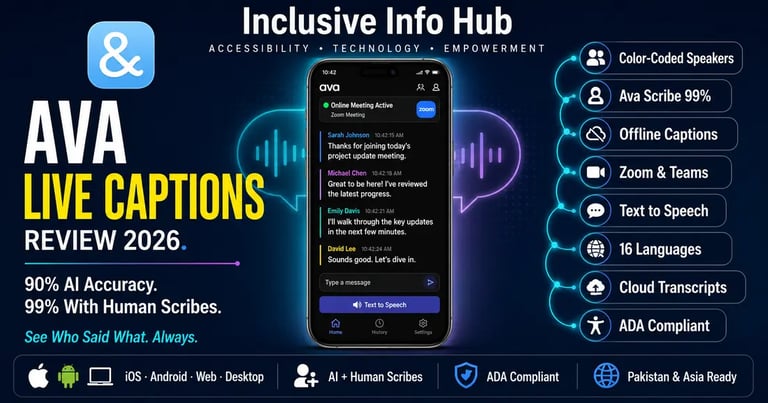
Ava's speech-to-text app provides 24/7 real-time audio transcription with 90% accuracy based on AI, and up to 99% accuracy through Ava Scribe — a service that pairs AI captions with human scribes who review and correct the output in real time for the highest-stakes conversations where errors carry real consequences.
The app is free to download on both the Apple App Store and Google Play Store as "Ava: Transcribe Voice to Text" published by Transcense Inc. The free tier provides unlimited basic captions with sessions of up to 40 minutes per conversation. Paid plans extend session length and unlock premium caption quality, and institutional plans serve schools, workplaces, and event organizers requiring ADA-compliant captioning at scale.
The Feature That Separates Ava From Every Other Captioning App
Most captioning apps solve one specific problem well: they convert what one person is saying into text that a deaf user can read. That is genuinely useful and the previous article in this series — Google Live Transcribe — covers that use case in depth.
Ava solves a different and harder problem: it converts what multiple people are saying into a structured, readable transcript that clearly shows who said each thing.
The color-coded speaker identification system is the defining feature of the Ava experience. Each speaker in a conversation is assigned a distinct color, and every caption line is labeled with the speaker's name or identifier and displayed in that speaker's color. A deaf user following a group discussion can see at a glance not just the words but the attribution — this sentence came from the professor, that response came from a classmate, this follow-up came from the moderator.
This distinction sounds simple. Its practical impact on deaf users' ability to follow group conversations is significant. As one user described: Ava enabled them not to miss relevant information going around the office — not because the captions themselves were revolutionary, but because knowing who was saying what transformed a wall of text into a structured, followable exchange.
Who Ava Is Built For
Deaf and Hard of Hearing Students in Group Academic Settings
University education is built around group interaction — seminars, tutorials, group projects, Q&A sessions after lectures, informal study group discussions. These are exactly the settings where one-on-one captioning tools fall short and where Ava's speaker identification delivers genuine value. A deaf student following a seminar discussion with six participants has a fundamentally different experience with Ava's color-coded speaker labels than with a plain text stream from a basic captioning app.
The Zoom, Microsoft Teams, and Google Meet integration means that online lectures and hybrid classes — now a permanent feature of university education globally — are also covered. A deaf student attending a hybrid seminar where some participants are in the room and some are on Zoom can use Ava's web or desktop app to caption the full session regardless of where each speaker is physically located.
Deaf Professionals in Workplace Meetings
Being left out of the loop at work was described by one Ava user as very difficult — and that difficulty is specifically about the group conversation, the informal discussion between colleagues, the meeting where multiple people are talking and the thread of the conversation moves fast. Ava's workplace plans provide ADA-compliant captioning for organizations, with institutional accounts that do not require every participant to have a personal Ava account — the deaf employee uses Ava; their hearing colleagues do not need to change anything about how they communicate.
Individuals in Medical, Legal, and Administrative Settings
High-stakes face-to-face appointments — a medical consultation, a legal meeting, an administrative interview — are situations where missing words has consequences. Ava Scribe's human-verified captioning tier, providing approximately one error in 100 words, is positioned specifically for these situations where AI accuracy alone is not sufficient and where the cost of a misread sentence is measured in medical outcomes or legal understanding rather than missed social cues.
Families and Social Groups
One of Ava's most emotionally significant use cases is social rather than professional or academic. A deaf family member at a gathering, a deaf person in a group of hearing friends, an individual at a community event — Ava's group captioning with speaker identification transforms participation from passive observation to active engagement. The ability to know not just what was said but who said it makes the difference between following a family conversation and reading a transcript of one.
Key Features in Full Detail
Color-Coded Speaker Identification
Every speaker in an Ava session is automatically identified and assigned a color, with their name or identifier displayed beside each caption line. In a group conversation, the visual distinction between speakers is immediate and readable without requiring the user to parse the content of each sentence to figure out who said it. When participants join a session from their own devices, their names are pulled from their Ava accounts automatically.
Offline Captions — A Critical Differentiator
This is one of the most important practical advantages Ava holds over Google Live Transcribe and several other captioning apps. Ava works on airplane mode — captions are available with or without phone service or WiFi. The app's offline captioning capability means a deaf user in an area with no internet signal, on a plane, in a building with poor connectivity, or anywhere that the network drops can still access real-time captions without interruption.
For users in Pakistan and across South Asia where internet connectivity is unreliable in many environments — inside certain buildings, in transit, in rural areas — this offline capability is not a minor convenience. It is the feature that determines whether the app is genuinely usable in those environments or not.
Ava Scribe — AI Plus Human Accuracy
For the highest-accuracy captioning available on any mobile platform, Ava Scribe combines the speed of AI captioning with human scribes who review and correct the output in real time. The result is approximately one error in 100 words — compared to approximately five errors in 100 words for AI-only captioning. For a deaf student in a high-stakes examination setting, a professional in a critical client meeting, or a patient in a detailed medical consultation, this level of accuracy represents the difference between a communication tool and a reliable record.
Ava Scribe is available as an on-demand premium service for situations that specifically require it, rather than as the default experience — meaning users pay for human-verified accuracy when the situation warrants it without paying for it constantly for everyday conversations.
Zoom, Microsoft Teams, and Google Meet Integration
Paired with the Ava web and desktop app, users can caption any video conference call — Zoom, Microsoft Teams, Google Meet, or any other videoconferencing platform — displaying captions directly within or alongside the call interface. For deaf students and professionals working in hybrid environments where some meetings are in person and some are online, this cross-platform coverage means a single Ava account handles both contexts.
Text to Speech — Two-Way Communication
A deaf user can type responses directly into the Ava interface and the app will read their typed message aloud to the hearing participants in the conversation. This text-to-speech reply capability enables a genuinely two-way exchange without the deaf user needing to use their voice — the hearing side speaks, the deaf user reads captions and types back, and the conversation flows naturally in both directions.
Cloud Transcript Storage
All Ava transcripts are saved in the cloud, accessible from any device through the Ava web interface. A deaf student can review the complete transcript of a lecture or seminar later on their laptop, search for specific terms, and use the transcript as a study resource alongside the session itself — extending the value of captioning from a real-time access tool into a permanent learning record.
Custom Vocabulary
Users can teach Ava specific words, names, and technical terms that appear frequently in their conversations. For a medical student whose seminars involve precise anatomical terminology, or an engineering student whose lectures reference specific technical standards and product names, custom vocabulary training improves accuracy on the specialist language that matters most to that user's daily academic life.
16 Language Support for International Users
Ava supports live transcription and translation in 16 languages, covering a meaningful range of the world's major spoken languages. For international students studying in a second language, the translation capability — captioning content in one language while displaying it in another — addresses both the deaf accessibility need and the language barrier simultaneously.
Pricing — Complete and Honest
Free tier: Unlimited basic captions per month with sessions of up to 40 minutes per conversation. No limits on group size or number of connected devices. Transcript saving included. Text-to-speech reply included. This free tier is genuinely functional for everyday one-on-one and group conversations within the 40-minute session limit.
Premium captions: $9.99 per month paid annually or $14.99 per month paid monthly, providing 3 hours of premium caption time per month with sessions up to 40 minutes. Premium captions achieve approximately 5 errors in 100 words. Additional hours available at $4.99 per hour.
Ava Pro: Unlimited premium caption time with conversations up to 2 hours. Priced for individual power users who require longer session support.
Ava Enterprise: Unlimited premium captions with sessions up to 8 hours, designed for organizational deployment in workplaces, schools, and event settings.
Ava Scribe: On-demand human-verified captioning at approximately 1 error in 100 words, available for high-stakes individual sessions through the Ava platform.
For students in Pakistan and across South Asia, the free tier's 40-minute session limit is the primary constraint worth planning around. Most university lectures run 50 to 90 minutes — longer than a single free session. Students who attend multiple lectures weekly would need to either upgrade to a paid plan or restart the session for longer lectures, which interrupts the captioning flow. The premium plan's $9.99 monthly cost at annual billing is the most realistic upgrade path for heavy student use.
Honest Limitations
The 40-minute session limit on the free tier is a real constraint for university use. A 90-minute lecture exceeds two free sessions. For students who need uninterrupted captioning across full lecture lengths, the free tier alone is insufficient and a paid upgrade is the honest recommendation.
AI accuracy in noisy environments drops from the quoted figures. Ava's AI captions achieve approximately 90% accuracy under good conditions — a single speaker, moderate background noise, standard accent. In noisy lecture halls, crowded rooms, or conversations with multiple simultaneous speakers, accuracy drops. Some Play Store reviews specifically cite poor accuracy in classroom environments with background noise as a practical limitation. The 99% accuracy figure applies to Ava Scribe with human scribes — not to the standard AI captioning tier.
Speaker identification requires each speaker to have Ava installed. The automatic color-coded speaker identification is most reliable when all participants have Ava installed on their own devices and have joined the session. When participants have not downloaded the app, speaker differentiation is less precise and may default to generic speaker labels rather than named individuals.
The free tier session restart interrupts captioning continuity. When a 40-minute free session ends and needs to be restarted for a longer conversation, there is a brief gap in captioning during the restart. For a fast-paced lecture or meeting, this gap can result in missed content.
App Store Details — Verified and Confirmed
Apple App Store: Search "Ava: Transcribe Voice to Text" — published by Transcense Inc. Free to download. Available globally including Pakistan, India, and South Asia.
Google Play Store: Search "Ava: Transcribe Voice to Text" — published by Transcense Inc. Free to download. Available globally.
Web browser: Access at web.ava.me — no download required for web use, compatible with any modern browser on any device.
Frequently Asked Questions
Is Ava free for deaf students? The core Ava app is free to download and use on iOS and Android with unlimited basic captions in sessions up to 40 minutes per conversation. A paid premium plan starting at $9.99 per month annually extends session length and improves caption accuracy for heavier use.
Is Ava available in Pakistan? Yes. The Ava app is available globally on both the Apple App Store and Google Play Store with no regional restrictions. The free tier is immediately accessible in Pakistan with no payment required.
Does Ava work offline? Yes. Ava works on airplane mode, meaning captions remain available without internet connectivity. This is a significant advantage over Google Live Transcribe, which requires an active internet connection to function.
What is the difference between Ava and Ava Scribe? Ava's standard AI captioning delivers approximately 90% accuracy — about 5 errors in every 100 words. Ava Scribe pairs AI captions with human scribes who review and correct the output in real time, delivering approximately 99% accuracy — about 1 error in every 100 words — for high-stakes situations where maximum accuracy is required.
Does Ava work with Zoom and Microsoft Teams? Yes. Through the Ava web and desktop apps, Ava integrates with Zoom, Microsoft Teams, Google Meet, and other video conferencing platforms to provide live captions during online meetings and hybrid classes.
What is the correct app to download — there are many apps called Ava? The correct app is published by Transcense Inc and is titled "Ava: Transcribe Voice to Text" on both the Apple App Store and Google Play Store. Verify the developer name is Transcense Inc before downloading to avoid unrelated apps with similar names.
What This Means for Students and Professionals in Pakistan and Across Asia
Whether you are a deaf postgraduate student in Lahore navigating weekly research seminars with multiple speakers, a hard of hearing professional in Karachi attending team meetings where informal discussion moves faster than any single captioning tool can cleanly follow, or a deaf student in Dhaka attending hybrid university classes where some participants are online and some are in the room — Ava addresses the specific challenge that most other captioning tools do not: the group conversation, the multiple speakers, the need to know not just what is being said but who is saying it.
The offline capability is particularly relevant for users across South Asia where connectivity is inconsistent. The fact that Ava's captions remain available on airplane mode — without internet — means a deaf user in a building with poor signal, on a long bus or train journey, or in any low-connectivity environment does not lose their communication access at the moment they are most dependent on it.
The 40-minute free session limit is a real constraint for full university lecture coverage and worth planning around honestly. For students who find the free tier insufficient for their lecture schedule, the premium plan at $9.99 per month is the most direct solution — though for students in Pakistan and South Asia where monthly USD subscriptions carry meaningful economic weight, the free tier combined with session restarts for longer lectures may be the practical working solution until pricing adjusts for regional markets.
Ava vs Google Live Transcribe — The Practical Comparison
Both Ava and Google Live Transcribe are covered in this blog's hearing accessibility series, and the comparison between them is one of the most common questions in the deaf and hard of hearing community.
Google Live Transcribe is free, unlimited, Android-only, requires internet, and excels at single-speaker real-time captioning in everyday face-to-face situations with strong language support across 120 languages.
Ava is free within session limits, cross-platform on iOS and Android, works offline, provides speaker identification and color-coded group conversation captions, integrates with Zoom and Teams, and stores transcripts in the cloud.
The practical recommendation: use both. Google Live Transcribe for everyday brief conversations, quick interactions, and situations where you are on Android and need immediate captioning with no session limit. Use Ava for group conversations, university seminars, workplace meetings, online classes, and any situation where knowing who said what is as important as knowing what was said.
A Closing Thought
The research seminar. The team meeting. The family gathering where six people are talking at once. These are the situations where a deaf person most consistently describes feeling excluded — not because no one is trying to include them, but because the structure of group conversation was built for ears and the tools designed to bridge that gap were built for one speaker at a time.
Ava understands this. The color-coded speaker identification is not a feature that looks impressive in a product demo and adds little in practice. It is the feature that transforms a transcript from a document into a conversation — one that a deaf student in Lahore can follow with the same comprehension as her hearing classmates, knowing not just what was said in the seminar but who raised each point, who responded to whom, and how the discussion actually moved.
That is the promise of genuinely accessible captioning. Not text on a screen. Participation.
Read More on Inclusive Info Hub
👉 10 Best Apps for Deaf and Hard of Hearing Users — where Live Transcribe sits in the full picture: Read our complete guide here → [10 BEST APPS DEAF HH ARTICLE LINK]
👉 Otter.ai — AI transcription for lectures, meetings, and Zoom with AI summaries: Read our full review here → [OTTER.AI ARTICLE LINK]
👉 Ava — live group conversation captions with 99% accuracy and human scribes: Read our full review here → [AVA Article link]
👉 Best AI Accessibility Tools in 2026 — complete guide including OCR and document tools: Read our full guide here → [BEST AI ACCESSIBILITY TOOLS ARTICLE LINK]