Nagish Is Now Rylo: The Free Captioned Phone Call App That Never Needed an Interpreter
Nagish, now rebranded as Rylo, is a free AI-powered captioned phone call app for deaf and hard of hearing users on iOS and Android. Keep your existing number. No interpreters. 100% private. Full 2026 review for users in Pakistan, Asia, the US, and UK.
APPS FOR HI SUPPORTLATEST TECHNOLOGYEDUCATION
Inclusive Info Hub
According to the Hearing Loss Association of America, approximately 15 percent of American adults report some trouble hearing, and globally the World Health Organization estimates that over 1.5 billion people live with some degree of hearing loss. At Inclusive Info Hub, every hearing accessibility app reviewed here is evaluated against one specific honest question: does it remove a barrier that deaf and hard of hearing users encounter every single day, not occasionally. And no barrier is more universal, more frequent, or more practically disruptive than the phone call.
Picture a hard of hearing professional in Karachi who needs to call her bank. The automated system asks security questions. A human operator comes on the line. The conversation moves fast, the audio is compressed, and following every word is genuinely difficult even with hearing aids. She has two options: ask someone else to make the call on her behalf and lose her privacy in the process, or struggle through the call and risk missing something important. Neither option is acceptable. Neither should be necessary.
Nagish was built specifically for this moment. And in 2026, having raised $85 million and rebranded as Rylo, it is doing it better than ever.
What Happened to Nagish — And What Is Rylo?
If you searched for Nagish on Google Play and could not find it, this is exactly why: Nagish officially rebranded to Rylo in 2026 following an $85 million funding raise. The developer confirmed the transition directly: Nagish is now Rylo, with a new name, a new look, and the same mission that built the original product.
Everything that made Nagish the most trusted free captioned calling app in the deaf and hard of hearing community carries forward into Rylo. The same AI captioning engine. The same privacy architecture. The same existing phone number support. The same free model. The rebrand reflects a broader ambition — to redefine accessible communication beyond phone calls into a comprehensive communication platform — but the core product that deaf and hard of hearing users depended on is still there, still free, and still the best free captioned calling app available on any platform.
Throughout this article both names are used. If you heard about this app as Nagish from any recommendation including our own 10 Best Apps for Deaf and Hard of Hearing Users guide, Rylo is the same app under its new name.
Where to Find It on App Stores
This is the most practically important section given the rebranding confusion. Here is the exact verified information for both stores:
Google Play Store: Search "Rylo: Live Call Captions" published by Rylo HQ. The package identifier remains confirming it is the same app as Nagish. Last updated March 22, 2026. Click here to get the download link on play store
Apple App Store: Search "Nagish: Caption Your Calls" published by Nagish Inc. The iOS rebrand to Rylo branding may follow the Android update — at time of writing the iOS App Store listing still displays the Nagish name. Free to download. Available globally. Click here to get the download link on App store
What Nagish and Rylo Actually Do
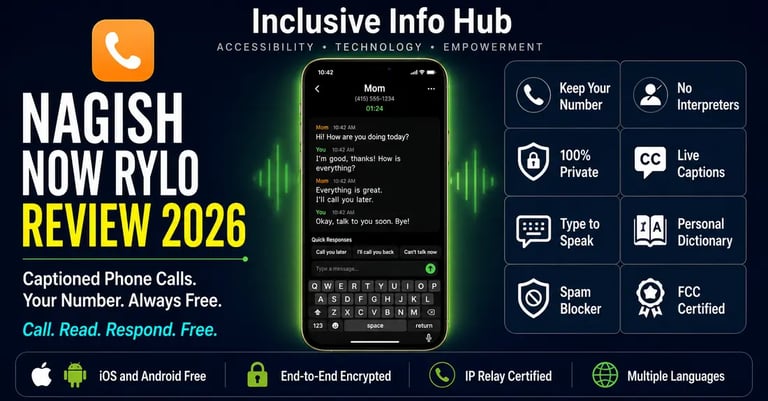
The core promise of this app is simpler and more radical than it first sounds: a deaf or hard of hearing person can make and receive real phone calls, using their own existing phone number, with every word the other person says appearing as real time captions on screen, with no human interpreter, no relay operator, and no one else listening to the call at any point.
This combination of features sounds obvious in 2026. It was not obvious when Nagish launched in 2020. Before apps like Nagish, deaf users who needed to make phone calls had limited options. Video relay services connected them to a sign language interpreter who relayed the conversation. IP relay services required typing everything through an operator. Traditional captioned phones were hardware devices tethered to a desk. All of these options required a third party to be present on the call, which meant privacy was structurally impossible for any sensitive conversation.
Nagish eliminated the third party entirely. The AI captioning engine runs on the device. No human reads the call. No relay operator hears the conversation. The call happens directly between the two parties, exactly as a standard phone call does, with captions appearing on the deaf user's screen as the other person speaks.
Key Features in Full Detail
Keep Your Existing Phone Number
This is the feature that most immediately removes the biggest practical barrier. A deaf user does not need to give anyone a new number. Does not need to explain why they are calling from an unfamiliar number. Does not need to maintain multiple phone numbers for different calling methods. Their existing number makes and receives captioned calls through Rylo exactly as it would through their native phone app. Contacts see the same number they have always had. Nothing changes for the hearing caller. Everything changes for the deaf user.
Real Time Call Captions with AI
As the hearing caller speaks, their words appear as captions on the deaf user's screen within a second of being spoken. The AI captioning engine processes audio locally with end-to-end encryption, meaning audio data is not routed through external servers where it could be accessed by third parties. The caption display is clean and large, with adjustable text size during the call for users who need larger font for comfortable reading.
Type to Speak
Rather than using their own voice on a call, a deaf or speech-disabled user can type their responses and the app reads them aloud to the hearing caller using a natural-sounding synthetic voice. The user can choose their preferred voice from a library of options and customize whether the voice sounds high or low. One user described the result: its synthetic voice speaks very clearly and does not sound robot-like at all, with callers enjoying having a more natural conversation directly without knowing an app is involved.
Quick Responses
Pre-set phrase buttons save time and effort for common call situations. Rather than typing a full sentence every time, a user can tap a Quick Response button to relay a complete phrase instantly. These phrases are customizable, allowing a deaf user to set up the specific responses that appear most often in their personal or professional calling contexts. A user who makes many business calls might set up responses like "Can you please repeat that?" or "I will send you a follow up email" as instant-tap responses.
Personal Dictionary
The AI captioning engine can be trained on specific vocabulary through a personal dictionary, allowing a user to add names, technical terms, local place names, professional jargon, or any word that the standard speech recognition engine might misinterpret. A healthcare professional using Rylo for work calls can add medical terminology. A student can add their professors' names and course-specific vocabulary. The personal dictionary makes captioning more accurate for the specific language of each user's actual conversations.
Voicemail Transcription
Voicemail messages are automatically transcribed and delivered as readable text, with the transcription quality described by one long-term user as the most accurate they have experienced anywhere. For a deaf user who cannot listen to voicemail audio, this automatic transcription means no message is ever missed or requires a sighted person's assistance to access.
Spam Filter and Number Blocking
A built-in spam filter automatically blocks calls from millions of known telemarketing, scam, and spam numbers, with the option to manually block specific numbers. This feature has particular value for deaf users who cannot quickly determine from audio whether an unknown incoming call is legitimate or spam, and who therefore bear a higher cognitive cost from junk calls than hearing users who can dismiss them within seconds.
Nagish Live / Rylo Live
Beyond phone calls, the app includes a live transcription mode for in-person conversations, functioning similarly to Google Live Transcribe for face-to-face situations. This live captioning capability covers doctor appointments, lectures, airport announcements, and any other in-person environment where hearing is a barrier. The combined phone call and live captioning capability in a single app makes Rylo a more comprehensive communication tool than a pure phone-captioning app.
Bluetooth Hearing Aid and Cochlear Implant Connectivity
The app automatically connects to Bluetooth-compatible hearing aids and cochlear implants, routing audio through the user's existing assistive devices rather than requiring them to choose between using their hearing aids and using the app. For users with hearing aids who also have residual hearing, this integration means the app augments rather than replaces their existing hearing support.
Service Directory
Introduced in late 2024, the Service Directory allows users to contact hundreds of service providers directly through the Nagish app with a single tap. This feature reduces the friction of calling businesses and institutions that deaf users may have historically avoided because of the phone call barrier.
FCC Certification and IP Relay
In February 2025, Nagish became certified by the FCC to provide IP Relay services, extending coverage to non-speaking people without decibel hearing losses and making the app eligible for federal funding for qualifying users in the United States. This certification means the app is free not just as a business decision but as a federally certified accessibility service.
Who Nagish and Rylo Are Built For
Deaf Users Who Need to Make Independent Phone Calls
The most immediate and impactful use case. Any deaf person who has ever had to ask a hearing family member or colleague to make a phone call on their behalf — whether from inconvenience, habit, or lack of a better option — has a tool that removes that dependency entirely. The call is private. The number is their own. No one else is involved.
Hard of Hearing Professionals in Phone-Heavy Careers
One user described handling over 100 calls a day with Nagish captioning every single one. For professionals in sales, customer service, healthcare administration, legal work, or any field where phone calls are a primary work tool, the captioning capability transforms a daily challenge into a manageable workflow.
People With Speech Disabilities
The type-to-speak capability extends the app's usefulness beyond hearing loss to speech disabilities. A person who can hear but cannot speak clearly on a call can type their side of the conversation and have it read aloud by the app's synthetic voice. This use case was specifically cited by a user with a speech disability who described the app as a game changer for their ability to function independently.
Students Navigating Administrative Phone Calls
University administrative processes are full of required phone calls: enrollment offices, financial aid departments, accommodation services, student health centers. For a deaf or hard of hearing student who has historically relied on a parent or friend to make these calls, Rylo makes each of these interactions independently manageable without any sighted or hearing assistance.
Honest Limitations
The app intercepts all incoming calls while active. This is the most serious limitation reported by users and it is worth stating directly. When Rylo is set up as the default calling app, it routes all calls through its captioning system. One user on Google Play reported missing 17 urgent calls from their doctor after uninstalling the app because Rylo continued to intercept calls even after deletion until the phone's default call settings were manually reset. Understanding how to correctly set and unset Rylo as the default calling app is important before relying on it and the developer's support team at support@nagish.com can assist with setup.
Some users reported spam call increases. A small number of Play Store reviews mention receiving increased spam calls after enrolling, with one user specifically stating their number appeared to have been shared with telemarketers. The developer denied selling user data and responded to each complaint directly. This pattern appears in a minority of reviews but is worth noting honestly.
Carrier compatibility for existing number forwarding varies. Some users report that their specific mobile carrier is not listed in the forwarding options, making the existing-number feature difficult to set up without technical assistance. Users who experience this should contact Rylo support directly as workarounds exist for most carriers.
FCC certification and the free model primarily apply to US users. The FCC certification, IP Relay service, and federally funded free model are US-specific regulatory frameworks. For users in Pakistan, South Asia, and most of the world outside the United States, the app is still free to download and use, but the regulatory guarantee of free service is a US benefit. International users should verify current availability and any regional pricing at the app's website before assuming permanent free access.
Language support is currently English, Spanish, French, Japanese, Hebrew, Italian, and a limited additional set. Urdu is not currently in the confirmed supported language list. For deaf users in Pakistan whose primary language is Urdu, this is a meaningful limitation for Urdu-language calls, though English-language calls are fully supported.
Frequently Asked Questions
Is Nagish the same as Rylo? Yes. Nagish rebranded as Rylo in 2026 following an $85 million funding raise. The app, the features, the developer, and the free model are all the same. On Android, search Rylo: Live Call Captions on Google Play. On iOS, search Nagish: Caption Your Calls on the App Store as the iOS listing may still show the Nagish branding during the transition period.
Is Rylo completely free? Yes. The app is completely free to download and use on both iOS and Android. In the United States, the FCC-certified captioning service is federally funded for qualifying users with hearing loss. For international users the core functionality remains free at time of writing, though users outside the US should verify current terms at rylo.com.
Can I keep my existing phone number? Yes. Rylo allows you to make and receive captioned calls using your existing phone number without changing it. Hearing callers see your same number and experience a normal phone call while you read captions on your screen.
Is my call private? Yes. Captions are generated by AI with end-to-end encryption and without any human involvement. No interpreter, relay operator, or third party hears the call at any point. The conversation is entirely between you and the person you are calling.
Does Rylo work in Pakistan? The app is available globally on both Google Play and the Apple App Store with no regional restrictions. Core phone captioning functionality is available in Pakistan. The FCC-funded free model is US-specific, and Urdu language support is not confirmed. English-language calls in Pakistan are fully supported.
What if I cannot find Nagish on the Play Store? Search for "Rylo: Live Call Captions" on Google Play instead. Nagish rebranded to Rylo in 2026 and the Play Store listing now shows the new name. The App Store iOS listing may still display the Nagish name during the transition.
What This Means for Deaf and Hard of Hearing Users in Pakistan and Across Asia
Whether you are a deaf professional in Lahore who needs to call a government office, a hard of hearing student in Karachi arranging a university appointment, or a speech-disabled individual in Dhaka navigating daily administrative calls, Rylo addresses a specific and persistent barrier: the phone call that requires hearing to complete.
The Urdu language limitation is worth acknowledging directly. For calls conducted in Urdu or other South Asian languages, the current version of Rylo may not provide reliable captioning accuracy. For English-language calls in Pakistan and South Asia, the app performs as described. As the app expands its language support following the rebrand and new funding, South Asian language coverage represents an important opportunity for Rylo to genuinely serve the region rather than just being technically available there.
The existing number feature has its most immediate impact in markets like Pakistan where a person's phone number is deeply tied to their identity and social network. Not having to explain a new number to contacts, not having to maintain multiple lines, and not having to ask anyone to make calls on your behalf are changes that compound into meaningful daily independence over time.
A Closing Thought
There is a particular kind of vulnerability in asking someone else to make a phone call for you. It is not just the inconvenience. It is the privacy that disappears the moment a third person is present on a conversation you needed to have alone. Medical results. Financial questions. Personal matters with employers. Legal situations. These are calls where the content is private by its nature and where having another person present changes what you say and how you say it.
Nagish understood this before it became Rylo. The entire design philosophy of the product is built around removing the third party from the call while removing none of the accessibility. The AI captions. Nobody else listens. The call is yours.
For a deaf professional in Karachi making a call to her bank at 9am, that privacy is not a feature. It is a right. Rylo delivers it, for free, on the phone she already carries.
Read More on Inclusive Info Hub
👉 10 Best Apps for Deaf and Hard of Hearing Users — where Live Transcribe sits in the full picture: Read our complete guide here → [10 BEST APPS DEAF HH ARTICLE LINK]
👉 Otter.ai — AI transcription for lectures, meetings, and Zoom with AI summaries: Read our full review here → [OTTER.AI ARTICLE LINK]
👉 Ava — live group conversation captions with 99% accuracy and human scribes: Read our full review here → [AVA Article link]
👉 Best AI Accessibility Tools in 2026 — complete guide including OCR and document tools: Read our full guide here → [BEST AI ACCESSIBILITY TOOLS ARTICLE LINK]