Google Live Transcribe Review 2026: Free Real-Time Captions for Every Conversation, Everywhere
Google Live Transcribe is a free Android app that converts speech to real-time captions in 120+ languages for deaf and hard of hearing users. Full 2026 review covering features, Sound Notifications, honest limitations, and why it matters for users in Pakistan and Asia.
APPS FOR HI SUPPORTLATEST TECHNOLOGYEDUCATION
Inclusive Info Hub
According to the World Health Organization, over 1.5 billion people worldwide live with some degree of hearing loss and for the majority of them, the most persistent daily barrier is not dramatic or exceptional. It is simply a conversation happening in real time that they cannot fully follow. A professor speaking at the front of a classroom. A doctor explaining a diagnosis. A cashier asking a question. A family member talking across the dinner table. At Inclusive Info Hub, every hearing accessibility app reviewed here is measured by one honest standard: does it remove that barrier reliably, affordably, and immediately for the users who need it most.
Picture a deaf university student in Karachi sitting in a face-to-face tutorial with her professor. No interpreter has been arranged. No CART captioning service is available. Her Android phone is on the desk between them, Live Transcribe open, the professor's words appearing on screen in large white text within one second of being spoken. She reads. She understands. She responds. The tutorial proceeds not perfectly, not without its limitations but it proceeds, and she participates in it, independently, using a free app that was already on her phone.
That is what Google Live Transcribe does. Not with caveats buried at the end of a glossy product description but with the clarity that only genuinely useful technology earns after being downloaded over 500 million times.
What Is Google Live Transcribe?
Google Live Transcribe is a free Android application developed by Google that provides real-time speech-to-text captioning for deaf and hard of hearing users, converting spoken words into large, readable text on screen within seconds of being spoken. It was publicly released on February 4, 2019, as a free app on the Google Play Store and has been downloaded over 500 million times as of early 2023 — making it one of the most widely adopted accessibility apps in history.
The app was developed by researchers Dimitri Kanevsky, Sagar Savla, and Chet Gnegy at Google in direct collaboration with Gallaudet University the premier university for the education of deaf and hard of hearing students in the United States and one of the most respected institutions in deaf education globally. That partnership is not a marketing footnote. Gallaudet researchers were involved in testing, feedback, and validation throughout the development process to ensure the app genuinely met the needs of deaf and hard of hearing users in real-world everyday situations not just in controlled laboratory conditions.
In August 2019, Google made Live Transcribe an open-source project, publishing the speech engine on GitHub. This decision reflects the kind of institutional commitment to accessibility that goes beyond product launches it means researchers, developers, and institutions worldwide can build on and extend the technology rather than waiting for Google to address every specific use case.
The app is available on the Google Play Store as part of the combined "Live Transcribe and Sound Notifications" package — both features in a single free download.
Important Platform Clarification (Before Anything Else)
Google Live Transcribe is Android only. It is not available on the Apple App Store.
This is the single most important practical fact in this review and it belongs at the top rather than buried as a footnote. iOS users have Apple's built-in Live Captions feature, available on iPhones running iOS 16 and above through Settings → Accessibility → Live Captions — which serves a similar function at no cost and requires no separate download.
For Android users in Pakistan, India, Bangladesh, and across South and Southeast Asia where Android devices represent the overwhelming majority of smartphones in use, the Android-only nature of Live Transcribe is not a limitation it is simply confirmation that this tool was built for the platform that reaches the most people globally.
The correct Play Store search term is "Live Transcribe and Sound Notifications" — published by Google LLC. The app is free with no in-app purchases and no premium tier. Every feature is available from the moment of download.
How Google Live Transcribe Actually Works
The interaction is designed to be as immediate as possible. A user opens the app or activates it through the accessibility shortcut, which can be set to appear as a floating button, a gesture, or a quick settings toggle and the transcription begins immediately. There is no setup process, no account creation, no mode selection. The microphone activates, Google's cloud speech recognition begins processing, and words appear on screen.
The transcription happens through a combination of on-device speech detection and Google Cloud speech recognition processing. An on-device neural network-based speech detector determines when speech is actually occurring filtering out silence and pure background noise before sending audio to the cloud for accurate recognition. This design reduces data consumption significantly compared to continuous raw audio streaming and improves the experience on slower mobile connections by only transmitting audio when speech is actually detected.
The display is deliberately minimal. Large white text on a dark background fills the screen, sized for readability at a distance and in varying lighting conditions. As a speaker continues talking, the text scrolls smoothly upward the most recent words always visible at the bottom where the eye naturally rests. The loudness indicator two concentric circles at the bottom of the screen gives a visual signal of audio volume, which is particularly useful for deaf users who cannot hear whether they themselves are speaking at an appropriate volume.
Transcriptions are not saved by default. Conversations stay private on the device and are not transmitted to or stored on Google's servers beyond the processing required for real-time recognition. Users who want to save a specific conversation can change this setting to retain transcriptions for up to three days.
Who Google Live Transcribe Is Built For
Deaf and Totally Deaf Users in Everyday Situations
For completely deaf users, Live Transcribe addresses the most frequent and mundane communication barrier the unplanned, brief, face-to-face interaction with a hearing person that happens dozens of times a day. A cashier, a receptionist, a lecturer, a colleague, a family member. These interactions do not justify the expense or logistics of a professional interpreter. They happen in moments, and Live Transcribe handles them in moments.
A doctor who is completely deaf described their experience with Live Transcribe clearly: they used it for the first time at a doctor's appointment and were able to read what their doctor was saying which was great being that they are completely deaf.
That is not a use case from a product demo. It is the actual daily experience the app was built to enable.
Hard of Hearing Users Supplementing Partial Hearing
For hard of hearing users who can follow some conversation but miss words or phrases particularly in noisy environments, when speakers are at a distance, or when the speaker has an unfamiliar accent Live Transcribe provides a real-time visual confirmation of what is being said. Rather than constantly asking for repetition or nodding along without full comprehension, a hard of hearing user can glance at the screen to catch any missed word without interrupting the natural flow of conversation.
Students in Classrooms and Tutorial Settings
For deaf and hard of hearing students attending face-to-face lectures, tutorials, and seminars where CART captioning or interpreter services are unavailable, Live Transcribe provides a baseline of conversational access that requires nothing from the institution no advance booking, no budget allocation, no accommodation approval process. The student brings their Android phone. The app does the rest.
Families With Deaf Members
One of the most personally significant use cases is the family dinner table the casual, overlapping, fast-moving conversation environment that is particularly difficult for deaf family members to follow even with extensive lip-reading skill. A deaf family member who places their phone on the table with Live Transcribe open can follow the conversation in real time, participating on more equal terms than any previous generation of deaf people has been able to in informal family settings.
As one user described after sharing the app with their mother: they tried it and were elated at how well it worked, describing the experience as feeling like Christmas.
Professionals in Meetings and Workplace Settings
For deaf and hard of hearing professionals attending workplace meetings, client calls, and informal office conversations, Live Transcribe provides a discreet, immediately available captioning tool that does not require employer approval or IT department setup. An Android phone on a meeting room table, app open, is sufficient.
Key Features in Full Detail
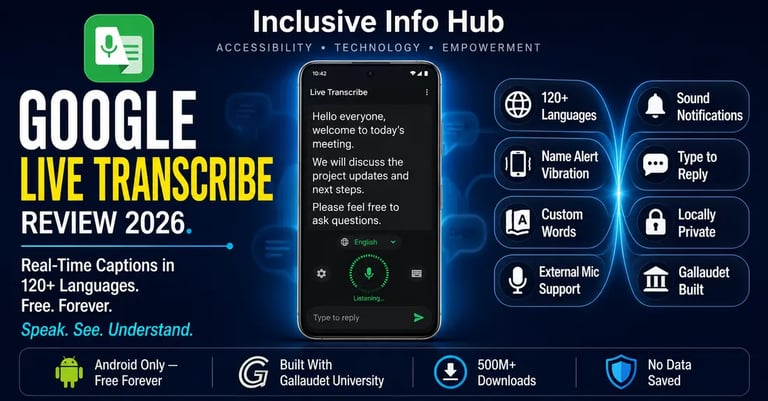
Real-Time Transcription in 120+ Languages and Dialects
Live Transcribe supports real-time transcription in over 120 languages and dialects, covering more than 80 percent of the global population by language. The range extends well beyond the major world languages — including Albanian, Burmese, Estonian, Macedonian, Mongolian, Punjabi, and Uzbek making it one of the most linguistically inclusive speech-to-text tools available on any platform.
For users in Pakistan where conversations frequently mix English and Urdu, the language switching capability allows a user to quickly switch between languages during bilingual conversations a practical feature for the mixed-language environments common in Pakistani homes, offices, and institutions.
Name Alert — Vibration When Your Name Is Spoken
This is one of the most thoughtfully designed features in the app and one that gets significantly less attention than it deserves. A user can set their name or any specific word as a trigger for the phone to vibrate when that word is detected in the audio. A deaf student sitting in a waiting room whose name will be called when it is their turn, or a hard of hearing professional in an open-plan office who cannot hear when they are being addressed from a distance, receives a tactile alert without needing to watch the screen continuously.
The social independence this enables is real and specific. Not needing to ask a companion to alert you when your name is called. Not missing your turn because you were not watching. These are small dignities that accumulate into meaningful daily independence.
Custom Words Teach the App Your Vocabulary
Users can add custom words that they use frequently — names of family members, technical terms from their field of study or work, local place names, specialized vocabulary that standard speech recognition might misinterpret. For a medical student whose lectures involve precise anatomical terminology, or a law student whose tutorials use specific legal terms, this customization significantly improves transcription accuracy for the specific vocabulary that matters most in their daily context.
Type to Reply Two-Way Text Communication
Rather than speaking a response which a deaf user may not do, or may not do clearly a user can type their reply directly into a text field within the app during a conversation. The typed text appears in a different color on the same screen, creating a simple visual conversation log that both parties can follow. For a completely deaf user who communicates primarily through writing or sign language, this type-to-reply capability means Live Transcribe supports a two-way exchange rather than just one-directional speech-to-text capture.
External Microphone Support
Live Transcribe supports external microphones through wired headsets, Bluetooth headsets, and USB microphones. For a deaf student attending a lecture where the professor is at a significant distance from their desk, a directional external microphone pointed toward the speaker can dramatically improve transcription accuracy compared to relying on the phone's built-in microphone to capture audio across a large room.
This external microphone capability also enables creative accessibility setups a small clip-on microphone on a lanyard around a speaking partner's neck, connected to the deaf user's phone, provides essentially the same function as a professional FM listening system at a fraction of the cost.
Loudness Indicator
Two concentric circles at the bottom of the screen provide a visual representation of ambient audio volume. As volume increases the outer circle expands; as it decreases the outer circle shrinks. For deaf users who produce speech but cannot monitor their own volume through hearing, this visual indicator signals whether they are speaking at an appropriate level for their environment without requiring feedback from a companion.
Privacy by Design
Transcriptions are not stored on Google's servers beyond the processing required for real-time recognition. By default, transcriptions are not saved anywhere. A user who wants a record of a specific conversation can opt into local storage for up to three days the transcript stays on the device and is not uploaded to the cloud. For deaf users who may be transcribing sensitive medical, legal, or personal conversations, this privacy-by-design approach is meaningfully different from cloud-dependent transcription services that retain conversation data.
Sound Notifications (The Companion Feature)
Bundled within the same "Live Transcribe and Sound Notifications" app is a companion feature that continuously monitors ambient audio and sends visual and vibration alerts when specific sounds are detected a smoke alarm, a doorbell, a baby crying, a dog barking, a car horn, a siren, a knock at the door. Users can also add custom sounds to the detection list when specific appliance beeps or household sounds are relevant to their situation.
The sound notification history allows a user to review what sounds occurred in their environment over the past 12 hours allowing a deaf user who was asleep or in another room to check what happened in their absence. For a deaf parent at home, a deaf student in university accommodation, or a hard of hearing professional working in a busy environment, this sound awareness layer addresses a safety and situational awareness gap that no captioning tool alone can fill.
The Gallaudet University Partnership — Why It Matters
Most technology companies that produce accessibility tools consult with disability communities at the end of the development process — a kind of box-checking that produces tools designed by engineers and validated by users too late in the process for fundamental design decisions to change.
Google's partnership with Gallaudet University worked differently. Partners at Gallaudet helped with testing and improvements throughout the development process, not just at the validation stage. Researchers at the university played a key role in designing the app and validating that it genuinely met the needs of deaf and hard of hearing users in real everyday situations.
The result is an app whose design decisions the large white text on dark background, the loudness indicator, the name-alert vibration, the type-to-reply field reflect actual deaf user experience rather than an engineer's assumptions about what deaf users need. Christian Vogler, Professor and Researcher at Gallaudet University, described the result directly: Live Transcribe enables things that were not even remotely possible a few years ago, like jumping into conversations at the dinner table or casually joining in when the opportunity arises.
Honest Limitations: What This Review Will Not Soften
Internet connection required. Live Transcribe requires a Wi-Fi or mobile data connection to function. The on-device speech detector determines when to send audio to Google's cloud for processing, but the actual recognition happens in the cloud. Without internet connectivity, the app cannot transcribe. For users in areas of Pakistan and South Asia with unreliable connectivity, this dependency is a real and practical limitation for the exact situations — remote areas, poor-signal buildings, connectivity-dead zones — where independent communication support is often most needed.
Background noise significantly reduces accuracy. Live Transcribe works best in quiet environments with a single speaker close to the microphone. In noisy environments — a busy cafeteria, a street corner, a crowded classroom — accuracy drops noticeably. Multiple simultaneous speakers create particular difficulty, as the app does not distinguish between different speakers or label who is talking. The Center for Signed and Spoken Language at Gallaudet explicitly noted this limitation: the app works best with one or two speakers in a setting with low background noise where everyone is close together.
Not a replacement for professional interpreters or CART captioning. This point deserves direct emphasis because the very accessibility and zero cost of Live Transcribe can create an expectation that it is sufficient for all situations. For high-stakes, professional, sensitive, or legally important communication — a court appearance, a medical consultation involving complex diagnosis and treatment decisions, a university examination, a job interview — Live Transcribe is not an adequate substitute for a qualified interpreter or professional captioning service. It is a tool for everyday informal communication, not for situations where missed words have serious consequences.
Android only. As confirmed above, iOS users cannot download this app. Apple's built-in Live Captions feature is the iOS equivalent.
English transcription for non-English speakers still presents a language barrier. While 120-plus languages are supported, accuracy varies significantly between languages. For users in Pakistan where English is the educational language but not necessarily the home language, receiving transcriptions in English still requires processing information in a second language — which carries its own cognitive load on top of reading captions in real time.
App Store Details — Verified
Google Play Store: Search "Live Transcribe and Sound Notifications" — published by Google LLC. Free to download and use. No in-app purchases. No premium tier. All features available from download. Compatible with Android 12 and above. Available globally with no regional restrictions. Click here to get it on Google Play Store
Apple App Store: Not available. iOS users should use Apple's built-in Live Captions through Settings → Accessibility → Live Captions on iPhone running iOS 16 or above.
Frequently Asked Questions
Is Google Live Transcribe free? Yes, completely. Live Transcribe has no subscription, no in-app purchases, and no premium tier. Every feature — real-time transcription in 120-plus languages, Sound Notifications, name alert vibration, custom words, type-to-reply, and external microphone support — is available at no cost from the moment of download.
Is Google Live Transcribe available in Pakistan? Yes. The app is available globally on Google Play with no regional restrictions. It is free to download and use in Pakistan, India, Bangladesh, and across South and Southeast Asia with no payment required.
Does Google Live Transcribe work offline? No. Live Transcribe requires an active Wi-Fi or mobile data connection to function. An on-device neural network detects when speech is occurring, but the actual transcription is processed through Google's cloud speech recognition and cannot function without internet connectivity.
Does Google Live Transcribe support Urdu? Live Transcribe supports over 120 languages and dialects. Urdu is included in the supported language list. Accuracy in Urdu may vary compared to English — users in Pakistan should test the Urdu transcription quality for their specific speaking environment before relying on it for important conversations.
Is Google Live Transcribe available on iPhone? No. Live Transcribe is Android only. iPhone users should use Apple's built-in Live Captions feature, available on iOS 16 and above through Settings → Accessibility → Live Captions, which provides similar real-time captioning functionality at no cost.
Does Live Transcribe save my conversations? By default, transcriptions are not saved and conversations are not stored on Google's servers beyond the processing required for real-time recognition. Users can optionally change settings to save transcriptions locally on the device for up to three days.
What This Means for Students and Professionals in Pakistan and Across Asia
Whether you are a deaf student at a university in Lahore navigating face-to-face tutorials with no interpreter arranged, a hard of hearing professional in Karachi attending workplace meetings without captioning support, or a deaf family member in Dhaka trying to follow conversations at the dinner table — Google Live Transcribe is available right now, on the Android phone you already own, for free, requiring nothing from your institution, your employer, or your family except a phone placed on the table between you.
The accuracy limitations in noisy environments and the internet dependency are real — and they are worth knowing about before relying on the app in a situation that genuinely requires perfect comprehension. For high-stakes communication, a professional interpreter or CART service remains the appropriate standard. For the dozens of everyday brief conversations that do not justify that level of support and have historically gone unaddressed, Live Transcribe fills the gap better than any other free tool currently available.
For Android-majority markets across South Asia — where hearing accessibility infrastructure is still developing and professional captioning services are rarely available or affordable — a free, immediately available, 120-language captioning tool built in partnership with the world's premier deaf university is not a minor development. It is the most practically impactful hearing accessibility tool that the majority of deaf and hard of hearing users in the region can access today.
A Closing Thought
There is a moment described by one of the researchers who built Live Transcribe — the observation that the app enables things that simply were not possible before. Not in a technical sense. In a human one. Jumping into conversations at the dinner table. Casually joining in when the opportunity arises.
These are not the moments that make headlines in technology journalism. They are the moments that make a life feel less isolated — the spontaneous exchange with a stranger, the overheard joke at the office, the question answered at the pharmacy counter, the tutorial attended and understood without anyone having to make special arrangements in advance.
Live Transcribe does not solve the full picture of what deaf and hard of hearing users navigate every day. It does not fix inaccessible environments, undertrained educators, or institutions that still treat hearing accessibility as an afterthought. What it does is put a genuinely useful, free, immediate tool in the pocket of every Android user who needs it in 120 languages, built with the people it is for, downloaded half a billion times, and still completely free.
That is worth a great deal.
Read More on Inclusive Info Hub
👉 10 Best Apps for Deaf and Hard of Hearing Users — where Live Transcribe sits in the full picture: Read our complete guide here → [10 BEST APPS DEAF HH ARTICLE LINK]
👉 Otter.ai — AI transcription for lectures, meetings, and Zoom with AI summaries: Read our full review here → [OTTER.AI ARTICLE LINK]
👉 Ava — live group conversation captions with 99% accuracy and human scribes: Read our full review here → [AVA Article link]
👉 Best AI Accessibility Tools in 2026 — complete guide including OCR and document tools: Read our full guide here → [BEST AI ACCESSIBILITY TOOLS ARTICLE LINK]