Best AI Accessibility Tools in 2026: How Artificial Intelligence Is Finally Closing the Access Gap
Discover the best AI accessibility tools in 2026 for blind, deaf, and neurodivergent users — from Be My AI to smart glasses. A complete guide for students and professionals in Pakistan, Asia, the US, and UK.
Inclusive Info Hub
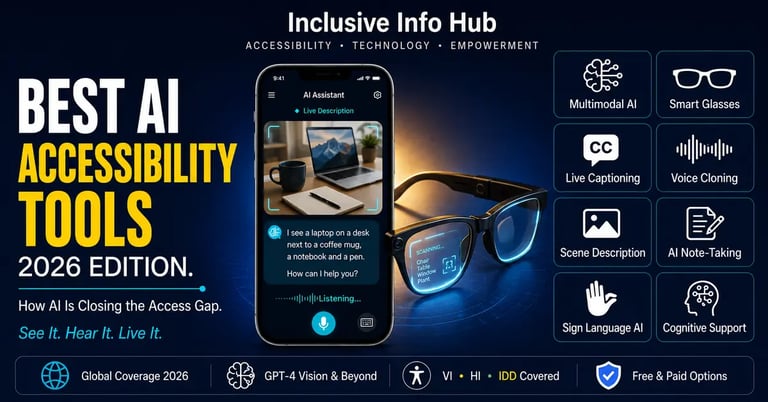
According to the World Health Organization, over 1.3 billion people worldwide live with some form of disability — and in 2026, more of them are using artificial intelligence every single day than at any point in human history. A blind student in Lahore points her phone at a notice board and hears it described in plain conversational English. A deaf student in Manila reads live captions of a lecture his professor is delivering in real time. A nonverbal student in Toronto builds a sentence on a tablet and an AI voice speaks it aloud for him, sounding less like a robot and more like him.
This is not science fiction anymore. This is Tuesday.
At Inclusive Info Hub, every tool in this guide has been evaluated against real accessibility criteria — independence, accuracy, platform availability, and genuine usefulness for students and professionals across Pakistan, South Asia, and globally, not just in well-resourced markets. What follows is the most complete, honest picture of where AI accessibility technology actually stands in 2026 — what works, what is overhyped, and what genuinely changes a life.
Why 2026 Is Different From Every Year Before It
For nearly three decades, assistive technology followed a fairly predictable arc. Screen readers like JAWS and NVDA gave blind users access to structured digital content starting in the late 1990s. VoiceOver and TalkBack brought that same access to smartphones in the 2010s. But all of these tools shared one fundamental limitation: they could only read what was already digital. A printed sign, a stranger's face, an unlabeled photograph — none of it existed for these tools because none of it was structured data.
The critical leap happened between 2023 and 2026, when multimodal AI — models that process images, text, and audio simultaneously and respond in natural conversational language — became fast, accurate, and cheap enough to run on an ordinary smartphone. When OpenAI's GPT-4 with Vision was integrated into Be My Eyes in late 2023, it marked a genuine before-and-after moment for the entire accessibility technology landscape.
By 2026, this is no longer a novelty feature bolted onto an existing app. It is the baseline expectation. Towards 2026, AI-powered accessibility has shifted from novelty to baseline expectation, with multimodal AI making assistive tech more powerful and increasing personalization making accessibility solutions more effective for individual users.
The numbers back this up in a way that should make every educator and policymaker pay attention. Computer vision combined with large language models now delivers text recognition accuracy in the 95 to 98 percent range and scene description accuracy between 85 and 92 percent under good conditions. Three years ago, those numbers were unthinkable for a tool running on a consumer smartphone.
A volunteer who helped train one of these systems described the moment a blind user first experienced detailed scene description this way — the app told her that her shirt was blue and her coffee mug was sitting on the left edge of the table, and she started crying. That sentence captures something specs sheets never can. This is not really about technology. It is about a category of small, constant indignities — not knowing if your shirt matches, not knowing where you set something down — finally disappearing.
1. Be My AI — Conversational Vision for Blind and Low Vision Users
Be My AI, built into the Be My Eyes platform and powered by advanced GPT-4 vision technology, lets a blind or low vision user take a photo and receive a detailed, conversational description — then ask follow-up questions in plain language exactly as they would ask a sighted friend.
This is the tool behind the coffee mug story above, and it remains one of the single most transformative pieces of accessibility technology released in the past five years. The conversational element is what changes everything. A static description says "a kitchen counter with various items." Be My AI lets you ask "is the milk carton open or closed?" and actually get an answer.
If and when the AI cannot answer a question confidently, it automatically offers to connect the user to a live human volunteer — meaning the technology never becomes a dead end. There is always a human safety net underneath the AI layer.
We have written a full in-depth comparison covering Be My Eyes and Be My AI on Inclusive Info Hub. Read our complete Seeing AI vs Be My Eyes review here → [SEEING AI VS BE MY EYES ARTICLE LINK]
2. Meta Ray-Ban Smart Glasses — Hands-Free AI in a Familiar Frame
Smart glasses have moved from gimmick to genuinely useful accessibility hardware in 2026, and the Meta Ray-Ban line is leading that shift. The two main AI accessibility features are integration with Be My Eyes and an upgraded Detailed Responses mode that narrates surroundings continuously without the user needing to hold up a phone.
When a Be My Eyes account is connected to the glasses, a blind user can call a sighted volunteer who sees exactly what the wearer sees through the glasses' camera in real time — completely hands-free. For a student walking across a campus, navigating a crowded market in Karachi, or simply wanting both hands free while cooking, this hands-free factor is the actual breakthrough, not the AI itself.
The honest limitation: premium wearable accessibility devices in this category range from $1,500 to $4,500, putting them well out of reach for the vast majority of students in Pakistan and across South and Southeast Asia. For now, this remains a Tier 1 market technology — but the price curve on smart glasses hardware has historically dropped quickly, and that trend is likely to continue.
We have written a full in-depth comparison covering Meta Ray-Ban Smart Glasses on Inclusive Info Hub. Read our complete review here → [Meta Ray Ban Smart Glasses]
3. Envision Glasses — Built by and for the Blind Community
Envision Glasses pairs the same AI engine behind the free Envision app with dedicated wearable hardware, designed from the ground up with input from blind users rather than retrofitted onto consumer eyewear built for sighted people first.
The glasses handle instant text reading, scene description, face recognition for people the user has met before, and barcode scanning — all completely hands-free. Because the hardware was designed accessibility-first rather than as an afterthought, the physical button layout, voice feedback timing, and overall interaction model tend to feel more intuitive to blind users in real-world testing compared to general consumer smart glasses with accessibility features added later.
We have written a full review of the Envision app, which shares the same AI engine as Envision Glasses. Full Envision AI review on Inclusive Info Hub
4. OrCam MyEye — The Standalone AI Reading Device
OrCam MyEye takes a different hardware approach entirely — a small AI-powered device that clips magnetically onto any pair of glasses, requiring no smartphone and no internet connection to function. It reads text, recognizes faces, and identifies products through on-device AI processing alone.
The complete independence from an internet connection is OrCam's defining strength. For students and professionals in areas with unreliable connectivity — which includes large parts of Pakistan, rural India, and much of Southeast Asia — a device that works entirely offline removes one of the most persistent frustrations with AI-based accessibility tools.
Like Meta's smart glasses, OrCam sits in the premium hardware tier, with pricing that places it outside reach for most students in lower-income markets without institutional or government funding support. It remains, however, one of the most clinically validated assistive reading devices available, frequently prescribed through vocational rehabilitation programs in the US, UK, and parts of Europe.
We have written a full in-depth comparison covering OrCam MyEye on Inclusive Info Hub. Read our complete review here → [OrCam MyEye complete Article]
5. Otter.ai — AI Transcription That Levels the Lecture Hall
For deaf, hard of hearing, and many neurodivergent students, the single most disruptive AI accessibility advancement of the past two years has not been visual — it has been instant, accurate, speaker-identified transcription of spoken language.
Otter.ai converts live speech into searchable, accurate text in real time, automatically distinguishes between speakers, generates AI summaries after every session, and now includes an AI chat function that can answer direct questions about anything said in a recorded lecture or meeting. For a deaf student without access to a live CART captioning service, or a student with ADHD who cannot reliably retain ninety minutes of spoken lecture content, this single category of tool has changed what classroom participation actually looks like.
That is the kind of quiet, unglamorous innovation that does not make headlines — it just makes Tuesday's lecture accessible.
We have written a full in-depth review of Otter.ai on Inclusive Info Hub. Read our complete Otter.ai review here → [OTTER.AI ARTICLE LINK]
6. Google Live Transcribe and Sound Notifications — Free, Built-In, and Genuinely Powerful
Built directly into Android and available at no cost, Google Live Transcribe converts speech to text on screen in real time, while a companion Sound Notifications feature alerts deaf and hard of hearing users to important environmental sounds — a doorbell, a fire alarm, a baby crying, a knock at the door — through visual and vibration alerts.
For a deaf student in Pakistan or anywhere across South Asia where premium captioning hardware is financially out of reach, the fact that this level of AI-powered transcription ships free on any reasonably modern Android device is genuinely significant. No subscription. No hardware purchase. Just a setting toggle away.
7. ElevenLabs and AI Voice Cloning — Giving Nonverbal Users Their Own Voice Back
One of the most emotionally significant developments in AI accessibility has nothing to do with vision or hearing at all. AI voice cloning technology, led by companies like ElevenLabs, now allows a person who is losing the ability to speak — due to ALS, throat cancer, or another progressive condition — to record samples of their own voice in advance and use AI to generate a synthetic voice that sounds like them, not like a generic robotic text-to-speech engine.
For AAC (Augmentative and Alternative Communication) users who have never been able to speak at all, the same underlying technology is now being used to generate more natural, less robotic-sounding output voices than the flat computerized voices that have defined AAC devices for over twenty years.
This is, quietly, one of the most human applications of AI in the entire accessibility space. It is not about reading the world. It is about being heard, in your own voice, by the people who love you.
8. Descript and AI Captioning Tools — Making Content Creation Genuinely Accessible
AI-powered video and audio editing platforms like Descript have gone far beyond basic captioning by 2026, offering automatic transcription, AI-generated audio descriptions for visual content, and text-based video editing that allows users with motor disabilities to edit video by editing a text transcript rather than manipulating a timeline with a mouse.
For disabled creators — students producing class presentations, advocates building awareness content, professionals creating training materials — these tools have genuinely opened up content creation as a viable activity rather than an inaccessible one. A wheelchair-using animator who could previously spend months hand-producing a short film can now use AI-assisted tools to storyboard and produce comparable work in days.
9. Proloquo2Go and Next-Generation AAC — AI-Enhanced Communication for Nonverbal Users
Augmentative and Alternative Communication apps like Proloquo2Go have integrated AI in 2026 to offer smarter word prediction, more natural sentence construction suggestions, and increasingly natural-sounding synthetic voices — moving AAC technology from a slow, mechanical communication method toward something that more closely resembles natural conversational pace.
For nonverbal students with autism, cerebral palsy, or other conditions affecting speech, the AI layer reduces the cognitive and physical effort required to construct each sentence — predicting likely next words and phrases based on context, much the way smartphone keyboards do, but tuned specifically for AAC communication patterns.
We have written a full in-depth comparison covering Proloquo2Go on Inclusive Info Hub. Read our complete review here → [Proloquo2Go]
10. Microsoft Copilot Accessibility Features — AI Built Into Everyday Work Tools
Microsoft has positioned accessibility as a central pillar of its AI strategy heading into 2026, integrating AI-powered accessibility checking, automatic alt-text generation, real-time live captions, and AI-assisted document simplification directly into Word, PowerPoint, Outlook, and Teams through Copilot.
For students and professionals with cognitive disabilities, dyslexia, or processing differences, Copilot's ability to summarize long documents, simplify complex language on request, and generate structured outlines from dense text represents a meaningful accommodation built directly into tools that millions already use daily — no separate app, no extra cost beyond an existing Microsoft 365 subscription.
What Is the Best AI Accessibility Tool in 2026?
There is no single best tool — the right choice depends entirely on the specific disability, budget, and daily context of the user. For blind and low vision users on a tight budget, Be My AI and the free Seeing AI app deliver the most capability per dollar spent, which in their case is zero. For deaf and hard of hearing students, Otter.ai and Google Live Transcribe together cover the overwhelming majority of daily captioning needs at no cost. For nonverbal users, AI-enhanced AAC apps like Proloquo2Go offer the most significant quality-of-life improvement currently available. Premium hardware like smart glasses and OrCam devices deliver genuine independence but remain financially out of reach for most users outside Tier 1 markets in 2026.
Is AI Accessibility Technology Free in 2026?
Many of the most powerful AI accessibility tools available in 2026 are completely free, including Be My AI, Seeing AI, Google Live Transcribe, and Otter.ai's free transcription tier. The tools that require payment tend to be specialized hardware — smart glasses, dedicated reading devices like OrCam — which typically range from $1,500 to $4,500. Software subscriptions for tools like Otter.ai Pro or premium AAC apps generally cost between $10 and $20 monthly, with many companies offering disability-based discounts or hardship waivers for qualifying users.
What Can AI Accessibility Tools Not Do Yet in 2026?
Despite genuine progress, AI accessibility tools still struggle with poor lighting conditions, crowded or visually chaotic environments, non-English languages and regional accents, and situations requiring nuanced human judgment rather than object or text recognition. These tools supplement — but do not replace — systemic accessibility infrastructure such as inclusive urban design, Braille signage, accessible public transport, and equitable healthcare access. A blind student in Lahore navigating a campus with no tactile paving still needs that infrastructure regardless of how good the AI in their pocket becomes.
The Honest Limitations Nobody Talks About Enough
It would be dishonest to end this guide on pure optimism. AI accessibility tools in 2026 still carry real and significant limitations that deserve direct acknowledgment.
The premium hardware gap is real and widening. Smart glasses, OrCam devices, and other wearable accessibility hardware sit at price points that exclude the vast majority of users in Pakistan, South Asia, and across the Global South. The most capable hands-free AI accessibility experiences remain, in practice, a Tier 1 market privilege.
Internet dependency is still a daily obstacle. Most of the conversational AI tools covered here — Be My AI, Copilot, advanced scene description — require a stable internet connection to function at full capability. In regions with inconsistent connectivity, these tools degrade unpredictably at the exact moments users need them most.
Accuracy still drops meaningfully in difficult conditions. Poor lighting, crowded scenes, unfamiliar accents, and non-English text all reduce the reliability of even the best AI accessibility tools. None of this technology is a substitute for the systemic, physical-world accessibility infrastructure that remains chronically underfunded across most of the world.
AI is a supplement, not a solution. No amount of software innovation replaces the need for accessible buildings, trained educators, inclusive curricula, and policy that protects disabled students' right to equal access. The tools in this guide are genuinely powerful. They are not a substitute for the harder, slower work of building accessible societies.
What This Means for Students in Pakistan and Across Asia
Whether you are a visually impaired student navigating lectures at NUST in Islamabad, a deaf student relying on live captions in a Zoom class in Dhaka, or a nonverbal student in Manila building sentences word by word on a tablet, the encouraging reality is that the most transformative AI accessibility tools available in 2026 — Be My AI, Seeing AI, Otter.ai, Google Live Transcribe — are free, work on Android, and require no institutional approval to start using today.
The premium hardware divide is real, and it is worth naming honestly rather than pretending it does not exist. But the software layer of this revolution — which is where most of the genuine day-to-day independence actually lives — has become remarkably democratized. A student in Lahore with a mid-range Android phone has access to nearly the same AI-powered visual description and transcription capability as a student in London with premium smart glasses. That gap, five years ago, did not exist in this direction. It is closing, and it is closing in favor of accessibility for everyone, not just those who can afford the latest hardware.
A Closing Thought
AI accessibility technology in 2026 does not solve everything. It cannot build ramps, fund inclusive education policy, or replace the patient work of teachers trained to support disabled students. What it does is remove, day by day and barrier by barrier, the small constant frictions that have made independence harder than it needed to be — a coffee mug whose location you could not confirm, a lecture you could not follow, a sentence you could not say in your own voice.
That removal matters. It is not a luxury and it is not a gimmick. For the student in Lahore, the professional in London, and everyone in between, it is what access actually looks like in practice in 2026 — imperfect, unevenly distributed, and genuinely, meaningfully better than it was even three years ago.
Read More on Inclusive Info Hub
👉 10 Best Apps for Deaf and Hard of Hearing Users — where Live Transcribe sits in the full picture: Read our complete guide here → [10 BEST APPS DEAF HH ARTICLE LINK]
👉 Ava — live group conversation captions with 99% accuracy and human scribes: Read our full review here → [AVA Article link]
👉 Best AI Accessibility Tools in 2026 — complete guide including OCR and document tools: Read our full guide here → [BEST AI ACCESSIBILITY TOOLS ARTICLE LINK]
👉Nagish now Rylo — the free global captioned calling alternative: Read our full review here — [RYLO NAGISH ARTICLE LINK]
👉Google Live Transcribe — free Android real-time captions for face-to-face conversations: Read our full review here — [GOOGLE LIVE TRANSCRIBE ARTICLE LINK]