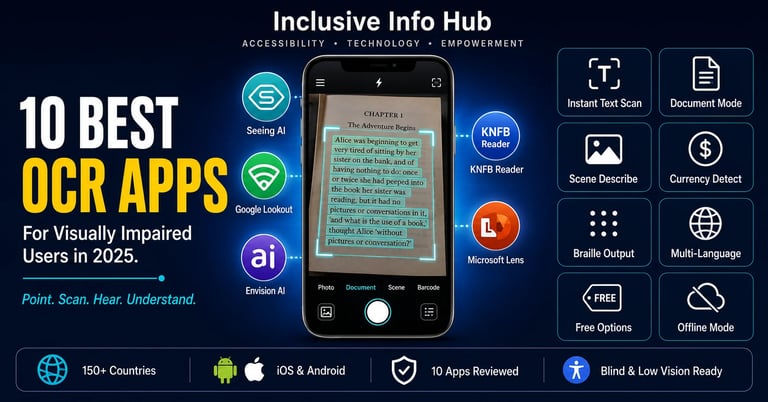
10 Best OCR Apps for Visually Impaired Users in 2025: Read Anything, Anywhere
Discover the 10 best OCR apps for blind and visually impaired users in 2025. From Microsoft's Seeing AI to Google Lookout and Envision AI — real features, honest comparisons, platform details, and who each app is best for, including students in Pakistan, Asia, the US, and UK.
Inclusive Info Hub
The Printed World Has Always Been a Barrier. OCR Is the Key.
Every single day, the world hands blind and visually impaired people a wall made of printed text. A prescription label. A university notice board. A government letter. A restaurant menu. A classroom handout. A price tag on a shelf. A sign on a door.
For decades, the only way past that wall was to ask someone for help. To depend on a sighted person being present, willing, and available. To accept that independence had a ceiling — and that ceiling was drawn precisely where print began.
Optical Character Recognition technology changed that equation. And smartphone cameras made it portable.
OCR, at its core, does one thing: it takes an image of printed text and converts it into machine-readable characters. That converted text can then be read aloud by a screen reader or the app's own voice engine, displayed in a larger or more accessible format, exported to a document, or fed into an AI for further processing. The result is a blind or visually impaired person who can point a phone at any printed surface and hear what it says — independently, instantly, without waiting for anyone.
In 2025, there are more capable OCR apps available to blind and visually impaired users than at any point in history. The challenge is no longer finding an OCR app. It is knowing which one to reach for and when.
This article reviews the 10 best OCR apps for visually impaired users available right now — what each one does well, who it is built for, how it performs, and where to get it. Two of these apps have full dedicated reviews on Inclusive Info Hub. The rest are covered in the detail you need to make a confident decision.
What to Look for in an OCR App for Visual Impairment
Before the list, it is worth understanding the criteria that separate a genuinely useful OCR app from one that merely sounds good on paper.
Accuracy is the most obvious measure — how reliably does the app read text correctly across different print qualities, lighting conditions, and languages? An OCR app that misreads every third word creates more confusion than clarity.
Speed matters enormously in real-world use. A blind user pointing their phone at a sign, a label, or a piece of paper needs a result in seconds — not after a thirty-second processing delay.
Accessibility of the app interface itself is a requirement that many reviews overlook. An OCR app for blind users that requires visual interaction to operate is fundamentally broken by design. The interface must be navigable by VoiceOver, TalkBack, or another screen reader without sighted assistance.
Platform availability determines who can actually use it. iOS-only apps are inaccessible to the majority of users in Pakistan, India, and across South and Southeast Asia where Android is dominant.
Price matters particularly for students and users in lower-income economies. A tool with a high one-time cost or aggressive subscription model creates access inequality that undermines the inclusive purpose of the technology.
Language support is critical for the global user base. An app that works well in English but fails on Urdu, Arabic, Hindi, or other scripts is not a global solution.
With these criteria in mind, here are the 10 best OCR apps for visually impaired users in 2025.
1. Seeing AI — Microsoft's All-in-One Visual Intelligence App
Developer: Microsoft | Price: Free | Platform: iOS, Android
Seeing AI is the most comprehensive free visual assistance app available for blind and visually impaired users, developed by Microsoft with direct involvement from blind engineers including Saqib Shaikh. What makes it stand above most OCR-only tools is its channel system — a collection of specialized modes that go far beyond text recognition.
The Short Text channel reads any text that enters the camera frame instantly, without requiring the user to tap or take a photo. Point the camera at a sign, label, or screen and the words are spoken within a second or two. The Document channel provides audio guidance to position a printed page correctly before capturing and reading the full text with formatting context. The Scene channel describes the broader environment — people, objects, spatial layout. The Product channel scans barcodes for product information. The Person channel identifies faces and reads emotional expressions. The Currency channel identifies banknote denominations — a feature with immediate daily value in cash-based economies across South Asia.
Seeing AI's interface is self-voicing by default, meaning users do not need to first enable VoiceOver or TalkBack to operate it — the app speaks its own interface elements. This is a fundamental accessibility design decision that most competitors miss entirely.
The Android launch in December 2023 was a turning point that brought this Microsoft tool to billions of Android users globally, including students and professionals in Pakistan, India, and across Southeast Asia who previously had no access.
👉 We have written a full in-depth review of Seeing AI on Inclusive Info Hub. Read our complete Seeing AI review here → [SEEING AI ARTICLE LINK]
2. KNFB Reader (OneStep Reader) — The OCR Standard for Blind Users
Developer: KNFB Reading Technology / NFB & Sensotec NV | Price: $99.99 one-time | Platform: iOS, Android, Windows
KNFB Reader — now available on app stores as OneStep Reader — is the gold standard for document OCR in the blind community. Co-developed by Ray Kurzweil and the National Federation of the Blind, it brings decades of OCR research into a smartphone app with an accuracy level that repeatedly surprises new users.
Unlike general-purpose visual AI tools, KNFB Reader is built specifically and exclusively for reading printed text. Its Tilt Assist feature uses audio and vibration cues to guide a blind user into the optimal camera position before capture — solving the fundamental challenge of how a non-visual user knows their camera is correctly aimed. Multi-Page Batch Mode allows scanning of multi-page documents one page at a time with the full text read back as a continuous piece. Text output is clean, well-formatted, and readable by Braille displays.
The $99.99 one-time purchase price is the most significant barrier for students in South Asia and lower-income markets. However, for blind users who depend heavily on printed document access, the investment in accuracy and reliability is consistently described as worthwhile by the blind community.
Available on iOS, Android, and Windows — making it accessible across devices in Pakistan, India, and globally.
👉 We have written a full in-depth review of KNFB Reader on Inclusive Info Hub. Read our complete KNFB Reader review here → [KNFB READER ARTICLE LINK]
3. Google Lookout — The Free Android-First Visual Assistant
Developer: Google | Price: Free | Platform: Android only
Google Lookout is a free visual assistance app for Android that uses AI and image recognition to identify objects and read text through the phone camera for users with visual impairments. It was introduced in 2018 and has been regularly updated through 2025, remaining one of the most capable free OCR tools available on Android.
The app works through modes — Quick Read for instant short text recognition, Scan Document for full-page text capture and reading, Explore for environment and scene description, Food Label for packaged goods, and Currency for banknote identification. The core OCR detection has been rated among the best available for a free Android application, with particularly strong performance on standard printed documents.
Lookout includes several features accessed through modes ranging from short text and document scanning to image recognition, currency identification, food label recognition, and item detection in the surroundings.
For students in Pakistan, India, Bangladesh, and across South and Southeast Asia where Android devices dominate, Google Lookout is the most accessible entry point into quality OCR visual assistance — completely free, no subscription, no one-time purchase, available on any Android device running Android 6.0 or later with at least 2GB of RAM.
The honest limitation is that PDF support remains inconsistent, particularly for documents in non-Latin scripts including Arabic and Urdu, where OCR accuracy can degrade significantly. For standard English printed text, it performs excellently.
👉 We have written a full in-depth review of Google Lookout on Inclusive Info Hub. Read our complete review here → [Google Lookout]
4. Envision AI — Award-Winning OCR Built With the Blind Community
Developer: Envision | Price: Free (core features) | Platform: iOS, Android
Envision is the fastest, most reliable and award-winning OCR app that speaks out the visual world, helping blind and visually impaired users to lead more independent lives. Envision is developed for and together with the visually impaired community.
That last point — developed with the visually impaired community — is what separates Envision AI from tools built by corporations primarily for sighted users with accessibility bolted on afterward. The app's design decisions reflect blind user experience at every level.
Envision AI offers Instant Text reading for quick short text, Scan Document for full-page OCR, Describe Scene for environment narration, Explore Image for interactive image description, and Recognize People for face identification. The OCR engine is consistently praised in the blind community for speed and accuracy, particularly on clean printed documents.
The app is free to download with core features available at no cost. The Envision Glasses — a separate hardware product — integrate with the same AI system for hands-free visual assistance, representing a more advanced use case for users who want a wearable rather than a phone-held tool. The app itself functions independently of the glasses.
Available on both iOS and Android, Envision AI is fully accessible to students and users across Pakistan, India, and the broader South and Southeast Asian market.
👉 We have written a full in-depth review of Envision AI on Inclusive Info Hub. Read our complete review here → [Envision AI ARTICLE LINK]
5. Microsoft Lens — The Document Scanning Workhorse
Developer: Microsoft | Price: Free | Platform: iOS, Android, Windows
Microsoft Lens (previously known as Office Lens) is a free scanning and OCR app from Microsoft that sits slightly differently in this list from the others. It is not primarily designed as an accessibility tool for blind users — it is a document scanning tool for everyone that contains powerful OCR capabilities useful to visually impaired users in specific workflows.
Microsoft Lens uses OCR to capture text from documents, whiteboards, business cards, and printed materials, and saves output to Microsoft Office apps — Word, OneNote, OneDrive — or as a searchable PDF. The intelligence of its cropping and perspective correction is particularly strong: it automatically straightens a photo of a document taken at an angle, which is practically useful for blind users who cannot visually verify that a page is flat and centered.
The combination of Lens with a screen reader creates a workflow where a blind user scans a printed document with Lens, the recognized text is saved to OneNote or a Word file, and the screen reader then reads the result. It is a two-step process rather than the instant audio of Seeing AI, but the output document quality is higher — well-suited for documents that need to be saved, shared, or worked on further.
For sighted students who frequently digitize printed notes, handouts, and whiteboard content, Microsoft Lens is one of the best free tools available on any platform.
👉 We have written a full in-depth review of Microsoft Lens on Inclusive Info Hub. Read our complete review here → [Microsoft Lens ARTICLE LINK]
6. TapTapSee — The Simplest Object and Text Identifier
Developer: CloudSight Inc. | Price: Free with in-app purchases | Platform: iOS, Android
TapTapSee is designed specifically for blind and visually impaired users — powered by the CloudSight Image Recognition API — and utilizes a smartphone's camera and VoiceOver capabilities to take a picture or video of anything and identify it with a voice in real time.
The interaction model is deliberately as simple as possible. Double tap the right side of the screen to take a photo. Double tap the left side to record a video. The app analyzes and identifies whatever the camera captured and reads the description aloud within seconds. There are no modes to switch, no settings to configure before use, no learning curve.
TapTapSee allows the visually impaired and blind community to accurately identify objects they encounter in their daily lives without the need for sighted assistance. Using your iPhone camera, you can take a photo at any angle and hear the description of the object read back to you.
TapTapSee has been praised by the RNIB, cited by the American Foundation for the Blind as a 2014 Access Award recipient, and consistently recommended for users who want the simplest possible interface. It is not the deepest OCR tool on this list — it does not offer document batch scanning, Braille output, or multi-page reading — but for daily object identification and short text reading, its simplicity is genuinely its strength.
It is particularly well suited to elderly users with visual impairments, users who are new to assistive technology, and situations where complex apps feel overwhelming. The blind community summary puts it best: TapTapSee is like a sighted assistant that never grows tired of being asked what something is.
👉 We have written a full in-depth review of TapTap See on Inclusive Info Hub. Read our complete review here → [TapTap See ARTICLE LINK]
7. Supersense — The Smart Auto-Detecting Scanner
Developer: Mediate Ltd. | Price: Free (core features) + Premium subscription | Platform: iOS, Android
Supersense is the smartest and simplest scanner app made for blind and visually impaired users to read any text format, currency, or product details from a barcode independently. With the power of AI, Supersense automatically figures out what you are trying to scan, guides you on how to point the camera, and reads the content in the right format.
The auto-detection intelligence is what makes Supersense stand out from most OCR apps. Rather than requiring the user to manually select a mode — short text, document, currency, barcode — Supersense analyses what the camera is pointed at and automatically selects the appropriate reading format. For a blind user who cannot see what they are holding, this removes one layer of decision-making that other apps require.
The free version of the app comes with unlimited access to the Magnifier, Quick Read, Import Mode, and Read History. The premium plan includes all the free features as well as unlimited access to the Smart Scanner, Document Reader, Multipage Scanner, Currency Reader, Barcode Scanner, Explore Environment Mode, Find Objects, and Scene Describer.
The free tier is functional and useful. The premium features are where the full power of the app lives, and the subscription model is more affordable than KNFB Reader's one-time cost for users who want advanced scanning capabilities without a large upfront purchase.
Supersense scans environments to locate items like doors or chairs, reading text on PDFs or apps offline with high accuracy. The offline text reading capability is a meaningful advantage for students in areas with inconsistent connectivity — which covers much of Pakistan, rural India, and parts of Southeast Asia.
👉 We have written a full in-depth review of Supersense on Inclusive Info Hub. Read our complete review here → [Supersense ARTICLE LINK]
8. Prizmo Go — The Free OCR Gem That Blind Users Swear By
Developer: CreaCeed | Price: Free (Prizmo Go) + Prizmo Pro paid | Platform: iOS
Prizmo Go is consistently recommended in the blind community as the best free OCR option for iOS users who do not want to pay for KNFB Reader but need comparable document scanning accuracy. It appears repeatedly in blind user forum discussions as a first-choice or reliable backup scanning tool.
As one experienced blind user on AppleVis summarized the ranking: Prizmo Go first, Seeing AI second, KNFB Reader third — and Prizmo Go does an amazing job for being free, doing as well as KNFB Reader for standard document scanning. This community endorsement carries weight because it comes from daily use, not marketing.
Prizmo Go handles printed document scanning with strong OCR accuracy, clean text output, and a workflow that works well with VoiceOver. The Pro version adds additional features including more languages, advanced formatting preservation, and batch processing. For users whose primary need is accurate document text extraction on iOS, Prizmo Go is the first tool to try before spending money on alternatives.
The significant limitation is iOS exclusivity. Like Voice Dream Reader, Prizmo is not available on Android, which limits its accessibility for students in Pakistan, India, and the Android-dominant South Asian market.
👉 We have written a full in-depth review of KNFB Reader on Inclusive Info Hub. Read our complete KNFB Reader review here → [Prizmo Go ARTICLE LINK]
9. ABBYY FineReader PDF — Industry-Grade OCR for Professional Users
Developer: ABBYY | Price: Subscription / one-time license (paid) | Platform: Windows, macOS, iOS (mobile version)
ABBYY FineReader occupies a different tier on this list. Where most apps here are free or low-cost tools optimized for mobile real-world scanning, ABBYY FineReader is the professional-grade desktop OCR solution used by corporations, legal firms, government agencies, and academic institutions worldwide. PC Magazine rated it the highest-quality OCR on the market, and that reputation is built on decades of consistent accuracy on complex documents.
For visually impaired professionals and advanced students, ABBYY FineReader's significance lies in what it does with difficult documents — complex multi-column layouts, scanned PDFs with image-only pages, legal contracts, academic papers with mixed tables and text, historical documents with degraded print quality. These are the scenarios where mobile phone camera apps begin to struggle, and where ABBYY's more sophisticated preprocessing and recognition engine maintains accuracy.
ABBYY supports over 190 languages including Arabic — which gives it relevance for documents in Urdu-adjacent script environments in South Asia and the Middle East, where other tools' accuracy degrades. It can be embedded into Windows, Linux, and virtual machine workloads for institutional deployment.
For a blind student or professional who regularly works with high-complexity printed documents in a desktop environment and needs results they can rely on, ABBYY FineReader is the serious tool. For everyday mobile scanning, the free apps earlier in this list are more practical.
👉 We have written a full in-depth review of ABBYY on Inclusive Info Hub. Read our complete review here → [ABBYY ARTICLE LINK]
10. Google Lens — The Universal Camera That Everyone Already Has
Developer: Google | Price: Free | Platform: iOS, Android (built into Google app and Camera app)
Google Lens closes this list not because it is the most specialized OCR tool for blind users — it is not — but because it is the most universally available and the most likely to already be in a student's pocket right now without them having downloaded anything.
Google Lens is built into the Google app on iOS and Android, into the default camera app on most Android devices, and into Google Photos. For a student who has never installed a dedicated OCR app, Google Lens is an immediate, zero-effort entry point into text recognition.
Google Lens is designed to help users search what you see, and for those with limited vision there are several options for using Google Lens with existing accessibility settings. It has had several feature channels over the years such as shopping, dining, and product identification, which are now all incorporated under the Search feature.
For low-vision users specifically, Google Lens is useful for recognizing handwritten text, enlarging serial numbers on objects, capturing text from flyers or boards and saving it to Google Keep, and identifying objects from photos.
The important distinction: Google Lens is designed primarily for sighted users who want to search visually. It is not optimized for blind users the way Seeing AI or Google Lookout are. It does not offer audio guidance for positioning, Braille output, or a self-voicing interface. For users who want a dedicated blind-accessible OCR experience, Google Lookout (App 3 in this list) is the more appropriate Google-built tool.
However for sighted students, low-vision users, and anyone who wants quick text capture without installing additional apps, Google Lens is the most frictionless starting point available globally — including in Pakistan, India, and across every Android market worldwide.
👉 We have written a full in-depth review of Google Lens on Inclusive Info Hub. Read our complete review here → [Google Lens ARTICLE LINK]
How to Choose the Right OCR App for Your Situation
If you are blind and on Android — Start with Google Lookout and Envision AI. Both are free, both are optimized for blind users, both work across South Asian markets. Add Seeing AI once you are comfortable.
If you are blind and on iOS — Seeing AI is your primary tool. Add Prizmo Go for document accuracy and KNFB Reader if you regularly work with complex multi-page documents.
If you are a student in Pakistan, India, or anywhere in South and Southeast Asia on a budget — Google Lookout, Envision AI, Seeing AI, TapTapSee, and Supersense (free tier) are all free and Android-compatible. Start there.
If you have low vision rather than no vision — Google Lens combined with Seeing AI covers most daily needs. The visual + audio hybrid of Seeing AI's Short Text channel is particularly well suited to low-vision users who can see some context but cannot read print clearly.
If you are a professional or graduate student dealing with complex printed documents — KNFB Reader for mobile scanning, ABBYY FineReader for desktop document processing. The investment in both tools is justified by the accuracy return on complex materials.
If you are a teacher introducing OCR tools to students with visual impairments — Google Lookout for Android classrooms, Seeing AI for iOS, and TapTapSee as the simplest onboarding tool for students new to assistive technology.
If you want one app to try first and nothing else — Download Seeing AI on iOS or Google Lookout on Android. Both are free, both work immediately, and both represent the current best that free OCR assistance can offer.
Full Reviews on Inclusive Info Hub
Two apps on this list already have complete, in-depth reviews published on Inclusive Info Hub. The remaining eight are coming soon. If you want the full picture on any specific app — features, pricing, Pakistan and Asia context, sighted user benefits, honest limitations, and download instructions — the full reviews are where to go.
Seeing AI — Full Review
KNFB Reader (OneStep Reader) — Full Review
Google Lookout — Full Review
Envision AI — Full Review
Microsoft Lens — Full Review
TapTapSee — Full Review
Supersense — Full Review
Prizmo Go — Full Review
ABBYY FineReader PDF — Full Review
Google Lens — Full Review