Supersense — AI for Blind Review 2026: The Auto-Detecting Scanner That Reads, Finds, and Explores for You
Supersense is a free AI scanner app for blind and visually impaired users that auto-detects text, documents, currency, barcodes, and objects without any mode switching. Full 2026 review including honest limitations for users in Pakistan, Asia, the US, and UK.
LATEST TECHNOLOGYDAILY LIVING APPSEDUCATION
Inclusive Info Hub
According to the World Health Organization, approximately 43 million people worldwide are completely blind and a further 295 million live with moderate to severe vision impairment — and for the majority of them, the single most consistent daily frustration is not dramatic or exceptional. It is simply encountering a piece of printed text, a product label, or an unfamiliar object and having no immediate, independent way to know what it is. At Inclusive Info Hub, every visual assistance app reviewed here is measured against one practical test: how much does it reduce that frustration, and how quickly.
Supersense reduces it through a design decision that sounds almost too simple to be significant: it removes the need to choose a mode before scanning. Point the camera. The app figures out what you are looking at — short text, long document, currency, barcode, or object — and reads it appropriately. No menu. No selection. No decision required from a user who, by definition, cannot see what they are about to scan.
That single design choice is what the entire Supersense experience is built around, and it is why the app has earned genuine community trust in the blind and low vision world despite operating in a market with well-resourced competitors from Microsoft, Google, and Apple.
What Is Supersense — AI for Blind?
<cite index="12-1">Supersense provides a set of digital eyes to make the physical world more accessible for the blind and low vision community. It uses the power of AI to not only describe things but actually solve problems for blind and visually impaired users.</cite>
Supersense is developed by Mediate, <cite index="10-1">an MIT-spinoff AI start-up based in Boston, with the support of the National Science Foundation and the US Department of Veterans Affairs.</cite> That institutional backing — NSF and the VA — gives the app a credibility signal that many independently developed accessibility tools cannot claim. The involvement of the Veterans Affairs department reflects the significant proportion of blind and low vision users who are military veterans — a community with specific and well-documented assistive technology needs.
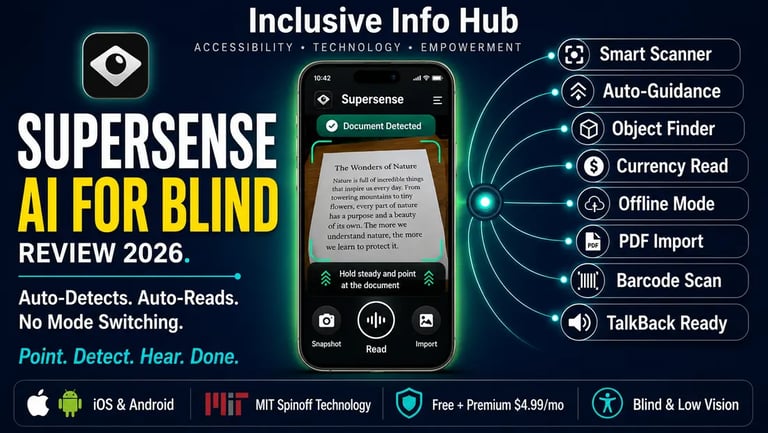
<cite index="13-1">Supersense is the smartest and simplest scanner app made for blind and visually impaired users to read any text format, currency, or product details from a barcode independently. With the power of AI, Supersense automatically figures out what you are trying to scan, guides you on how to point the camera, and reads the content in the right format.</cite>
The app is available on both the Apple App Store and Google Play Store as "Supersense — AI for Blind" and is free to download with a premium subscription unlocking the full feature set.
The Core Design Philosophy: Auto-Detection Over Mode Selection
Most visual assistance apps — including Google Lookout, Seeing AI, and TapTapSee — require a user to select which type of content they want to scan before pointing the camera. Seeing AI has channels. Lookout has modes. Even strong apps present a navigation step between opening the app and receiving useful information.
<cite index="13-1">Supersense's Smart Scanner automatically detects whether you are trying to quickly read a piece of text, a long document, a currency, or a barcode. Smart Guidance helps you point the camera and finds the best angle to have the most accurate results.</cite>
For a blind user who cannot see what they are holding — a folded letter, a packaged product, a banknote — knowing which mode to select before scanning is itself a visual task. Supersense removes this problem entirely. The AI makes the classification decision the moment the camera captures the subject. A user simply points and listens.
This approach is particularly valuable in two daily situations that other apps handle less gracefully: grabbing something off a desk without knowing what it is, and opening a letter or piece of mail with no prior knowledge of its contents. In both cases, Supersense's auto-detection means the answer arrives without the user having to already know the question.
Who Supersense Is Built For
Blind and Totally Visually Impaired Users
<cite index="12-1">Users can independently read texts, documents, and handwriting quickly using the unique auto camera guidance system, locate specific objects such as a chair, door, trashcan, or person around by scanning the environment with the camera, explore new and unfamiliar environments and hear about the objects that are around, and read texts on photos and PDFs from other apps.</cite>
For a completely blind user, the combination of auto-detection and smart camera guidance means the app handles two problems simultaneously — what am I looking at, and am I pointing the camera correctly. Both are solved through audio feedback alone.
Low Vision Users Supplementing Partial Sight
For users with low vision who can see some context but cannot read standard print clearly, Supersense's instant text reading fills exactly the gap where partial sight fails — confirming the content of something that can be seen but not read comfortably without effort or strain.
Users Who Prioritize Offline Reliability
<cite index="12-1">Every single feature works without an internet connection so that users can use the app in any situation.</cite> This is one of Supersense's most important practical advantages for users in Pakistan, India, and across South Asia where connectivity is inconsistent. The core text reading, document scanning, object finding, and barcode recognition all function without any data connection after initial app download.
Users New to Assistive Technology
The minimal interface — no mode selection, no complex navigation, no multi-step workflow — makes Supersense one of the most approachable visual assistance apps for users who are new to assistive technology, including people who have recently lost vision and are navigating the accessibility tool landscape for the first time.
Key Features — What Supersense Actually Does
Smart Scanner — Auto-Detection at Its Core <cite index="13-1">The Smart Scanner is the app's defining feature — it automatically detects whether you are trying to quickly read a piece of text, a long document, a currency, or a barcode, without requiring the user to select a mode manually.</cite> The AI classification happens in real time as the camera processes the scene, and the appropriate reading format is applied immediately.
Smart Guidance — The Camera Positioning System One of the most thoughtfully designed features in any visual assistance app. <cite index="13-1">Smart Guidance directs the user on how to point the camera and finds the best angle for the most accurate results.</cite> A blind user receives audio instructions — tilt left, move closer, hold steady — that guide the device into optimal scanning position before capture. For users who cannot see whether their camera is correctly aimed, this guidance system is the difference between a scan that works and one that fails.
Quick Read — Instant Short Text Instantly reads the text presented in front of the rear camera for short text encounters — signs, labels, packaging, notes, screen content — without requiring capture or processing delay.
Document Reader — Full Page Text Reads longer documents with smart guidance assistance, guiding the user through positioning to capture a complete page of text before reading it sequentially. Useful for letters, printed forms, textbook pages, and multi-paragraph printed materials.
Object Explorer and Find <cite index="13-1">Scan the physical environment and hear about the objects that are around. Users can locate specific objects such as chairs, doors, trashcans, or people by scanning with the camera.</cite> This environmental awareness mode functions similarly to Google Lookout's Explore and Find modes, helping a blind user understand and navigate an unfamiliar space.
Currency Recognition Recognizes banknotes and announces their denomination — a daily independence feature with particular relevance in cash-heavy economies. The specific currencies supported should be verified for your region, as currency recognition databases vary by country.
Barcode Scanner <cite index="13-1">Scan barcodes to hear the name and brand of the products with additional information.</cite> For independent grocery shopping, medication management, and household organization, this feature enables a blind user to identify any barcoded product without sighted assistance.
PDF and Image Import <cite index="13-1">Read and explore text from images and PDF files. Users can send files directly from any other app using the "Recognize with Supersense" tool in the share menu.</cite> This integration with the operating system's share functionality means Supersense can process documents arriving through email, messaging apps, or cloud storage services without requiring any manual file transfer.
Read History Displays a history of recent recognitions in a single scrollable screen — allowing a user to return to something that was read earlier without needing to rescan the same content.
Full Screen Reader Compatibility <cite index="10-1">The app has full VoiceOver accessibility support and is available in multiple languages.</cite> On Android, <cite index="12-1">the app has full TalkBack accessibility support.</cite> Both screen reader integrations mean the app's own interface is navigable without sighted assistance — a non-negotiable requirement for an app designed specifically for blind users.
Personal Training on Request <cite index="10-1">Whenever a user gets stuck, they can find a tutorial under the Menu or request a call and the Supersense team will reach them to give personal training on how to use the app.</cite> This human support layer — an actual phone call from the development team for onboarding assistance — is unusual for a mobile app and reflects the community-centered philosophy behind the product.
Pricing — Free Tier and Premium Options
<cite index="10-1">Supersense has limited access to all features on the free tier. For unlimited access, subscription plans are available: Monthly Subscription at $4.99, Yearly Subscription at $49.99, and Lifetime Subscription at $99.99.</cite>
The free tier includes the Magnifier, Quick Read, Import Mode, and Read History — covering basic text reading and image import functionality at no cost.
The premium subscription unlocks the Smart Scanner, Document Reader, Multipage Scanner, Currency Reader, Barcode Scanner, Object Explorer and Find Mode, and Scene Describer — essentially everything that makes Supersense distinctive over simpler free tools.
At $4.99 per month, the premium tier is one of the most affordable visual assistance subscriptions available. The $99.99 lifetime option is competitive with KNFB Reader's one-time price while offering a broader feature set beyond pure document OCR. For users in Pakistan and South Asia where monthly USD-denominated subscriptions carry real economic weight, the lifetime option represents better long-term value if the app fits daily workflows.
Honest Limitations — What This Review Will Not Soften
Development activity has slowed significantly. The last confirmed Play Store update was February 1, 2024 — more than two years before this review. Version 1.4.19 appears to be the current version on Android. The App Store version shows similarly infrequent updates. For a field where competitors like Seeing AI, Google Lookout, and Envision receive regular updates with new AI capabilities, this relative stagnation is a meaningful concern for users deciding whether to invest in a lifetime subscription.
This does not mean the app is broken or about to be discontinued. It means that users should evaluate Supersense against its current feature set rather than against an expectation of rapid future development. The features it has work. New features are not arriving quickly.
The premium paywall covers the most important features. The free tier — Quick Read and Magnifier — covers only the most basic use cases. The auto-detection and smart guidance that define Supersense's core value proposition are premium features. For users evaluating the free tier before purchasing, the experience will not reflect the app's genuine capability.
Currency support varies by region. The specific banknotes recognized by the currency mode are not universally documented for all countries. Pakistani Rupee support, like with Google Lookout, should be verified before relying on this feature for daily cash transactions.
Competition has become significantly stronger. Since Supersense's most active development period, Seeing AI has launched on Android, Google Lookout has expanded its features, and Envision AI has grown its community. The auto-detection advantage that distinguished Supersense in 2019 to 2022 is less uniquely its own in 2026 than it once was.
App Store Details — Verified and Confirmed
Apple App Store: Search "Supersense — AI for Blind" — same developer, same features, same pricing. Available on iPhone and iPad. Click here to get download link
Developer website: supersense.app for additional information and direct contact.
Developer contact for support or personal training: supersense@mediate.tech
Supersense vs Seeing AI vs Google Lookout — How They Compare
For a blind or visually impaired user trying to decide between the three most prominent free or low-cost visual assistance apps, the honest comparison is as follows.
Seeing AI from Microsoft offers a comparable feature set including text, documents, scenes, products, currency, and face recognition — for free, on both iOS and Android, with active regular updates from one of the largest technology companies in the world. Its channel system requires mode selection, which Supersense avoids, but Seeing AI's development momentum and zero cost for all features are significant advantages.
Google Lookout offers continuous ambient environment awareness and seven specialized modes entirely free on Android, with active Google engineering behind it. It does not match Supersense's auto-detection elegance but its offline capability and zero cost are compelling for Android-first users.
Supersense's genuine remaining advantage is its auto-detection model combined with smart camera guidance — the combination of these two features in a single interaction still delivers a smoother experience than manually selecting modes and independently managing camera positioning in competing apps. For users who find mode-switching disruptive to their workflow, this remains a real differentiator.
Frequently Asked Questions
What is the correct name to search for Supersense on app stores? Search "Supersense — AI for Blind" on both the Apple App Store and Google Play Store. The developer is Mediate Labs. Do not confuse this with unrelated apps sharing the Supersense name that appear in the same search results.
Is Supersense free to use? The core app is free to download with basic features including Quick Read and Magnifier available at no cost. The full feature set — Smart Scanner, Document Reader, Currency Reader, Object Finder, and Scene Describer — requires a premium subscription at $4.99 per month, $49.99 per year, or $99.99 as a lifetime purchase.
Does Supersense work offline? Yes. <cite index="12-1">Every single feature works without an internet connection.</cite> This is one of Supersense's most important practical advantages over cloud-dependent visual assistance tools, particularly for users in areas with unreliable connectivity.
Is Supersense available in Pakistan? Yes. The app is available on both Google Play and the Apple App Store globally with no regional restrictions. The free tier is accessible immediately with no payment required.
Is Supersense still being actively updated? Update frequency has slowed significantly — the last confirmed Play Store update was February 2024. The app continues to function correctly on current Android and iOS versions, but users seeking the most actively developed visual assistance tool may prefer alternatives with more recent update histories such as Seeing AI or Google Lookout.
What This Means for Students and Professionals in Pakistan and Across Asia
Whether you are a blind student in Lahore who needs to read printed handouts between lectures, a visually impaired professional in Karachi sorting through daily correspondence, or a low vision user in Dhaka navigating a cash-based shopping environment — Supersense's offline-first design and auto-detection model address two of the most consistent practical challenges in the region: inconsistent internet connectivity and the cognitive overhead of mode switching when every scan is a situation you cannot see in advance.
The development slowdown is worth noting honestly for anyone considering the lifetime subscription. Investing $99.99 in an app that is not receiving regular updates carries more risk than the same investment in a more actively maintained alternative. For users who want to try Supersense before committing financially, the free tier and the personal training offer from the development team both provide reasonable evaluation pathways.
For users who primarily need reliable offline text reading with smart camera guidance and find the auto-detection model genuinely useful — the current version of Supersense, even without recent updates, delivers that value consistently.
A Closing Thought
There is a particular kind of confidence that comes from knowing an app will simply work — not the app that has the most features or the highest-profile developer behind it, but the one that, every single time you point your phone at something, tells you what it is without asking you first what you think it might be.
Supersense was built around that confidence. The auto-detection model, the smart camera guidance, the offline-first architecture — these design decisions reflect a development team that understood something important: a blind user should not have to make decisions about a tool based on visual information they do not have.
Whether Supersense continues to develop aggressively or maintains its current feature set, what it built between 2019 and 2024 remains genuinely useful. In a market increasingly dominated by large technology companies with enormous engineering resources, an MIT-spinoff backed by the NSF and the Department of Veterans Affairs, built by people who worked directly with the blind community, still has something real to offer.
Point. Detect. Hear. Done.
Read More on Inclusive Info Hub
👉 "ChatGPT Without Eyes" — the complete setup guide for VoiceOver, TalkBack, JAWS, and Braille displays: Read here → [CHATGPT WITHOUT EYES ARTICLE LINK]
👉 Best AI Accessibility Tools in 2026 — complete guide to every AI tool blind students should know: Read our full guide here → [BEST AI ACCESSIBILITY TOOLS ARTICLE LINK]
👉 Seeing AI vs Be My Eyes — AI visual assistance for reading the world around you: Read our full comparison here → [SEEING AI VS BE MY EYES ARTICLE LINK]
👉 Google Lookout — free Android AI visual assistant with 7 modes: Read our full review here → [GOOGLE LOOKOUT ARTICLE LINK]
👉 10 Best OCR Apps for Visually Impaired Users — complete guide including Supersense in context: Read our full guide here → [10 OCR APPS ARTICLE LINK]