
Google Lookout Review 2026: The Free Android AI That Never Stops Watching Out for You
Google Lookout is a free Android-only AI accessibility app for blind and low vision users with 7 powerful modes including text, documents, currency, food labels, and generative AI image descriptions. Full 2026 review for users in Pakistan, Asia, and globally.
EDUCATIONNAVIGATION APPSDAILY LIVING APPSLATEST TECHNOLOGY
Inclusive Info Hub
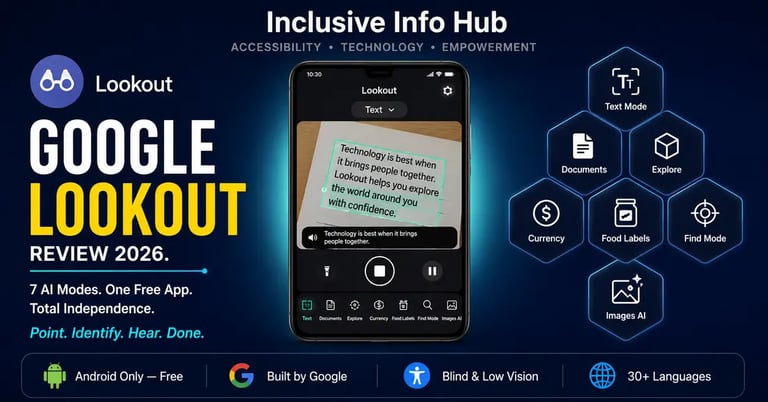
According to the World Health Organization, at least 2.2 billion people worldwide live with vision impairment — and the best free AI visual assistance tool built specifically for this community is not available on the iPhone. That single fact is the most important thing to understand about Google Lookout before anything else. At Inclusive Info Hub, every accessibility app reviewed here is evaluated honestly: what it does, who it actually reaches, and what it costs — which in Lookout's case is nothing at all.
Picture a student in Lahore walking into a university cafeteria she has never visited before. She is blind. She has her Android phone in her pocket. She opens one app, selects Explore mode, and begins to hear a steady stream of spatial information: table ahead, chairs to your left, counter at twelve o'clock, sign above reading daily specials. She does not need to ask anyone for help. She does not need to wait. The app is simply watching, processing, and telling her what is there — continuously, automatically, at no cost.
This is what Google Lookout was built to do. Not as a demonstration of technology capability. As a daily independence tool for the 253 million people worldwide who are blind or visually impaired, built in direct collaboration with that community, and distributed for free on the most widely used mobile operating system on earth.
What Is Google Lookout?
<cite index="11-1">Lookout uses computer vision and generative AI to assist people with low vision or blindness in getting things done faster and more easily. Using your phone's camera, Lookout makes it easier to get more information about the world around you and do daily tasks more efficiently like reading text and documents, sorting mail, putting away groceries, and more. Built in collaboration with the blind and low-vision community, Lookout supports Google's mission to make the world's information universally accessible to everyone.</cite>
Lookout is a Google product — which means it carries the engineering resources, AI infrastructure, and distribution reach of one of the most powerful technology companies in the world, delivered entirely free through Google Play. It is not a startup product or a charitable project. It is a fully maintained, regularly updated Google application with a dedicated accessibility team behind it, available on any Android device running Android 6.0 or above with at least 2GB of RAM.
The app is self-voicing, meaning users do not need to enable TalkBack or any other screen reader to use it — Lookout speaks its own interface from the moment it opens. This design decision, shared with Seeing AI on iOS, reflects a genuine understanding of the user: a blind person should not have to configure accessibility settings before they can access an accessibility tool.
Important Platform Clarification
Google Lookout is Android only. It is not available on the Apple App Store.
This is the single most important practical fact in this entire review. If you search for Lookout on the iPhone App Store, any result you find is a different app by a different developer — not Google Lookout. The correct and only legitimate listing for this app is on Google Play, where it is called "Lookout – Assisted vision" and is published by Google LLC.
For iOS users looking for comparable free visual assistance, Seeing AI by Microsoft serves a similar function and is available on both iOS and Android.
👉 We have written a full comparison of Seeing AI and Be My Eyes — the closest iOS equivalents to Lookout's core functionality. Read our complete Seeing AI vs Be My Eyes comparison here → [SEEING AI VS BE MY EYES ARTICLE LINK]
For Android users in Pakistan, India, Bangladesh, and across South and Southeast Asia — where Android devices represent the overwhelming majority of smartphones in use — Lookout's Android-only nature is not a limitation at all. It is simply the right platform choice for the right market.
The Seven Modes — How Lookout Actually Works
This is the architecture that makes Lookout genuinely useful rather than a single-trick tool. Rather than one undifferentiated camera-to-audio experience, Lookout organizes its capabilities into seven distinct modes, each optimized for a different daily situation. A user selects the mode that matches their current task, and the AI adjusts its behavior accordingly.
Mode 1: Text
The everyday workhorse for short printed text. Point the camera at any sign, label, printed note, or surface containing text, and Lookout reads it aloud in real time without requiring a tap or a capture action. The app announces when no text is in view and reads automatically when text enters the frame. For a blind student walking through a corridor reading door signs, or a professional identifying documents on a desk, this mode handles the constant background of printed text that sighted people navigate without thinking.
Mode 2: Documents
Built for longer printed content where accuracy and completeness matter more than speed. In Documents mode, Lookout guides the user through positioning the device correctly to capture a full page of text or handwriting, then reads the captured content. <cite index="11-1">Documents mode is available in over 30 languages</cite>, making it one of the more multilingual features in the app. For a student in Pakistan receiving printed handouts in English, or a professional dealing with official correspondence, this is the mode that turns a printed page from an obstacle into information.
Mode 3: Explore
The most spatially ambitious mode and the one that most directly resembles continuous environmental awareness. <cite index="13-1">In Explore mode, users point their camera around them to hear about what is in their environment, like objects and text.</cite> Lookout processes the scene and describes the spatial context — furniture, exits, people, objects — helping a blind user understand an unfamiliar space without needing a sighted guide or prior familiarity with the layout.
The honest caveat: Explore mode remains in beta as of this review and is acknowledged as less accurate than the other modes. It is most useful for initial orientation in a new environment rather than for real-time navigation requiring precise spatial accuracy.
Mode 4: Currency
Identifies banknote denominations by pointing the camera at a single note at a time. <cite index="11-1">Currency mode supports US Dollars, Euros, and Indian Rupees.</cite> The Indian Rupee support is directly relevant for users across the subcontinent, though Pakistani Rupee support is notably absent — a gap worth flagging honestly for readers in Pakistan who would benefit most from this mode in daily cash transactions. It does not recognize coins.
Mode 5: Food Labels
<cite index="11-1">Identifies packaged foods by their label or barcodes using Food labels mode, available in over 20 countries.</cite> The first time this mode is selected, it prompts a one-time data download to enable offline food label recognition — making it usable without an internet connection after that initial setup. For a blind user shopping independently, this mode transforms a supermarket from an environment requiring constant sighted assistance into one that can be navigated alone.
Mode 6: Find
<cite index="11-1">Scan surroundings to find objects like doors, bathrooms, cups, vehicles, and more using Find mode. Find mode can also tell you the direction and distance to the object, depending on device capabilities.</cite> The directional guidance — "door at ten o'clock, approximately three meters" — is the kind of spatial information that transforms an unfamiliar indoor space from disorienting to manageable.
Mode 7: Images
The most recently significantly updated mode, powered by generative AI. <cite index="11-1">Capture, describe, and ask questions about an image using Images mode. Image descriptions and Q&A are available globally in English only.</cite> This conversational layer — where a user can capture an image and then ask follow-up questions about what it contains — brings Lookout into the same territory as Be My AI and the newer features of Seeing AI, and represents the most significant capability expansion the app has received in recent updates.
What Makes Lookout Different From Google Lens
This question comes up constantly and deserves a clear answer because the two apps overlap in obvious ways — both are free, both are from Google, both use the phone camera to identify what it sees.
The difference is in behavior rather than capability. A user familiar with Lookout described the distinction well: Google Lens is like a friend who describes things only when asked, while Lookout is like a friend who is constantly talking and provides descriptions without being prompted.
Lookout is designed for continuous, ambient, hands-minimized use. It watches and talks. Google Lens is designed for deliberate, moment-by-moment queries. Both are useful. For a blind user who needs ongoing environmental awareness, Lookout's continuous mode behavior is the right fit. For a low-vision user who wants to query specific things on demand, Google Lens can complement it.
👉 Both Google Lookout and Google Lens are covered in our full 10 Best OCR Apps guide. Read the complete comparison here → [10 OCR APPS ARTICLE LINK]
Who Lookout Is Built For
Blind Users Who Need Ambient Environmental Awareness
Lookout's continuous processing model — always watching, speaking when it finds something relevant — is specifically designed for blind users who need ongoing spatial and textual information about environments they are moving through, rather than static information about a single held object. The recommendation to wear the device on a lanyard or in a shirt pocket with the camera facing outward reflects this design intention explicitly.
Low Vision Users Managing Daily Tasks
For users with partial vision who can manage many daily tasks independently but need assistance with specific challenging moments — reading fine print, identifying unlabeled food items, confirming currency denominations — Lookout's targeted modes provide exactly the right level of support without requiring a fundamental change in how the user interacts with their environment.
Android Users in Pakistan and South Asia Who Need a Free Visual AI Tool
This is the clearest recommendation in this entire review. For a blind or low-vision student or professional in Lahore, Karachi, Islamabad, Dhaka, or anywhere across South Asia with an Android phone and a Google account — Lookout is free, requires no subscription, works on budget Android hardware meeting the minimum specifications, and delivers AI-powered visual assistance that matches or surpasses what was available on specialized hardware costing thousands of dollars only five years ago.
Key Advantages Over Competing Free Tools
No account required for core features. While a Google account is required for initial sign-in, the sign-in process uses any existing Google account — which the overwhelming majority of Android users already have — and does not require creating a new account specifically for Lookout.
Offline capability for key modes. The core text and document processing <cite index="12-1">is processed on the device, which means the app can be used without an internet connection</cite> for its foundational features. Food labels mode also downloads its recognition data for offline use after the initial setup. For users in areas with unreliable connectivity, this on-device processing provides meaningful reliability compared to fully cloud-dependent tools.
TalkBack and screen reader compatibility. <cite index="15-1">The Lookout app is self-voicing, so users do not need to enable a screen reader or text-to-speech to listen to descriptions.</cite> However, it also works correctly alongside TalkBack for users who prefer to have both running simultaneously.
Recents history. Lookout maintains a history of descriptions from the current session that can be reviewed as text — providing a retrievable record of what the app described rather than a one-time audio announcement that disappears immediately.
Honest Limitations
Android only — permanently. Google has never released Lookout for iOS and has given no indication that this will change. For iOS users, Seeing AI remains the closest free equivalent.
Currency support excludes Pakistani Rupee. The current currency mode supports US Dollars, Euros, and Indian Rupees only. For blind users in Pakistan who depend on cash transactions daily, this is a genuine and frustrating gap. The Indian Rupee support suggests regional expansion is possible — Pakistani Rupee support would meaningfully extend the app's daily living utility across a country of 230 million people.
Explore mode accuracy remains beta-level. The environmental awareness mode that would be most valuable for navigation — continuous spatial description of surroundings — is explicitly described as less accurate than other modes and remains in beta status. For users expecting Explore mode to function as reliable navigation assistance, the current accuracy level may disappoint.
Images mode Q&A is English only. The generative AI image description and conversational follow-up feature — the most sophisticated capability in the current version — is available globally but only in English. For users in Pakistan and South Asia whose primary language is not English, this limits the most powerful mode's practical accessibility.
Volume control issue noted by users. <cite index="11-1">A serious bug has been flagged by users: Lookout appears to use Android's accessibility audio stream, which uses a separate volume slider that Lookout does not provide direct access to, making it difficult to adjust the announcement volume without enabling another accessibility service like TalkBack.</cite> This is a real and frustrating usability issue for some users and worth knowing before download.
App Store Details — Verified and Confirmed
Google Play Store: Search "Lookout – Assisted vision" — published by Google LLC. Free to download and use. Compatible with Android 6.0 and above with minimum 2GB RAM. Available globally with no regional restrictions.
Click here to download it on Play Store
Apple App Store: Not available. Any "Lookout" app found on the App Store is a different product by a different developer.
No cost, no subscription, no premium tier. Lookout is entirely free with no in-app purchases and no feature gating behind a paid upgrade. Every mode is available from the moment of download.
Frequently Asked Questions
Is Google Lookout available on iPhone? No. Google Lookout is an Android-only app and has no iOS version. It is not available on the Apple App Store. iPhone users should consider Seeing AI by Microsoft as the closest free equivalent for visual assistance.
Is Google Lookout free? Yes, completely. Lookout has no subscription, no in-app purchases, and no paid tier. Every feature and all seven modes are available at no cost from the moment of download.
Is Lookout available in Pakistan? Yes. Lookout is available globally on Google Play with no regional restrictions. However, the Currency mode does not currently support the Pakistani Rupee — only US Dollars, Euros, and Indian Rupees are supported in that specific mode.
Does Google Lookout work offline? Core features including text and document reading use on-device processing and work without an internet connection. Food labels mode requires a one-time data download but functions offline after that. The Images mode generative AI description requires an internet connection.
What is the difference between Google Lookout and Google Lens? Google Lens responds when asked — it is a deliberate, query-based tool. Google Lookout watches continuously and speaks proactively — it is designed for ambient, hands-minimized use where a blind user needs ongoing environmental awareness rather than single on-demand queries.
What devices support Google Lookout? Any Android device running Android 6.0 or above with at least 2GB of RAM. The app is no longer restricted to Google Pixel devices — it works on Samsung, Xiaomi, Oppo, Vivo, and all major Android manufacturers, which are the dominant devices across Pakistan and South Asia.
What This Means for Students and Professionals in Pakistan and Across Asia
Whether you are a blind student at a university in Lahore navigating an unfamiliar campus for the first time, a low-vision professional in Karachi sorting through printed correspondence, or a visually impaired parent in Dhaka managing grocery shopping independently — Google Lookout represents one of the most genuinely practical, zero-cost daily independence tools currently available on Android anywhere in the world.
The Pakistani Rupee gap in Currency mode is a real frustration that Google should address. The English-only limitation on the AI image description mode narrows the most powerful feature's accessibility for non-English-primary users. These are honest limitations worth naming.
What remains true regardless of those gaps: seven AI-powered visual assistance modes, running on the Android phone a user already owns, at no cost, with no subscription, built by Google in direct collaboration with the blind and low-vision community. For a student in Islamabad with a mid-range Android phone, this is the same visual AI assistance that was available only on specialized hardware costing thousands of dollars less than a decade ago.
That democratization of access is exactly what this technology was supposed to deliver. In Lookout's case, on Android, it largely does.
A Closing Thought
There is something worth pausing on in the image of a blind student walking into an unfamiliar cafeteria and simply knowing what is there — not because someone told her, not because she memorized it in advance, but because a free app on an Android phone is watching the room and telling her what it sees.
That experience is not perfect. The Explore mode is still in beta. The volume control has a bug. The Currency mode does not cover the rupee. These are real limitations and they belong in this review.
But the experience exists. It is free. It runs on the device already in her pocket. And a student in Lahore has exactly the same access to it as a student in London.
That equality of access — imperfect, incomplete, but genuine — is what Google set out to build when Lookout launched. In 2026, it has gotten close enough to matter every day.
Read More on Inclusive Info Hub
👉 Seeing AI vs Be My Eyes — the closest iOS equivalents to Lookout's visual assistance: Read our full comparison here → [SEEING AI VS BE MY EYES ARTICLE LINK]
👉 10 Best OCR Apps for Visually Impaired Users — including Lookout in full context: Read our full guide here → [10 OCR APPS ARTICLE LINK]
👉 Best AI Accessibility Tools in 2026 — complete guide across all categories: Read our full guide here → [BEST AI ACCESSIBILITY TOOLS ARTICLE LINK]
👉 Envision AI — the award-winning alternative to Lookout for visual assistance: Read our full guide here → [Envision AI ARTICLE LINK]