ABBYY FineReader PDF Review 2026: The Professional OCR Tool That Turns Any Scan Into Searchable, Editable Text
ABBYY FineReader PDF is the world's most accurate OCR software for converting scanned documents into editable text. iOS mobile app plus Windows and Mac desktop reviewed for blind, low vision, and sighted users in Pakistan, Asia, the US, and UK.
DAILY LIVING APPSNAVIGATION APPSEDUCATION
Inclusive Info Hub
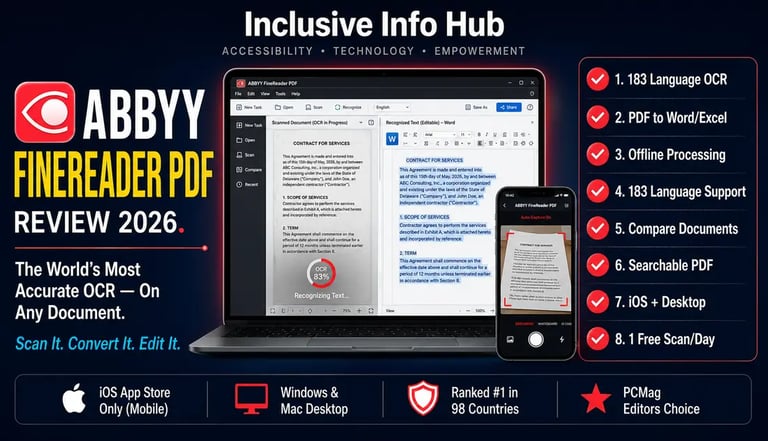
According to PC Magazine — one of the most respected technology publications in the world — ABBYY FineReader PDF has earned the Editors Choice badge for its excellent performance and feature depth in document scanning and OCR. At Inclusive Info Hub, every OCR tool reviewed here is evaluated against one honest question: does it actually deliver on the promise of making printed documents digitally accessible, and does it do so with the accuracy that users who depend on it for real work genuinely need.
Picture a law student in Lahore who receives three hundred pages of printed case law in physical form before an exam. No digital version exists. No accessible format has been prepared. A sighted student can read the physical papers. A blind or low vision student cannot — unless those pages can be converted into accurate, searchable, screen-reader-compatible digital text. Accuracy here is not a preference. It is the difference between the document being accessible and it not being accessible at all.
Or picture a professional in London who has spent twelve years scanning and filing business documents and technical manuals. The software that came bundled with their Fujitsu ScanSnap scanner has been running perfectly — converting scans to searchable, editable PDFs at a level of accuracy no other software they have tested comes close to matching. They describe it as staggeringly accurate even on poor quality input.
Both of these people are using the same software. ABBYY FineReader PDF has been doing this longer, and doing it more accurately, than almost any other OCR solution currently available.
What Is ABBYY FineReader PDF?
ABBYY FineReader PDF is a professional document recognition and PDF management application developed by ABBYY — a global AI company founded in 1989 and headquartered in Milpitas, California, with research and development centers across Europe and Asia. The company has over three decades of specialization in optical character recognition, machine learning applied to document processing, and digital intelligence software.
The product exists in two distinct forms that serve different use cases and run on different devices. Understanding which version is relevant to you is the most important practical decision in this review.
The desktop application — ABBYY FineReader PDF for Windows and FineReader PDF for Mac — is the full-power professional product. It is downloaded from abbyy.com, not from any app store, and it carries a paid license. This is the version that lawyers, academics, government agencies, and enterprise organizations use for high-volume, high-accuracy document digitization.
The mobile application — FineReader: PDF Scanner and OCR — is available on the Apple App Store for iPhone and iPad as a free download with a one-scan-per-day free tier and a premium subscription for unlimited scanning. This is the version a student or professional carries in their pocket for on-the-go document capture.
One critical platform note before proceeding: ABBYY officially discontinued the FineReader PDF mobile app for Android. The Android mobile version is no longer available. For Android users needing comparable mobile OCR functionality, Microsoft Lens or Google Lookout are the most appropriate alternatives covered elsewhere on this blog.
Why Accuracy Matters More in OCR Than in Any Other App Category
Most app categories allow for imprecision. A navigation app that is slightly off can be corrected. A note-taking app that formats something wrong can be edited. An OCR app that misreads text produces errors that a blind user relying on screen reader output will never know are there — because the screen reader faithfully reads aloud whatever the OCR engine produced, wrong or right.
A blind student whose textbook chapter was OCR-processed with 94 percent accuracy has roughly 1 error in every 17 words. In a 5,000 word chapter, that is approximately 280 errors — some minor, some meaning-altering, all invisible to a user who cannot see the original text to compare.
This is why ABBYY FineReader's reputation for industry-leading OCR accuracy is not just a marketing claim. It has direct accessibility implications. FineReader PDF uses cutting-edge purpose-built AI at each step of document processing — from image enhancements, through object detection, to text recognition — using optimized algorithms, generative AI, and neural network architectures to deliver the best possible results with unparalleled performance.
The result, as users who have been using the software for over a decade consistently report, is that the finished text almost does not need to be edited — which for an accessibility context means the output is reliably usable from the first reading.
ABBYY FineReader PDF for iOS — The Mobile App
The iOS mobile app — searched on the Apple App Store as "FineReader: PDF Scanner and OCR" and published by ABBYY USA Software House Inc — is the version most relevant to students and everyday users who need portable document capture rather than enterprise-grade desktop processing.
The mobile app has been ranked the number one business application in 98 countries and has received the SUPERSTAR Award in the Document Capture category in the Mobile Star Awards.
The core mobile workflow is straightforward. A user points their iPhone or iPad camera at any printed document — a textbook page, a handout, a receipt, a letter, a whiteboard, a sign — and FineReader captures it with automatic perspective correction, removing page curves, shadows, and background distractions before processing. The OCR engine then extracts the text and makes it available as a searchable PDF, a plain text file, or a Word document depending on the user's export preference.
The automatic perspective correction is worth dwelling on for a moment. When a blind or low vision user photographs a printed page, they cannot visually verify that the page is flat, centered, and correctly oriented. FineReader's automatic image processing corrects even significantly angled or curved captures — meaning the quality of the output does not depend on the user being able to see whether they captured the page correctly.
The mobile app supports both offline and online text recognition. The offline processing mode extracts text in plain text format from 59 recognition languages directly on the device without any internet connection — which is a meaningful advantage for users in areas with inconsistent connectivity across Pakistan, South Asia, and Southeast Asia. The online recognition mode supports 183 languages in full document format including preservation of the original layout, columns, and tables.
The free tier provides one scan per day — enough for occasional document capture but insufficient for students or professionals with regular scanning needs. The premium subscription unlocks unlimited scanning, additional export formats, and cloud storage integration.
ABBYY FineReader PDF for Windows and Mac — The Desktop Application
The desktop application is where ABBYY FineReader PDF's full capability lives — and it is genuinely a different category of tool from the mobile app, in the same way that a professional camera is a different category from a phone camera. Both take photographs. Only one is chosen when the photograph genuinely matters.
FineReader PDF empowers professionals to maximize efficiency in the digital workplace. Featuring ABBYY's latest AI-based OCR technology, FineReader PDF makes it easier to digitize, retrieve, edit, protect, share, and collaborate on all kinds of documents in the same workflow.
The desktop application is accessed at abbyy.com/finereader — not through any app store — and is available as a paid license. A free trial is available at pdf.abbyy.com/download for users who want to evaluate before purchasing.
The desktop version's most significant capability beyond the mobile app is its handling of complex document layouts. Multi-column academic papers, legal documents with footnotes and marginalia, financial tables, government forms, and historical documents with degraded print quality — these are the scenarios where consumer-grade OCR tools produce unreliable output and where FineReader's more sophisticated preprocessing pipeline maintains accuracy.
The Compare Documents feature — which identifies differences between two versions of a document, including differences introduced by OCR errors — is particularly valuable for professionals who need to verify that a digitized document matches its original exactly. For a blind legal professional checking that a scanned contract has been digitized correctly, this comparison tool provides a verification layer that no visual review alternative can offer non-visually.
The software also supports over 190 languages including Arabic — which is directly relevant for document processing in Pakistan, the Middle East, and across the Arabic-speaking world where other OCR tools frequently struggle with Arabic script accuracy.
Who ABBYY FineReader PDF Is Built For
Blind and Low Vision Students Digitizing Academic Materials
For a blind student whose course materials arrive in printed form — which remains standard in many Pakistani and South Asian universities — ABBYY FineReader PDF's high-accuracy OCR is the tool that determines whether those materials become genuinely usable digital text or merely approximately readable output full of invisible errors.
The iOS mobile app handles individual page capture and is portable enough to use in a library or classroom. The desktop application handles multi-page document batches for more efficient processing of complete textbook chapters or full course packets.
Researchers and Academics Processing Large Document Volumes
Academic research involves working with large volumes of source material — historical documents, academic papers, archival records — that exist only in print or as low-quality scanned PDFs with no text layer. FineReader's ability to process these materials at high accuracy and convert them to searchable, annotatable digital formats directly serves this research workflow.
Legal and Professional Users Working With Complex Documents
Lawyers, accountants, government officials, and enterprise professionals who regularly work with multi-page printed contracts, financial records, and regulatory documents benefit most from the desktop application's complex layout handling and document comparison features.
Sighted Students and Professionals Digitizing Their Own Notes
For any student who handwrites lecture notes or annotates printed readings, FineReader's capture and OCR capability converts those physical notes into searchable digital documents. The neural network photo categorization — which automatically sorts gallery photos into document types including handwritten, business cards, IDs, and receipts — reduces the organizational overhead of managing large volumes of captured content.
Users in Pakistan and South Asia With Inaccessible Printed Materials
The combination of 183 language OCR support including Arabic, offline processing capability for unreliable connectivity environments, and a one-scan-per-day free tier that requires no payment makes the iOS mobile app relevant for users across Pakistan and South Asia even within meaningful budget constraints.
Key Features at a Glance
Industry-Leading OCR Accuracy — powered by ABBYY's proprietary neural network and generative AI pipeline, consistently rated the highest-quality OCR available by PC Magazine and enterprise technology evaluators.
183 Language Recognition — the most extensive language offering on the market, covering Latin and Cyrillic scripts, Chinese, Japanese, Korean, Arabic, and artificial languages including Esperanto. Directly relevant for multilingual document processing in South Asia and the Middle East.
Offline Processing — 59 languages processed entirely on-device with no internet connection required. Full 183-language cloud processing available for users with reliable connectivity.
Automatic Perspective and Image Correction — removes shadows, hand obstruction, page curves, background clutter, and angle distortion from captured images before OCR processing, improving output quality for non-ideal capture conditions.
Multiple Export Formats — output to searchable PDF, Word, Excel, plain text, and JPEG depending on the user's downstream workflow requirements.
Neural Network Document Categorization — automatically classifies gallery photos into seven document types — A4 documents, books, business cards, handwritten content, IDs, other documents, and receipts — for organized document management without manual sorting.
Searchable PDF Creation — converts image-only scanned PDFs into fully searchable, copy-paste-enabled PDFs with the original visual layout preserved alongside the invisible text layer. This is the format most directly useful for screen reader access to scanned documents.
Document Comparison (desktop only) — identifies differences between two versions of a document, including OCR-introduced errors, for verification of digitization accuracy.
Arabic and Complex Script Support — the desktop application's 190-plus language support includes Arabic with right-to-left text handling, which is essential for document processing in Pakistan and across the Arabic-speaking world.
Pricing — Honest and Complete
iOS Mobile App (FineReader: PDF Scanner and OCR): Free download from the Apple App Store. The free tier provides one scan per day indefinitely — enough for occasional use but insufficient for regular scanning needs. Premium subscription unlocks unlimited scans, additional export formats, and cloud storage integration. Premium pricing should be verified at the App Store listing as it varies by region.
Desktop Application (Windows and Mac): Paid license downloaded from abbyy.com. A free trial is available at pdf.abbyy.com/download. Flexible licensing options are available starting at five licenses for business deployments. Individual licensing pricing is available directly at abbyy.com and varies by license type and duration.
ABBYY does not currently offer a standardized student discount program, though educational institution licensing arrangements are available for bulk deployment. Students seeking the desktop application for academic use should check with their institution's IT or library services, as some universities license FineReader for student use through institutional agreements.
For users in Pakistan and across South Asia where the desktop license cost represents a significant expenditure, the free iOS tier's one-scan-per-day allowance covers essential occasional scanning needs at zero cost, with the mobile premium subscription offering a more affordable entry point than the full desktop license.
Honest Limitations
Android mobile app is discontinued. This is the clearest and most important limitation for the significant proportion of this blog's audience using Android devices. ABBYY officially discontinued FineReader PDF Mobile for Android. Android users should consider Microsoft Lens or Google Lookout as free alternatives for mobile OCR needs.
iOS Pro version experienced OCR feature reduction in August 2023. Multiple App Store reviewers report that the Pro version's OCR features were significantly reduced in August 2023, with one long-term user describing the result as now very inaccurate and almost useless compared to the original. The standard "FineReader: PDF Scanner and OCR" version — not the Pro — is the recommended iOS download. ABBYY confirmed some functional adjustments were made but maintained the app is still shipping and supported.
Desktop application pricing is premium. The full-featured desktop application is not inexpensive, positioning it as a professional tool rather than a student budget option. The free trial and one-scan-per-day mobile free tier provide evaluation and occasional-use access without purchase commitment.
Complex layouts occasionally produce errors. While FineReader's accuracy is industry-leading, documents with extremely complex multi-column layouts, heavy mathematical notation, or severely degraded print quality can still produce output that requires manual correction. No OCR tool currently achieves perfect accuracy on all document types.
App Store Details — Verified and Confirmed
Apple App Store (iOS): Search "FineReader: PDF Scanner and OCR" — published by ABBYY USA Software House Inc. Free to download. One scan per day free permanently. Premium subscription for unlimited scanning. Available globally including Pakistan.
Apple App Store (iOS — avoid this one): "FineReader Pro: PDF Scanner" — this is the Pro version with reduced OCR features since August 2023. The standard version above is recommended.
Android/Google Play Store: Not available — officially discontinued by ABBYY.
Desktop (Windows and Mac): Not on any app store — download from abbyy.com or pdf.abbyy.com/download for the free trial.
Frequently Asked Questions
Is ABBYY FineReader PDF available on Android? No. ABBYY officially discontinued FineReader PDF Mobile for Android. The mobile app is currently available only on iOS through the Apple App Store. Android users should consider Microsoft Lens or Google Lookout as free alternatives for mobile document scanning.
Is there a free version of ABBYY FineReader? The iOS mobile app — "FineReader: PDF Scanner and OCR" — is free to download with one free scan per day permanently. The desktop application for Windows and Mac offers a free trial downloadable at pdf.abbyy.com/download before requiring a paid license.
Which ABBYY app should I download on iPhone? Search for "FineReader: PDF Scanner and OCR" on the App Store — this is the standard version and the recommended download. Avoid the "FineReader Pro: PDF Scanner" version which received user reports of significantly reduced OCR accuracy after August 2023.
Is ABBYY FineReader better than Microsoft Lens for blind users? For accuracy on complex documents, ABBYY FineReader's OCR engine consistently outperforms consumer scanning apps including Microsoft Lens. For free unlimited scanning on Android, Microsoft Lens is the more accessible alternative. The two tools serve different use cases — FineReader for accuracy-critical professional work, Microsoft Lens for free everyday document capture.
Does ABBYY FineReader support Arabic and Urdu scripts? The desktop application supports over 190 languages including Arabic. The mobile app's online recognition supports 183 languages including Arabic. Urdu uses modified Arabic script which falls within Arabic language support, though specific Urdu script accuracy should be tested against particular documents before relying on it for critical use.
Is ABBYY FineReader available in Pakistan? The iOS mobile app is available globally on the Apple App Store with no regional restrictions. The desktop application is available for download globally at abbyy.com. The free tier of the mobile app requires no payment and is immediately accessible.
What This Means for Students and Professionals in Pakistan and Across Asia
Whether you are a blind law student in Lahore trying to digitize printed case materials, a low vision researcher in Karachi converting scanned academic papers into screen-reader-accessible text, or an iPhone-using professional in Dhaka who needs to capture and convert documents with the highest available accuracy — ABBYY FineReader PDF's iOS app offers a zero-cost starting point and a premium upgrade path that is available globally including across South Asia.
The Android discontinuation is a genuine and significant gap for the majority of this blog's audience. It is worth stating plainly that ABBYY's decision to exit the Android mobile market means the world's most accurate OCR mobile technology is no longer accessible to the Android-dominant South Asian market through ABBYY's own product. For students and professionals in Pakistan and across South Asia with Android devices, the alternatives covered in our full OCR guide — particularly Microsoft Lens and Google Lookout — remain strong free options.
For iPhone users, the iOS app's one-scan-per-day free tier means a student can digitize one textbook page or one handout per day at no cost — a constrained but genuinely useful baseline for the most accuracy-sensitive scanning needs.
A Closing Thought
Twelve years. That is how long one user has been scanning technical manuals with ABBYY FineReader, filing them as searchable PDFs, and finding them retrievable through full-text search when they need them. Twelve years of a tool that simply works — accurately, consistently, without requiring the user to correct its output before trusting it.
In accessibility terms, that consistency is not a convenience. It is a prerequisite. A blind student who cannot see the original document has no way to catch OCR errors that a sighted user would spot at a glance. The accuracy of the tool they depend on is the accuracy of the information they receive. When that accuracy is industry-leading, consistently, over twelve years, it is not just a product feature. It is the thing that makes the document genuinely accessible rather than only apparently so.
That is what ABBYY FineReader PDF has spent three decades building. On iOS, it is available today for free — one page at a time.
Read More on Inclusive Info Hub
👉 10 Best OCR Apps for Visually Impaired Users — ABBYY FineReader in full context alongside free alternatives: Read our full guide here → [10 OCR APPS ARTICLE LINK]
👉 Microsoft Lens — the best free Android alternative for document scanning: Read our full guide here → [Microsoft Lens ARTICLE LINK]
👉 Google Lookout — free Android visual AI with document scanning capability: Read our full review here → [GOOGLE LOOKOUT ARTICLE LINK]
👉 Seeing AI vs Be My Eyes — free visual assistance for blind users on Android and iOS: Read our full comparison here → [SEEING AI VS BE MY EYES ARTICLE LINK]
👉 Best AI Accessibility Tools in 2026 — complete guide including OCR and document tools: Read our full guide here → [BEST AI ACCESSIBILITY TOOLS ARTICLE LINK]