
CoughDrop AAC Review 2026: The Cloud-Based Communication App That Works on Every Device Your Team Already Owns
CoughDrop AAC is a cloud-based communication app for nonverbal users with autism, cerebral palsy, and Down syndrome. Android app plus web access on any device. $9/month or $295 lifetime. Full 2026 review for families and SLPs in Pakistan, Asia, and globally.
APPS FOR IDD SUPPORTLATEST TECHNOLOGYEDUCATION
Inclusive Info Hub
According to the Centers for Disease Control and Prevention, approximately one in 36 children in the United States is diagnosed with autism spectrum disorder — a prevalence that, applied globally, represents tens of millions of families navigating complex communication needs with tools that were not always designed for the reality of their daily lives. At Inclusive Info Hub, every AAC app reviewed here is measured by one honest standard: does it genuinely support the entire team around a nonverbal person, not just the person themselves.
Picture a seven-year-old named Ali in Karachi. He is nonverbal, diagnosed with autism at age four, and uses an AAC app to communicate. His school day involves a special education teacher, a speech-language pathologist, and a classroom aide. His home life involves his mother, his father, and his grandmother. Six different people, across two different environments, all trying to understand and support how Ali communicates — and all of them needing to see the same boards, track the same progress, and work from the same strategy.
Most AAC apps hand Ali a device and leave the rest of the team to figure it out. CoughDrop was built around the understanding that Ali's voice is only as powerful as the system supporting it — and that system involves every person in his life, not just the one holding the tablet.
What Is CoughDrop AAC?
<cite index="11-1">CoughDrop is a full-featured Augmentative and Alternative Communication application designed for individuals with complex communication needs, such as those with autism, cerebral palsy, Down syndrome, and Rett syndrome.</cite> It stands apart from most AAC apps through one defining architectural decision: it is cloud-based first, meaning a user's communication boards, vocabulary, settings, and data are stored securely online and accessible from any device — Android phone, tablet, laptop, desktop, or Chromebook — simply by logging in.
The native Android app is available on Google Play as "CoughDrop AAC" published by MavWare LLC. For users on any other device — including iPhones, iPads, Windows computers, Mac computers, and Chromebooks — CoughDrop is fully accessible through any modern web browser at mycoughdrop.com, without downloading anything at all.
This device-agnostic architecture is not a technical workaround. It is the central design philosophy of the entire product. <cite index="15-1">Communication happens everywhere and AAC should always be there. CoughDrop makes it possible for people to use their AAC account and speak from any device.</cite> Whether using a dedicated speech system or logging into a tablet, smartphone, or Chromebook, CoughDrop speech boards are saved securely in the cloud and ready to go on any device.
The Cloud-First Difference — Why It Actually Matters
Most AAC apps store everything locally on a single device. The boards are on the tablet. If the tablet is lost, broken, or left at school, communication stops. If a therapist wants to update vocabulary, they need to physically access that device. If a parent wants to check what words their child used during the school day, there is no way to know without asking the teacher directly.
CoughDrop dissolves all of these problems with one architectural decision. <cite index="15-1">Even when CoughDrop teams up with a dedicated AAC device, you are not locked into using your account exclusively on that device. Log in on one device at school and another at home if needed. If the primary device is forgotten or runs out of battery, just grab another device, log in and go.</cite>
A parent can modify boards from their phone at 11pm without taking the tablet from their child's room. A therapist can update vocabulary from their own laptop without visiting the home. A teacher can check which words a student used most frequently last week and adjust the classroom strategy accordingly. These are not edge cases. They are the everyday realities of supporting a nonverbal person across multiple environments, and they are exactly what CoughDrop's cloud architecture makes possible.
Who CoughDrop Is Built For
Children With Autism Who Communicate Across Multiple Environments
For autistic children who move between home, school, and therapy settings — which describes most children receiving any level of educational support — the ability to maintain a single consistent communication system across all environments is clinically significant. AAC research consistently shows that consistency across settings improves both vocabulary retention and generalization. CoughDrop's cloud sync ensures the same boards follow the child wherever they go without manual intervention.
Children and Adults With Cerebral Palsy Using Switch or Eye Tracking Access
<cite index="11-1">CoughDrop is flexible and configurable enough to work with the access and comprehension needs of many communicators.</cite> The app supports eye tracking, head tracking, and switch access — meaning users with significant physical limitations who cannot reliably tap a touchscreen directly can still access their full communication system through alternative input methods. This level of physical access accommodation is not common in free or low-cost AAC tools.
Users With Down Syndrome, Angelman Syndrome, and Rett Syndrome
CoughDrop explicitly lists Down syndrome, Angelman syndrome, and Rett syndrome alongside autism and cerebral palsy as its primary user populations. The starter boards provided at different communication levels mean a family beginning with a very simple vocabulary set does not need to build everything from scratch — the scaffolding is there from day one.
Speech-Language Pathologists Managing Multiple Clients
This is where CoughDrop genuinely distinguishes itself from every other AAC app reviewed on this blog. <cite index="10-1">Key features include a dedicated modeling mode for supporters, built-in data tracking, detailed reports on language use and progress, and a secure messaging tool for team collaboration.</cite> An SLP can hold free supervisor accounts linked to multiple communicator accounts, modify boards remotely without visiting each client, review detailed usage reports showing which vocabulary is being used and which is being avoided, and message other team members about strategy — all from a single login.
For a speech therapist in Lahore or Karachi managing a caseload of nonverbal students across multiple schools, this remote management capability reduces the logistical burden of AAC implementation dramatically.
Families Who Need AAC Across Devices They Already Own
The family of a nonverbal child rarely owns a single dedicated AAC device. They own whatever combination of Android phones, old tablets, school-issued Chromebooks, and home laptops the household has accumulated. CoughDrop's web-based architecture means every one of these devices becomes a communication device with a single login — with no additional hardware purchase and no separate per-device licensing.
Key Features at a Glance
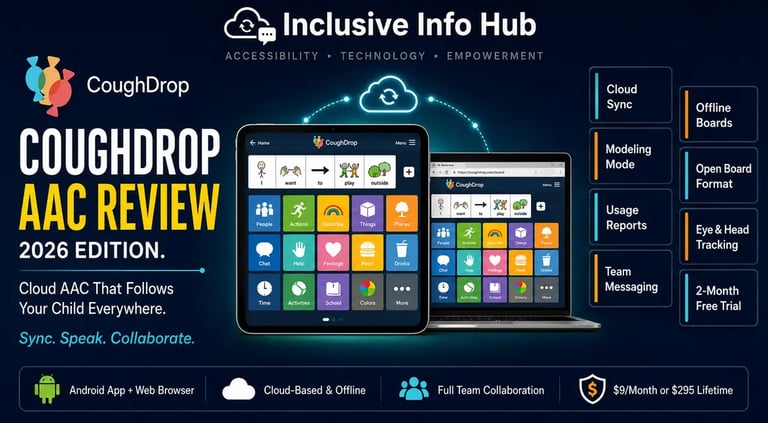
Cloud Sync Across All Devices — the defining feature. Boards, vocabulary, and settings are stored securely online and accessible from any device through the app or any web browser. Device loss or breakage never means communication loss.
Modeling Mode for Supporters — a dedicated interface designed specifically for parents, teachers, and therapists to model AAC use — demonstrating vocabulary by selecting symbols themselves while the communicator watches — which is the most evidence-based strategy for expanding AAC vocabulary in young users. Most AAC apps simply have no modeling interface at all.
Built-in Usage Reports and Data Tracking — <cite index="11-1">CoughDrop's in-depth reporting options track language use and modeling making it possible to easily view progress and gauge growth.</cite> A parent can see which buttons their child tapped most frequently this week. An SLP can pull a report showing vocabulary growth over three months. A teacher can check whether the student is using their AAC device during independent work time. This data layer is what makes CoughDrop a clinical tool rather than just a communication app.
Secure Team Messaging — built-in messaging between all linked team members so that a teacher, therapist, and parent can communicate directly about strategy without relying on separate messaging platforms or paper communication logs.
Open Board Format Support — CoughDrop supports the Open Board Format, an open standard for sharing vocabulary sets between different AAC platforms. This means vocabulary a family built in CoughDrop is portable — it can be exported and used in another compatible AAC system if their needs change, rather than being locked into one developer's proprietary format forever.
Offline Access After Sync — <cite index="15-1">While CoughDrop uses the power of the cloud to keep users connected, users will not be hindered if they are not linked to the internet. They can sync their account and the device will be able to access their main speech boards wherever they go.</cite> This is critical for users in areas with inconsistent connectivity — the boards are downloaded to the device and function offline after the initial sync, with changes uploaded the next time connectivity is restored.
Customizable Boards With Rich Symbol Set — <cite index="12-1">boards with large or small buttons can be personalized using the rich symbol set, user-provided images or camera photos, user-recorded audio, speech synthesis, and more.</cite> A family can add personal photographs, record a grandparent's voice saying a family member's name, or create entirely custom boards for specific situations — a restaurant visit, a doctor's appointment, a holiday activity.
Translation Tool for Multilingual Families — <cite index="15-1">the available translation tool makes it simple to choose words for additional languages. Quickly communicate in multiple languages when a voice is available for that language.</cite> For bilingual households — which describes many families across Pakistan and South Asia — this multilingual support removes the false choice between using AAC in English and using it in the home language.
Printable Boards — communication boards can be printed as physical paper materials, providing a low-tech backup option for situations where devices are unavailable, battery has run out, or a physical board is simply more practical — such as a laminated board attached to a wheelchair.
Pricing — Honest and Complete
This is the section where CoughDrop's model differs most significantly from both free alternatives like SabiKo and Cboard, and from one-time purchase apps like Proloquo2Go.
<cite index="10-1">CoughDrop costs $9 per month or $295 as a one-time lifetime license per communicator, with a two-month free trial. Free accounts are available for supporters — parents, therapists, and teachers — connected to a communicator.</cite>
The structure of this pricing deserves careful reading:
The communicator account — the account the nonverbal person uses to speak — costs money after the two-month trial. Either $9 per month on a rolling subscription, or $295 paid once for a lifetime license.
The supervisor accounts — for every parent, teacher, and therapist connected to that communicator — are completely free. An unlimited number of supporters can be connected to a single communicator account without any additional cost.
This means a family that purchases one $295 lifetime license can give every teacher, therapist, and family member free access to view, model, and edit that communicator's boards without paying anything beyond the initial purchase. For a school district, one license per student covers the entire support team.
The two-month free trial is genuinely useful for evaluation purposes — two months is enough time for a family to build out boards, test the interface across devices, and determine whether CoughDrop's team-collaboration model is the right fit before committing to a payment.
For families in Pakistan and across South Asia where $295 represents a significant expenditure, the monthly $9 option distributes the cost more manageably — though it accumulates to $108 annually, making the lifetime license a better investment within three years of consistent use.
CoughDrop vs SabiKo vs Cboard — The Honest Comparison
These three apps represent three different philosophies of free or affordable AAC, and understanding the distinctions helps families choose the right fit.
SabiKo offers the most polished native app experience, the best neural voices on a free tier, and the strongest offline performance — but lacks the team collaboration infrastructure and detailed reporting that CoughDrop provides. For a family using AAC independently without clinical support, SabiKo's free tier delivers more immediate value. For a family with an active SLP and a school team, CoughDrop's data and collaboration tools justify the cost.
Cboard is free and open-source with 40-plus language support and UNICEF backing, but its recent freemium transition, browser-based performance limitations, and more basic collaboration tools position it as an entry point rather than a long-term clinical platform.
CoughDrop occupies a specific niche: the most complete team-based AAC system available at a price point significantly below dedicated hardware AAC devices, designed specifically for the coordination challenge that most AAC families encounter in practice.
👉 We have written full reviews of both SabiKo and Cboard AAC. Read our SabiKo AAC review here → [SABIKO ARTICLE LINK] Read our Cboard AAC review here → [CBOARD ARTICLE LINK] ]
👉 We have also covered Proloquo2Go — the most established clinical AAC app and its iOS-only limitations. Read our Proloquo2Go review here → [PROLOQUO2GO ARTICLE LINK]
Honest Limitations
The free tier is genuinely limited after the trial. Unlike SabiKo's free core that functions indefinitely, CoughDrop's functionality becomes significantly restricted after the two-month trial without a paid account. Families who download the app expecting a permanently free experience will be disappointed. The two-month trial is real and useful, but it is a trial — not a free tier.
Cloud reliance creates offline dependency during initial setup. While offline use is supported after sync, a user who has not recently synced their device may find boards unavailable in connectivity-dead zones. For users in areas with very unreliable internet, the initial setup and regular sync requirement is a practical friction point.
The interface has a learning curve. CoughDrop's depth of features — reporting dashboards, supervisor accounts, modeling mode, Open Board Format — means the initial setup is more complex than simpler apps like SabiKo or the basic version of Cboard. Families without SLP support may find the breadth of options overwhelming rather than empowering without guidance.
Phone use is noted as less optimal than tablet. The developer themselves acknowledge in Play Store responses that CoughDrop works best in landscape orientation on a tablet rather than a phone — the interface is designed for larger screens, and portrait-mode phone use can feel cramped. For families whose only Android device is a phone rather than a tablet, this is worth knowing before committing.
No iOS native app. There is no dedicated CoughDrop app on the Apple App Store. iOS and iPad users access CoughDrop through Safari or Chrome browser at mycoughdrop.com, which works but lacks some of the native app polish and offline performance of the Android app.
App Store Details — Verified
Google Play Store: Search "CoughDrop AAC" — published by MavWare LLC, package identifier com.mycoughdrop.coughdrop. Free to download. Two-month trial included. Last updated with Android 15 compatibility improvements. Compatible with Android 4.4 and above.
Apple App Store: No native iOS app available. iPhone and iPad users access CoughDrop through a web browser at mycoughdrop.com.
Web browser access: Visit mycoughdrop.com directly on any device — works on Windows, Mac, Chromebook, iOS Safari, Android Chrome, and any modern browser with no installation required.
Account required: A coughdrop.com account is required to use the app. The account can be created free for a two-month trial directly within the app or at mycoughdrop.com.
Frequently Asked Questions
Is CoughDrop AAC free to use? CoughDrop offers a two-month free trial with full access. After the trial, a paid account is required for the communicator at $9 per month or $295 as a one-time lifetime purchase. Supervisor accounts for parents, teachers, and therapists connected to a communicator are always free.
Is CoughDrop available on iOS or iPhone? There is no dedicated CoughDrop app on the Apple App Store. iPhone and iPad users can access CoughDrop's full web interface through Safari or Chrome browser at mycoughdrop.com, which provides the same boards and features as the Android app.
Does CoughDrop work offline? Yes, after the initial sync. Boards are downloaded to the device and accessible without internet connection after syncing. Changes made offline are uploaded when connectivity is restored. A consistent internet connection is needed for cloud sync, team collaboration features, and initial setup.
Is CoughDrop available in Pakistan? Yes. The Android app is available globally on Google Play with no regional restrictions. The web interface at mycoughdrop.com is accessible from any country. The two-month free trial is available globally.
What makes CoughDrop different from SabiKo or Cboard? CoughDrop's defining advantage is its team-collaboration infrastructure — modeling mode, usage reports, secure team messaging, and free supervisor accounts for unlimited supporters. For families working with a speech-language pathologist and a school team, these features justify the subscription cost. For families managing AAC independently, free alternatives like SabiKo may deliver more immediate value at zero cost.
Can multiple people use the same CoughDrop account? One communicator account covers the user's own communication. Multiple supervisor accounts — for parents, teachers, therapists — can be linked to that communicator at no additional cost, each accessing and modifying boards from their own separate login.
What This Means for Families in Pakistan and Across Asia
Whether you are a speech-language therapist in Lahore managing a caseload of nonverbal students across several schools, a special education teacher in Karachi trying to maintain consistent AAC vocabulary between classroom and home, or a parent in Dhaka whose child attends a school with no dedicated AAC support infrastructure — CoughDrop's cloud-based team model addresses a specific and real problem that most AAC apps leave entirely unsolved.
The monthly cost — $9 per month or $295 for a lifetime license — is a genuine barrier for many families across Pakistan and South Asia, and it would be dishonest to minimize that. For families where budget is the primary constraint, SabiKo's permanently free core tier or Cboard's free web access are more realistic starting points. For families who are already investing in SLP support and want a tool that makes that support more effective, efficient, and consistent across home and school — CoughDrop's team infrastructure pays for itself in the therapist hours it saves.
The web-browser access model also deserves specific mention for the Pakistani context. A family that owns a mix of an Android phone, an old laptop, and a school-issued Chromebook can give every device access to the same communication boards with a single account — no per-device purchase, no compatibility problem, no format conversion. In a market where families rarely own a single standardized device ecosystem, this flexibility is quietly one of CoughDrop's most practical advantages.
A Closing Thought
Ali, the seven-year-old from Karachi introduced at the start of this review, does not just need a communication app. He needs his mother, his father, his grandmother, his teacher, his classroom aide, and his SLP all working from the same understanding of how he communicates, what words he uses most, and what he is ready to learn next.
No AAC app solves everything. But CoughDrop was built around the recognition that Ali's communication success depends on the entire team surrounding him — not just the tablet in his hands. The cloud sync means his boards follow him from school to home. The modeling mode means his teacher can demonstrate vocabulary during circle time. The usage reports mean his SLP can see exactly which words he is and is not using before next week's session. The free supervisor accounts mean his whole team can be connected without anyone paying extra.
That is not a feature list. That is a philosophy about how communication actually works in a child's life — and it is why CoughDrop occupies a distinct and genuinely valuable space in the AAC landscape that no free alternative currently replicates.
Read More on Inclusive Info Hub
👉 SabiKo AAC — the free permanently-available Android-first alternative: Read our full review here → [SABIKO ARTICLE LINK]
👉 Cboard AAC — the free open-source UNICEF-backed browser-based AAC tool: Read our full review here → [CBOARD ARTICLE LINK]
👉 Proloquo2Go — the most established clinical AAC app and Android alternatives: Read our full review here → [PROLOQUO2GO ARTICLE LINK]
👉 Spoken — Tap to Talk AAC — AI-powered communication for adults with aphasia and speech loss: Read our full review here → [SPOKEN ARTICLE LINK]