
Google Sound Notifications Review 2026: The Free Android Feature That Tells Deaf Users What Is Happening Around Them
Google Sound Notifications is a free Android feature that alerts deaf and hard of hearing users to important sounds like smoke alarms, doorbells, and baby cries through vibration and visual alerts. Full 2026 review for users in Pakistan, Asia, the US, and UK.
APPS FOR HI SUPPORTLATEST TECHNOLOGYEDUCATION
Inclusive Info Hub
According to the World Health Organization, over 1.5 billion people live with some degree of hearing loss globally, and among the most consistently underappreciated barriers they face is not communication but awareness. Not missing a conversation but missing a sound that everyone else in the building heard and responded to. A smoke alarm. A doorbell. A baby crying in the next room. A knock at the door. A car horn outside. These are not social inconveniences. Some of them are life-safety signals. At Inclusive Info Hub, every hearing accessibility tool reviewed here is measured by one honest question: does it genuinely close a gap that deaf and hard of hearing users experience every day, and does it do so in a way that is immediately accessible without requiring expensive hardware or technical setup.
Picture a deaf university student in Karachi living in shared accommodation. Her housemates can hear the fire alarm from any room in the apartment. She cannot. When she is asleep, when she is wearing headphones, when she is in another room with the door closed, the alarm that would wake her housemates does not reach her. Without a specific tool designed for this situation, she is dependent on a housemate noticing she is not responding and physically coming to her room. That dependency is neither reliable nor dignified.
Google Sound Notifications was built for exactly this moment. And it is free, already available on her Android phone, and takes less than two minutes to set up.
What Is Google Sound Notifications — And Where to Find It
Before anything else, this section addresses the most important practical confusion around this tool: there is no standalone app called "Google Sound Notifications" in the Play Store.
Sound Notifications is a feature built inside the "Live Transcribe and Sound Notifications" app published by Google LLC on Google Play. Both features — Live Transcribe for real-time speech captions and Sound Notifications for environmental sound alerts — are bundled into a single free download. They serve completely different purposes and can be used independently of each other.
Google Play Store search term: "Live Transcribe and Sound Notifications" — published by Google LLC, free to download, compatible with Android 12 and above.
Once downloaded, Sound Notifications is activated separately from Live Transcribe through the Android Accessibility settings rather than through the app interface directly. The setup path is: Settings, then Accessibility, then Sound Notifications, then toggle on. On devices where this path does not appear, opening the downloaded app and navigating to Sound Notifications settings achieves the same result.
Sound Notifications is Android only. There is no iOS equivalent built by Google. iPhone users should explore the Sound Recognition feature built into iOS through Settings, Accessibility, Sound Recognition, which serves a similar purpose natively on Apple devices.
What Sound Notifications Actually Does
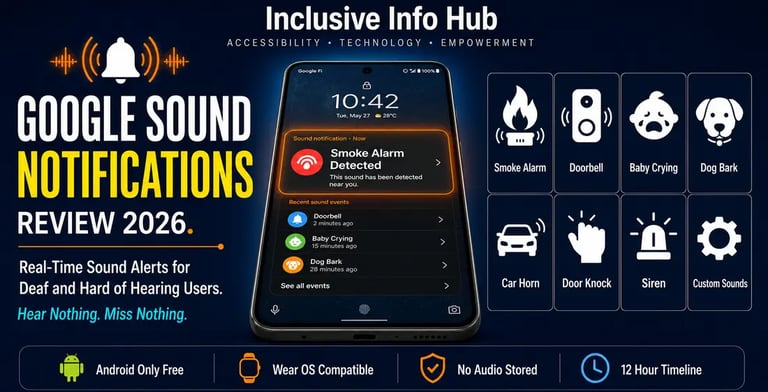
The core function is straightforward and deliberately simple. Sound Notifications uses the Android phone's microphone to continuously monitor the ambient audio environment around the user. When the AI detection system identifies a sound that matches one of the alert categories, it immediately sends a push notification to the phone, triggers a camera flash from the phone's torch light, and vibrates the device.
No audio is recorded or stored. No conversation is processed. The system is listening for specific sound patterns — the frequency signature of a smoke alarm, the rhythm of a doorbell, the acoustic characteristics of a baby's cry — not for speech or general audio. This distinction matters for privacy. The phone is not recording the room. It is pattern-matching against a library of recognized sounds and triggering an alert when a match is detected.
The alerts arrive through three simultaneous channels: a visible push notification with the name of the detected sound, a camera flash from the phone torch, and vibration. The multi-channel approach reflects an understanding that a single alert method is not always reliable. A deaf user whose phone is face-down in another room might miss a screen notification but feel the vibration. A user with a Wear OS smartwatch receives the alert on their wrist regardless of where the phone is. A user whose phone is silenced receives the flash notification regardless of sound settings.
The Sounds Sound Notifications Detects
The detection library covers the sounds most likely to carry either safety significance or social significance in everyday home and workplace environments:
Safety sounds: Smoke alarm, carbon monoxide alarm, fire alarm, siren.
Household sounds: Doorbell, door knock, water running, kettle boiling.
People and animal sounds: Baby crying, dog barking.
Vehicle sounds: Car horn, appliance beep.
Custom sounds: Users can add sounds from their specific home environment that are not in the default detection library, such as a specific appliance beep, a particular alarm tone, or any other recurring household sound that carries personal significance.
The custom sound addition feature deserves specific attention. Every home has sounds that matter to the people who live in it and that are not on any generic detection list. A deaf parent whose child uses a specific toy that makes a distinctive sound when they fall. A hard of hearing professional whose home office printer makes a beep when it runs out of paper. A deaf university student whose specific fire alarm model has a tone not precisely matching the generic library. Custom sounds address exactly these gaps.
The Timeline View — 12 Hours of Sound History
One of the most practically useful features of Sound Notifications is one that does not appear in most reviews of the tool. The Timeline view provides a scrollable record of every sound detected by the app over the past 12 hours, showing the name of each detected sound, the time it occurred, and the duration it lasted.
For a deaf user who was asleep, in the shower, or simply away from their phone, the Timeline means they can check what happened in their absence rather than having no information at all. A deaf parent who left their child with a grandparent for two hours can check on return whether the baby cried, and when. A deaf professional working from home can check whether the doorbell rang while they were concentrating in another room. A deaf student who slept through their morning can check whether any alarms fired during the night.
This retrospective awareness is qualitatively different from and complementary to the real-time alert function. Together they mean that sound information is never simply lost for a deaf user — it is either received in real time or retrievable from the timeline.
Wear OS Integration — Sound Alerts on the Wrist
Sound Notifications works with Wear OS by Google smartwatches, delivering text notifications with vibrations directly to the wrist when an important sound is detected by the phone. This integration addresses one of the most significant practical limitations of a phone-based alert system: the phone is not always on the person.
A deaf user who is asleep with their phone on the bedside table will feel a wrist vibration from their Wear OS watch when a smoke alarm triggers at 3am in a way that a phone notification on the table may not reliably deliver. A deaf professional who has their phone in a bag will feel the wrist alert when the doorbell rings. The watch integration transforms Sound Notifications from a tool that requires the phone to be nearby and visible into one that follows the user wherever they are.
This concern about sleep specifically was described directly by the deaf and hard of hearing community as one of the situations where the standard alert system is least reliable. Sound Notifications' Wear OS integration was designed specifically in response to this community feedback.
Who Sound Notifications Is Built For
Deaf Adults Living Independently
For a completely deaf adult living alone, Sound Notifications addresses a genuine safety and practical independence gap that no other free tool currently fills. Smoke alarms, carbon monoxide alarms, and fire alarms are life-safety signals that a deaf person without specialized alert hardware has no reliable way to receive. A free Android feature that monitors these sounds continuously and delivers multi-channel alerts is not a convenience. It is a baseline safety provision that everyone living independently deserves access to.
Hard of Hearing Users With Partial Hearing Loss
For users with moderate to severe hearing loss who can hear some sounds but miss others in certain conditions, Sound Notifications provides a reliable backup for the situations where partial hearing is insufficient. A hard of hearing user who cannot hear the doorbell when the television is on, or who sleeps without hearing aids and cannot hear a smoke alarm, benefits from the additional alert layer without needing to depend on it for every sound in every situation.
Deaf Parents
The baby cry detection is among the most emotionally significant features in the default sound library. A deaf parent who cannot hear their infant from another room, who needs to be alerted when their child is in distress without being physically present in the room at all times, has a tool that delivers that alert to their phone and wrist simultaneously. For deaf parents who have historically managed infant monitoring through expensive dedicated baby monitor hardware adapted for deaf users, a free built-in Android feature providing this function represents a meaningful cost reduction alongside the safety benefit.
Deaf and Hard of Hearing Students in Shared Accommodation
University dormitories and shared student houses present a specific sound awareness challenge — multiple different alarms, doorbells, intercoms, and household sounds in an environment the deaf student does not fully control or know in advance. Sound Notifications provides ambient sound monitoring that covers the environment rather than requiring specific hardware to be installed in specific locations.
Temporarily Deaf or Hearing-Impaired Users
Post-surgical hearing loss, ear infections, swimmer's ear, or temporary threshold shift from noise exposure can leave a normally hearing person with significantly reduced hearing for days or weeks. Sound Notifications is available immediately during any period of temporary hearing reduction without requiring any hardware purchase or professional setup.
Key Features in Full Detail
Continuous Background Monitoring
Sound Notifications runs continuously in the background on an Android device once enabled, monitoring ambient audio without requiring the app to be open or the user to take any action after initial setup. This passive background operation means the protection is always active without the user needing to remember to start it each time.
Multi-Channel Alert Delivery
Every detected sound triggers three simultaneous alerts: a push notification identifying the sound by name, a camera flash from the torch light, and device vibration. The multi-channel delivery is designed to reach the user across a range of positions, distances, and device states. The flash component is particularly useful in low-light environments where a screen notification might be missed.
Custom Sound Addition
Users can add sounds from their specific environment that are not in the default detection library, recording the sound directly through the app and associating it with a custom alert label. This customization capability ensures the tool is genuinely useful in the specific household rather than only in a generic average environment.
Wear OS Smartwatch Integration
All Sound Notifications alerts are delivered to connected Wear OS smartwatches simultaneously with the phone alerts. The wrist vibration and text notification on the watch ensures alerts are received when the phone is not directly on the person.
12 Hour Sound Timeline
A scrollable history of all detected sounds over the past 12 hours, showing time, duration, and sound type, allows retrospective review of the sound environment during periods of absence or sleep.
Privacy Preserving Architecture
No audio is recorded, stored, or transmitted by Sound Notifications. The system performs local pattern matching against audio signatures without capturing or retaining actual audio content. This privacy guarantee is important for a system that necessarily monitors the ambient environment continuously.
Free With No Usage Limits
Sound Notifications is completely free with no subscription, no premium tier, no usage limits, and no account required. As a feature of an Android accessibility tool built by Google, its ongoing availability is structurally guaranteed in a way that third party app features cannot be.
How to Set It Up in Under Two Minutes
Step 1: Open Google Play Store and search "Live Transcribe and Sound Notifications" published by Google LLC. Download the app.
Step 2: Open your phone's Settings app. Tap Accessibility. Look for Sound Notifications in the accessibility menu.
Step 3: Toggle Sound Notifications on. The feature begins monitoring immediately.
Step 4: Tap Sound Notifications settings to review which sounds are active in your detection library and to add any custom sounds specific to your home environment.
Step 5: If you have a Wear OS smartwatch, open the Wear OS app on your phone and confirm that Sound Notifications alerts are enabled for the watch. Wrist vibration alerts will now accompany phone alerts for every detected sound.
The entire setup process requires no account creation, no payment, and no technical knowledge beyond basic Android settings navigation.
Honest Limitations
Android only. Sound Notifications is not available on iPhone or iPad. iOS users should use the built-in Sound Recognition feature through Settings, Accessibility, Sound Recognition on devices running iOS 14 and above, which serves the same purpose natively on Apple hardware.
Requires phone to be within microphone range of the sound source. Sound Notifications monitors audio through the phone's built-in microphone. A phone in a bedroom cannot reliably detect a smoke alarm in a kitchen on the other side of a closed door. For whole-home coverage, the phone would need to be positioned in the room where monitoring is needed, or multiple Android devices would need Sound Notifications active in different rooms. This is a meaningful limitation for users seeking whole-home sound coverage from a single device.
False alerts and missed detections are possible. AI sound detection is not perfect. A television playing a sound that resembles a smoke alarm may trigger a false alert. A smoke alarm in a distant room with an unusual acoustic environment may not trigger detection reliably. The system is a supplement to dedicated alerting infrastructure, not a replacement for it.
Battery consumption during continuous background monitoring. Running continuous background audio monitoring increases battery consumption compared to normal phone use. Users who rely on Sound Notifications throughout the day and night should be aware of increased battery drain and plan charging accordingly.
Custom sound training has a learning curve. The custom sound addition feature requires the user to record the specific sound they want detected, which can be challenging for sounds that do not occur on demand, such as a specific alarm that only triggers in emergencies.
Sound Notifications vs Dedicated Deaf Alert Systems
Dedicated deaf alert systems, including specialized smoke detectors that flash bright lights and vibrate bed shakers, doorbell flashers, and whole-home alerting hardware, are the professionally recommended standard for permanent home accessibility. These hardware systems provide more reliable coverage across larger spaces than a single smartphone can deliver.
Sound Notifications is not a replacement for dedicated deaf alert hardware in a permanent home setup. It is a free, immediate, portable supplement that is available everywhere the phone is available. For a deaf student in temporary university accommodation who cannot install permanent hardware, for a deaf traveler in a hotel room, for a hard of hearing person who wants a backup alert layer in addition to existing hardware, Sound Notifications fills exactly the portable supplement role that dedicated hardware cannot serve.
The comparison should be understood in these terms: dedicated hardware for permanent home coverage, Sound Notifications for portable immediate coverage in every environment the phone enters.
Frequently Asked Questions
Is Google Sound Notifications a separate app? No. Sound Notifications is a feature bundled inside the "Live Transcribe and Sound Notifications" app on Google Play. It is activated separately from Live Transcribe through Android Accessibility settings after downloading the combined app.
Is Google Sound Notifications free? Yes, completely free. No subscription, no premium tier, no account required. All features including custom sound addition and Wear OS integration are available at no cost.
Is Sound Notifications available in Pakistan? Yes. The "Live Transcribe and Sound Notifications" app is available globally on Google Play with no regional restrictions.
Does Sound Notifications record audio or store conversations? No. Sound Notifications performs local pattern matching against audio signatures without recording, storing, or transmitting any actual audio content. Privacy is architecturally guaranteed rather than promised through policy.
Is Sound Notifications available on iPhone? No. Sound Notifications is Android only. iPhone and iPad users should use the built-in Sound Recognition feature through Settings, Accessibility, Sound Recognition on iOS 14 and above.
Can Sound Notifications detect a smoke alarm from another room? Sound detection accuracy depends on the distance between the phone and the sound source, the acoustic characteristics of the room, and whether doors or walls are between them. For best results, the phone should be in the same room as the sounds being monitored. For whole-home coverage, multiple devices with Sound Notifications active in different rooms provide better reliability.
What This Means for Deaf Users in Pakistan and Across Asia
Whether you are a deaf student in Lahore living in shared university accommodation, a hard of hearing parent in Karachi managing a household with young children, or a profoundly deaf professional in Dhaka working from a home office where you need to know when the doorbell rings without being in the same room — Sound Notifications addresses a category of daily independence that no captioning or calling app covers.
Captioning tools help deaf users follow what people say. Sound Notifications helps deaf users know what is happening in their physical environment. These are two completely different problems and together they cover a much larger portion of the daily experience of being deaf than either tool covers alone.
For users in Pakistan and across South Asia where dedicated deaf alert hardware is expensive, uncommon, and not widely available through national disability support programs, a free built-in Android feature that monitors smoke alarms, doorbells, baby cries, and car horns represents one of the most immediately practical safety tools in this entire series.
The two-minute setup. The free Wear OS wrist vibration. The 12-hour sound timeline. These are not flashy features. They are the quiet infrastructure of daily independence for deaf users who live in the same buildings, sleep in the same rooms, and share the same environments as hearing people who have never had to think twice about knowing what sounds are happening around them.
A Closing Thought
There is a particular kind of vulnerability in not knowing what is happening in your own home. Not in a dramatic sense but in the accumulated small moments of uncertainty. Was that the doorbell or a sound from the television? Did the kettle finish? Is the baby settled or crying again? Has anyone knocked?
For hearing people these questions resolve themselves automatically, continuously, without effort or attention. For deaf people they have historically required either constant visual checking, dependence on hearing housemates, or expensive specialized hardware installed throughout the home.
Sound Notifications answers these questions automatically, continuously, for free, on the Android phone a user already owns. It does not answer all of them in all situations. It does not replace dedicated safety hardware. But it closes a gap that previously required significant financial investment or permanent dependence on other people, and it does so with a two-minute setup and a zero-dollar price tag.
For the student in Karachi who needed someone to come to her room when the fire alarm went off, that gap closing is not a convenience. It is independence in the most literal possible sense.
Read More on Inclusive Info Hub
👉 10 Best Apps for Deaf and Hard of Hearing Users — where Live Transcribe sits in the full picture: Read our complete guide here → [10 BEST APPS DEAF HH ARTICLE LINK]
👉 Ava — live group conversation captions with 99% accuracy and human scribes: Read our full review here → [AVA Article link]
👉 Best AI Accessibility Tools in 2026 — complete guide including OCR and document tools: Read our full guide here → [BEST AI ACCESSIBILITY TOOLS ARTICLE LINK]
👉Nagish now Rylo — the free global captioned calling alternative: Read our full review here — [RYLO NAGISH ARTICLE LINK]
👉Google Live Transcribe — free Android real-time captions for face-to-face conversations: Read our full review here — [GOOGLE LIVE TRANSCRIBE ARTICLE LINK]