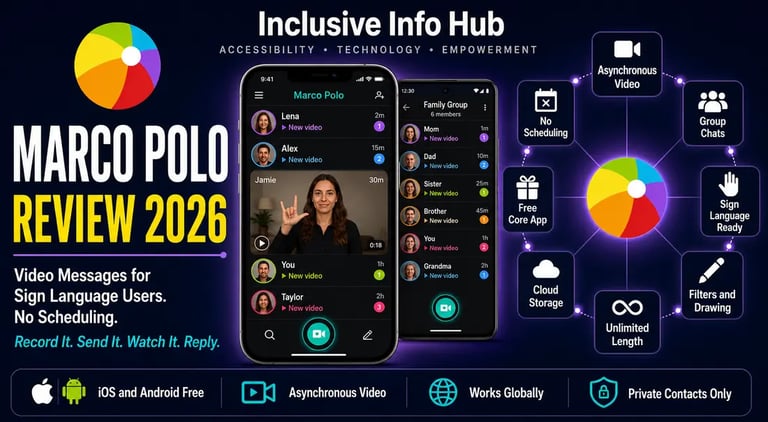
Marco Polo Review 2026: The Video Walkie Talkie That Gives Sign Language Users Their Voice Back
Marco Polo is a free asynchronous video messaging app ideal for deaf and hard of hearing users who communicate through sign language. Send unlimited video messages on your own time on iOS and Android. Full 2026 review for users in Pakistan, Asia, the US, and UK.
APPS FOR HI SUPPORTLATEST TECHNOLOGYEDUCATION
Inclusive Info Hub
According to the World Health Organization, over 1.5 billion people worldwide live with some degree of hearing loss. For deaf people who use sign language as their primary language, that figure represents more than a hearing barrier — it represents a communication identity that most messaging platforms ignore entirely. At Inclusive Info Hub, every hearing accessibility app reviewed here is measured by one honest question: does it serve deaf users in the way they actually communicate, not in the way hearing app designers assume they should.
Picture a deaf university student in Islamabad whose closest friend moved to Karachi after graduation. They communicated daily through sign language when they lived in the same city. Now they text. Text messaging works but it strips out everything that makes sign language rich — the handshape and movement that carries meaning, the facial expression that carries grammar, the body language that carries emotion and humor. Their conversations have become functional and flat.
Marco Polo gives them back what texting took away. One presses record. Signs a message. Sends it. The other watches it when they are ready — an hour later, the next morning, during a break between classes — and signs a reply. No scheduling a video call. No time zone calculation. No hoping both people are available simultaneously. The conversation flows naturally, asynchronously, in the language both of them actually think in.
That is what Marco Polo does that no text messaging app can replicate for sign language users. And it does it for free.
What Is Marco Polo?
Marco Polo is a video messaging application developed by Joya Communications Inc., founded by Michal Bortnik and Vlada Bortnik. The app describes itself as a video walkie talkie — a messaging experience that combines the immediacy and expressiveness of face-to-face video with the convenience and flexibility of text messaging, where messages can be sent and watched at any time without both parties needing to be available simultaneously.
The app is available on both the Apple App Store and Google Play Store as "Marco Polo — Video Messenger" published by Joya Communications Inc. The core video messaging functionality is free with unlimited video messages. A premium subscription called Marco Polo Plus adds enhanced features for users who want additional customization.
While Marco Polo was designed as a general video messaging platform for everyone, it has been specifically and consistently highlighted by deaf and hard of hearing community resources, including Sorenson Communications and AT&T Accessibility, as one of the most valuable communication tools available for deaf users — particularly those who communicate through sign language. AT&T Accessibility describes it directly: Marco Polo is a video messenger app so Deaf people using sign language can quickly leave short video messages without having to schedule a live call. It combines the convenience of text and voice messages with the expressiveness of video that captures every gesture and facial expression.
The Core Concept That Makes Marco Polo Different
Every other app in this hearing accessibility series addresses a specific communication barrier in real time. Google Live Transcribe captions speech as it happens. Ava identifies group conversation speakers live. Cardzilla shows large text immediately in a face-to-face exchange. Nagish and Rylo caption phone calls as they occur.
Marco Polo solves a completely different problem. It solves the barrier that occurs when the communication is not happening right now — when the deaf user and the person they want to communicate with are not in the same place, not available at the same time, and where the expressiveness of sign language needs to be preserved across that temporal gap.
Text messaging strips sign language of everything except the semantic content. Voice messages are inaccessible to deaf recipients. Standard video calls require both parties to be available simultaneously, which in practice means scheduling, which means friction, which means many conversations that would have happened spontaneously simply do not happen.
Marco Polo removes all of that friction by treating video messages the same way text messaging treats text messages — send whenever, watch whenever, reply whenever. The video is stored in the cloud, available to replay as many times as needed, with no length restriction imposing artificial brevity on the message.
Who Marco Polo Is Built For
Deaf Users Who Communicate Through Sign Language
This is Marco Polo's most clear and impactful accessibility use case. For a deaf person whose natural communication language is ASL, BSL, or any other sign language, the video format of Marco Polo is not just convenient — it is the only messaging format that preserves the full richness of their language. Handshape. Movement. Location. Facial expression. Body orientation. All of these components of signed communication are captured in video and completely absent from text.
A deaf user who texts their hearing family members is communicating in their second language. A deaf user who sends Marco Polo messages to signing friends is communicating in their first language. The difference in fluency, expressiveness, and the depth of relationship that flows from genuine linguistic expression is not trivial.
Hard of Hearing Users Who Prefer Visual Communication
For hard of hearing users who do not use sign language but find face-to-face video communication more accessible than voice calls or text, Marco Polo's lip reading capability — watching a video message at normal speed while being able to see the speaker's face and mouth clearly — provides better comprehension than a voice-only call. The ability to replay a message multiple times without asking the sender to repeat themselves removes a common social friction point for hard of hearing users who frequently need to ask for repetition.
Deaf Family Members Communicating Across Distances
Geographic distance makes maintaining sign language relationships difficult in ways that hearing people do not face. A deaf parent in one city and a deaf adult child in another city can maintain a daily video message exchange on Marco Polo in the same way hearing people maintain text message threads — spontaneously, briefly, without scheduling. A hearing family member who has learned some sign language through Lingvano can send signed video messages to a deaf relative and receive signed replies.
Deaf Students Communicating With Hearing Classmates and Professors
For academic communication that does not fit neatly into email — brief clarifications, quick questions, project coordination — Marco Polo provides a video alternative that allows a deaf student to communicate naturally rather than forcing every interaction into written text. A hearing professor can record a video explanation of a concept and send it directly; the deaf student can watch it at full speed, replay it, and sign a reply.
International Deaf Communities
Marco Polo works over WiFi anywhere in the world with no international messaging charges. For deaf users in Pakistan, India, Bangladesh, and across South and Southeast Asia communicating with the global deaf community, family members abroad, or international contacts, the absence of per-message or per-minute international charges makes Marco Polo a more accessible option than traditional international video calling with its scheduling requirements.
Key Features in Full Detail
Asynchronous Video Messaging
The defining feature. Record a video message of any length and send it. The recipient watches it when they are ready. Both parties communicate at their own pace, in their own time, without needing to coordinate availability. For deaf users whose signing partners have different schedules, different time zones, or simply different levels of availability at any given moment, this asynchronous model removes the biggest practical barrier to frequent video communication.
Unlimited Video Message Length and Storage
Marco Polo imposes no limit on the length of individual video messages and stores all messages in the cloud. A deaf user who wants to send a detailed signed explanation of a complex situation is not forced into artificial brevity by a time limit. The full message can be recorded in a single take and sent without compression of the communication.
Group Video Conversations
Multiple participants can join a single Marco Polo conversation group. All members can send video messages to the group at any time, creating a group video thread where everyone's messages appear in chronological order and can be watched by all members at their own pace. For deaf community groups, sign language study circles, or group project collaboration among deaf students, this group video thread format preserves the communal nature of group communication in a way that group text chats cannot.
Video Filters, Drawing Tools, and Emoji Reactions
Creative tools — color filters, drawing on the video frame, emoji reactions to specific messages — add the expressive layer that makes video communication feel personal rather than functional. For sign language users, the ability to draw on screen during a message provides an additional visual communication channel for sharing images, diagrams, or written information within the same message frame. Emoji reactions allow immediate response to a watched message without the overhead of recording a full reply.
Speed Control and Replay
Marco Polo Plus subscribers can adjust the playback speed of received messages, watching at slower speed for messages with complex or unfamiliar signs, or at faster speed for reviewing familiar content efficiently. Replay is always available for all users — any message can be watched as many times as needed without asking the sender to resend.
Real-Time Watching Indicator
When a message is being watched, the sender can see a live indicator showing the recipient is currently viewing. This synchronous awareness within an asynchronous medium creates a feeling of connection closer to a live conversation than traditional messaging — the equivalent of knowing someone is reading your message as you watch the send confirmation.
Private Contact-Only Network
Marco Polo does not have a public network or searchable user directory. Connections can only be made between people who know each other's phone numbers. This privacy model means the platform is used for genuine personal and professional relationships rather than public social media broadcasting — a deliberate design choice that maintains the intimacy of close communication.
Cross-Platform and Global Availability
Marco Polo works on iOS and Android globally over WiFi, with no country restrictions and no international charges. The app has no geographic limitations on where video messages can be sent or received, making it equally functional for a deaf user in Lahore communicating with a signing friend in London as for two users in the same city.
Marco Polo Plus — What the Paid Tier Adds
Marco Polo offers a premium subscription called Marco Polo Plus that enhances the core experience:
Speed control for adjusting playback of received messages. Custom emojis and reactions for more expressive replies. Enhanced video quality settings. Additional filter options for video customization. Chat theming and appearance options.
The core video messaging functionality — unlimited messages, unlimited length, group conversations, cloud storage — remains fully available on the free tier. Marco Polo Plus adds refinement and customization rather than gating core communication capability behind a paywall.
For deaf users in Pakistan and South Asia where the free tier covers every essential communication need, the Plus subscription is an optional enhancement rather than a necessary upgrade.
Honest Limitations
Requires internet connectivity. Marco Polo requires a WiFi or mobile data connection to send and receive video messages. For users in areas of Pakistan and South Asia with unreliable connectivity, this dependency means messages may not send or arrive reliably in low-signal environments.
The best features are behind the premium subscription. Speed control — which is particularly useful for hard of hearing users who need to watch messages at slower speed for better comprehension — requires Marco Polo Plus. Some users have specifically noted that the most useful features for accessibility purposes are gated behind payment, which limits access for casual users and those with budget constraints.
Not designed specifically for deaf users. Marco Polo is a general video messaging app that happens to serve deaf and hard of hearing users exceptionally well due to its video format. It has no built-in captioning for hearing recipients of signed messages, no sign language recognition technology, and no accessibility-specific features. Its value for deaf users comes entirely from the video format itself and the asynchronous model.
Video storage policy. Messages are stored in the cloud and retained for as long as the account is active. Users who share sensitive information through video messages should be aware that this content exists in cloud storage. The privacy model protects against stranger access through the contact-only network design but messages exist on Marco Polo's servers.
Not a replacement for real-time communication tools. Marco Polo covers asynchronous video communication. It does not address real-time captioning, live phone call accessibility, or sound awareness — the use cases covered by other apps in this series. Marco Polo works best as part of a broader toolkit alongside real-time tools rather than as a standalone communication solution.
App Store Details — Verified and Confirmed
Apple App Store: Search "Marco Polo — Video Messenger" published by Joya Communications Inc. Free to download. Marco Polo Plus subscription available in-app. Available globally.
Google Play Store: Search "Marco Polo: Video Chat App" published by Joya Communications Inc. Free to download. Marco Polo Plus subscription available in-app. Available globally including Pakistan, India, and South Asia.
Frequently Asked Questions
Is Marco Polo free for deaf users? The core video messaging functionality of Marco Polo is completely free — unlimited video messages, unlimited length, group conversations, and cloud storage. Marco Polo Plus is a paid subscription that adds speed control, custom emojis, and enhanced customization features.
Is Marco Polo available in Pakistan? Yes. The app is available globally on both the Apple App Store and Google Play Store with no regional restrictions. It works over WiFi anywhere in the world with no international messaging charges.
Can Marco Polo be used for sign language communication? Yes. Marco Polo's video format captures the full visual expressiveness of sign language including handshape, movement, location, facial expression, and body orientation. This makes it the most natural video messaging tool for deaf users who communicate through sign language, preserving their full communication in a way text messaging cannot.
Does Marco Polo require both people to be online at the same time? No. Marco Polo is asynchronous — video messages are sent and received independently of each other. The recipient watches the message whenever they are available and records a reply at their own convenience. No scheduling or simultaneous availability is required.
Is Marco Polo only for deaf users? No. Marco Polo is a general video messaging app used by people of all hearing abilities. Its specific value for deaf and hard of hearing users comes from the video format preserving sign language expressiveness and the asynchronous model removing the scheduling barrier of live video calls.
What This Means for Deaf Users in Pakistan and Across Asia
Whether you are a deaf student in Islamabad whose signing friends have scattered to different cities after graduation, a deaf parent in Karachi maintaining a relationship with a deaf child studying abroad, or a hard of hearing professional in Dhaka who communicates better through video than voice and finds live call scheduling impractical — Marco Polo provides something that no other app in this series provides: the ability to have a full, expressive, sign-language-capable conversation across any distance, on any schedule, for free.
The global deaf community is connected by sign language in ways that transcend individual national sign languages. ASL in particular has become a widely shared reference language across the international deaf community, and the ability to communicate in ASL through Marco Polo videos connects deaf users in Pakistan to that global community in a way that text-based apps simply do not.
For hearing family members in Pakistan who have learned some sign language through an app like Lingvano, Marco Polo provides the practice environment where that learning becomes real communication — send a signed video message to a deaf family member and receive a signed reply. The learning becomes conversation. The conversation becomes relationship.
A Closing Thought
The student in Islamabad and her friend in Karachi used to sign to each other every day. Then they moved apart and started texting. Their conversations became shorter, flatter, and less frequent — not because their friendship changed but because the medium changed. Text messaging removed the language and left only the words.
Marco Polo gives them back the language.
That is not a small thing. Communication is not just information transfer. It is the experience of being understood in the way you think and feel and express yourself. For a deaf person whose thinking happens in a visual, spatial, gestural language, text messaging is always a translation. Marco Polo is the original.
Send whenever. Watch whenever. Sign. Reply. Stay connected in the language that is actually yours.
Read More on Inclusive Info Hub
According to the World Health Organization, over 1.5 billion people worldwide live with some degree of hearing loss. At Inclusive Info Hub, every hearing accessibility app reviewed here is measured by one honest question: does it remove a real daily barrier for deaf and hard of hearing users. Some barriers require sophisticated AI and cloud computing to remove. Some require a good microphone and a captioning engine. And some — the most immediate, the most frequent, and the most human — require nothing more than very large text on a screen that the other person can read across a counter.
Picture a deaf person at a pharmacy in Lahore. She needs to ask the pharmacist a question about her prescription. The pharmacist does not know sign language. She does not have a notebook. She opens the Notes app on her phone and types her question — but the font is small, the pharmacist squints across the counter, and she has to physically hand the phone over for them to read it. The interaction is awkward. The communication is functional but undignified.
Now picture the same situation with Cardzilla open. She types the same question. The words immediately fill the entire screen in the largest possible text, auto-resized to fit perfectly without her doing anything. She holds the phone up facing the pharmacist. They read it instantly from where they are standing. No squinting. No phone-passing. No awkwardness.
That is what Cardzilla does. Everything about it fits into that single paragraph. And it has been the most used app of many deaf users' daily lives for over a decade for exactly this reason.
What Is Cardzilla?
Cardzilla is a fast and simple large text display app designed for deaf and hard of hearing users to communicate with hearing people in face-to-face situations where speech and sign language are not available. A user types a message and the text automatically resizes itself to fill the screen in the largest possible font, allowing the message to be read across a counter, table, or room without the other person needing to hold the phone.
The app is Deaf-owned and Deaf-designed — a distinction that matters more here than almost any other app reviewed in this series. On iOS, Cardzilla was created by Tim Kettering of Ink and Salt LLC, a Deaf-owned and Deaf-operated company. On Android, the app is published by Randall Noriega. Both versions serve the same purpose, share the same core concept, and are free to download.
That Deaf ownership shapes every design decision in the app in ways that a hearing designer working from research and empathy cannot fully replicate. The auto-resize that fills the screen completely rather than leaving margin. The shake-to-clear gesture that wipes the message in a natural physical motion. The saved favorites for frequently used phrases. The absence of any setup, account, or loading screen between the user and the message. These are not features designed for a disability market. They are solutions designed by someone who uses the tool every day and knows exactly what slows down real communication in real situations.
Two Developers — One App Concept
This article covers both the iOS and Android versions of Cardzilla, and it is important to clarify upfront that they are developed by different people with slightly different feature implementations.
Apple App Store: Search "Cardzilla" published by Tim Kettering or Ink and Salt LLC. The iOS version is the original and most feature-complete, including Dark Mode support, user selectable color settings, shake-to-erase with disable option in settings, and key commands when a keyboard is attached.
Google Play Store: Search "Cardzilla" published by Randall Noriega, package identifier com.nulltone.cardzilla. The Android version provides the same core large text auto-resize functionality with the same fundamental interaction model.
For users in Pakistan and across South Asia where Android is the dominant platform, the Google Play version is the relevant download. For iPhone users, the iOS version from Ink and Salt LLC is the original and is the version described in most published reviews and recommendations.
Both are free to download. Both serve the same core purpose. The iOS version has more documented features in its version history.
How Cardzilla Actually Works
The entire interaction model fits in four sentences. Open the app and a blank card appears immediately. Start typing. The text automatically resizes to fill the screen as you type — larger text when fewer words are present, smaller text as more words are added, always maximizing readability for the available space. Hold the phone up and the other person reads it.
That is the complete product. No settings to configure before use. No account to create. No mode to select. No loading screen. No internet connection required. The app opens on a blank card, ready to receive text, every single time.
This radical simplicity is not a limitation of ambition. It is the result of someone who uses the app daily and understood that every additional step between a deaf person's thought and a hearing person reading it is a barrier — and removed all of them.
Key Features — Every One of Them Matters
Auto-Resize Text That Fills the Screen
This is the core feature and the one that distinguishes Cardzilla from simply opening a Notes app and increasing the font size. The text does not sit at a fixed size with blank space around it. It actively calculates the available screen space and resizes the text to fill it completely as each character is typed. Type two words and they fill the entire screen in enormous letters. Type a full sentence and the font reduces to keep all the words visible simultaneously without scrolling.
The no-scroll design is specifically noted in the app's own description as a deliberate choice. Scrolling requires the hearing person to interact with the device — to swipe to read more. Auto-resize keeps the complete message visible in one frame, maintaining the communication dynamic where the deaf user controls the device and the hearing person simply reads.
Shake to Clear
When a message has been read and the conversation moves to the next exchange, a simple shake of the device clears the current card and creates a fresh blank one. No button to tap. No navigation to perform. The same physical motion that has cleared a whiteboard for decades — erase by gesture — translated into a digital context. The iOS version allows shake-to-erase to be disabled in settings for users who find accidental triggering a problem.
Saved Messages and Favorites
All cards are automatically saved, meaning nothing typed into Cardzilla is ever permanently lost. A saved message history allows previously used cards to be swiped back through and redisplayed. Frequently used messages can be saved as favorites for instant retrieval — a feature with direct practical value for the phrases that appear in the same situations repeatedly. A deaf person who visits the same pharmacy every month and asks the same question about prescription refills can save that exact card and display it with a single swipe rather than retyping it each visit.
Quick Navigation With Swipe Interface
Swiping left or right navigates through previously created cards in the session history. For a back-and-forth exchange where multiple messages have been shown in sequence, this swipe navigation allows the deaf user to reference earlier parts of the conversation without retyping.
Dark Mode Support
White text on a black background is one of the highest contrast combinations for readability at a distance and in varying lighting conditions. Cardzilla's Dark Mode delivers exactly this combination, making large text messages readable across a wider range of environmental lighting than a standard white background display.
User Selectable Color Settings
Beyond Dark Mode, the iOS version allows full color customization of both text and background. For users with low vision who depend on specific color contrast combinations for comfortable reading, this customization means Cardzilla can match the individual's actual visual accessibility needs rather than offering a fixed color scheme.
External Keyboard Support
When a physical keyboard is attached to an iPhone or iPad — through Bluetooth or a case with integrated keyboard — Cardzilla supports key commands for navigation and management. For deaf users who type faster on a physical keyboard or who use their phone with accessibility hardware, this compatibility means Cardzilla integrates cleanly into their existing setup.
Works Without Internet
Cardzilla requires no internet connection to function. Every feature operates entirely on the device. For users in areas of Pakistan and South Asia with inconsistent connectivity, a communication tool that cannot fail due to signal loss or data exhaustion is a meaningful reliability advantage.
Who Cardzilla Is Built For
Deaf Users Communicating With Non-Signing Hearing People
This is Cardzilla's exact primary use case and the one it was designed around. When a deaf person needs to communicate with a hearing person who does not know sign language — which describes the majority of hearing people in most environments — and where speech is not an option, the fastest path to readable communication is large text on a screen. Cardzilla makes that path as frictionless as it is possible to make it.
One deaf user described the experience directly: it is so ridiculously simple, but goes a really long way in making needs met. The app's designer is deaf, and it shows — he designed it to make it easy and purposeful and it works.
Hard of Hearing Users Who Prefer Not to Use Their Voice
Not all hard of hearing users are comfortable using their voice in public situations, particularly when hearing loss affects speech production clarity as well as hearing reception. Cardzilla provides a dignified text-based alternative to speaking aloud that does not require the other person to strain to understand unclear speech or repeatedly ask for repetition.
Deaf Users in Service Environments
Pharmacies, banks, retail shops, medical clinics, government offices, restaurants, transport stations — all the service environments where a deaf person needs to communicate briefly with a hearing staff member who has no sign language competency. A retail worker who discovered Cardzilla through a customer's use of it described it as drastically improving their ability to help every customer in their job, and said they would never go back to pen and paper.
People Who Are Temporarily Non-Verbal
Medical situations where speaking is painful or restricted — post-surgical recovery, severe laryngitis, vocal cord injury — leave hearing people in the same communicative position as deaf users for the duration of the condition. Cardzilla serves this temporary non-verbal situation as straightforwardly as it serves permanent deafness, with no special setup or configuration required.
Hearing People Communicating With a Deaf Friend or Family Member
The simplest and best app for communicating with a deaf friend was one Play Store review's description. Cardzilla works as effectively from a hearing person's side of the exchange as from the deaf person's side — a hearing family member who downloads Cardzilla to show messages to a deaf relative is using the app exactly as intended.
Real Use Cases From Real Users
An emergency room nurse who encountered a deaf patient immediately downloaded Cardzilla onto her own phone after seeing a patient use it, recognizing the direct benefit for non-verbal patients in clinical settings.
A retail worker who uses Cardzilla with deaf customers described it as enabling complete communication where pen and paper had previously created friction and limited exchanges.
A Sorenson staffer — someone who works professionally in deaf accessibility services — described using Cardzilla more frequently for conversations than Make It Big, a competing large text app.
A deaf user who previously used the Notes app for the same purpose described the problem with Notes as tiny font and occasional freezing during sync — not useful for time-sensitive communication. Cardzilla solves both problems.
These are not testimonials curated by a marketing team. They are user reviews from people whose daily communication relies on this tool.
Cardzilla vs Notes App — Why This Comparison Matters
The most common alternative deaf users reach for before discovering Cardzilla is the phone's built-in Notes app or any general text editing application. The comparison is instructive because it explains exactly what Cardzilla adds over what already exists.
A Notes app displays text at a standard reading size with a small font optimized for reading on the screen rather than showing to another person across a distance. Increasing the font size manually is possible but creates a fixed large-text document that requires scrolling as text extends beyond the visible area. The interface is cluttered with formatting tools, sync indicators, and navigation elements that the other person sees when the phone is held up toward them. The app opens slowly compared to a dedicated single-purpose tool.
Cardzilla opens immediately on a blank card, displays text in the maximum possible size for the amount of content without scrolling, removes all interface clutter from the displayed view, and clears with a shake. Every difference serves the specific requirement of showing a message to another person quickly and readably. A Notes app was not designed for this purpose. Cardzilla was designed for nothing else.
Honest Limitations
Cardzilla is a display tool, not a communication platform. It shows the deaf user's typed message in large text. It does not caption the hearing person's spoken response. A deaf user who displays a message in Cardzilla and then needs to understand the hearing person's spoken reply still requires either lip reading, the other person writing back, or a captioning app for the response. Cardzilla covers one direction of the exchange.
The iOS and Android versions have different feature sets. The iOS version is more feature-complete with Dark Mode, color customization, and external keyboard support documented in detail. The Android version provides core large text functionality. Users on Android who want additional customization features should verify the current Android version's feature set before assuming full feature parity.
Swipe-to-clear can be triggered accidentally. Multiple users have noted that the shake-to-clear gesture occasionally triggers when the phone is moved during a conversation rather than deliberately shaken to clear. The iOS version addresses this with a disable option in settings. Android users experiencing this issue should check settings for a similar option.
No translation capability. Cardzilla displays text in whatever language the user types. It does not translate the message into another language. For a deaf user whose primary written language differs from the hearing person's preferred reading language, a separate translation tool would be needed alongside Cardzilla.
Small user base on Android relative to iOS. The Android version has been downloaded approximately 15,000 times total — significantly smaller than the iOS install base. While this reflects historical platform preference rather than quality, it means the Android version has received less community feedback and may have fewer reported issues addressed over time.
Frequently Asked Questions
Is Cardzilla free? Yes, completely free on both the Apple App Store and Google Play Store with no in-app purchases and no premium tier. Every feature is available from the moment of download at no cost.
Is Cardzilla available in Pakistan? Yes. The app is available globally on both stores with no regional restrictions and no internet connection required to use.
What is the difference between the iOS and Android versions of Cardzilla? The iOS version is published by Tim Kettering of Ink and Salt LLC and includes Dark Mode, user selectable color settings, shake-to-erase disable option, and external keyboard support. The Android version is published by Randall Noriega and provides the same core auto-resize large text functionality. Both are free. The iOS version is more feature-complete based on documented version history.
Does Cardzilla need an internet connection? No. Cardzilla works entirely offline with no internet connection required. This makes it reliable in any location regardless of signal or data availability.
Can Cardzilla caption what the hearing person says back? No. Cardzilla is a text display tool for showing the deaf user's typed messages in large text. For captioning the hearing person's spoken response, a separate app such as Google Live Transcribe or Ava would be used alongside Cardzilla.
Is Cardzilla only for deaf users? Cardzilla is designed primarily for deaf and hard of hearing users communicating with hearing people, but it is equally useful for anyone who is temporarily non-verbal — post-surgical recovery, vocal injury, situations where speaking aloud is not appropriate — and for hearing people communicating with a deaf friend or family member.
What This Means for Deaf and Hard of Hearing Users in Pakistan and Across Asia
Whether you are a deaf student in Lahore navigating a university campus where no staff member knows sign language, a hard of hearing professional in Karachi managing client interactions where speech is unclear, or a deaf user anywhere across South Asia navigating daily service interactions in a society without widespread sign language literacy — Cardzilla removes a specific and frequent communication barrier at zero cost, with zero setup, and with zero internet dependency.
The lack of widespread sign language literacy among hearing people in Pakistan and across South Asia means that the communication gap Cardzilla bridges is encountered more frequently in this context than in countries with stronger institutional sign language support and interpreter infrastructure. A deaf person in Lahore encounters far more hearing people with no sign language competency per day than a deaf person in a country with robust interpreter access. Cardzilla's direct text display solution addresses exactly the communication gap that interpreter access gaps leave unfilled.
The Android availability matters specifically for South Asian users where Android devices are overwhelmingly dominant. The Google Play version's free availability means every Android user in the region can install and use Cardzilla immediately.
A Closing Thought
There is a nurse in an emergency room somewhere who had never heard of Cardzilla before a deaf patient held up their phone and showed her a message in letters large enough to read from across the treatment bay. She downloaded it immediately onto her own phone before the appointment was over.
That is not a marketing story. That is what happens when a tool is designed with absolute clarity of purpose by someone who uses it every day for the same reason everyone else needs it.
Tim Kettering built Cardzilla because he is deaf and needed it. He built it to be fast and purposeful. He got it right. And a decade later, deaf users and the hearing people who encounter them are still describing it as their most used app, their immediate download, and their preferred alternative to every general text tool that was never designed for this specific situation.
Large text. Instant. No setup. Free.
Sometimes the right answer is also the simple one.
Read More on Inclusive Info Hub
👉 10 Best Apps for Deaf and Hard of Hearing Users — where Live Transcribe sits in the full picture: Read our complete guide here → [10 BEST APPS DEAF HH ARTICLE LINK]
👉 Ava — live group conversation captions with 99% accuracy and human scribes: Read our full review here → [AVA Article link]
👉 Best AI Accessibility Tools in 2026 — complete guide including OCR and document tools: Read our full guide here → [BEST AI ACCESSIBILITY TOOLS ARTICLE LINK]
👉Nagish now Rylo — the free global captioned calling alternative: Read our full review here — [RYLO NAGISH ARTICLE LINK]
👉Google Live Transcribe — free Android real-time captions for face-to-face conversations: Read our full review here — [GOOGLE LIVE TRANSCRIBE ARTICLE LINK]
👉Cardzilla — large text display for immediate face-to-face communication: Read our full review here — [INSERT CARDZILLA ARTICLE LINK]